How To Create Shortcode In Wordpress Plugin How To Add Shortcode In WordPress Page How To Use WordPress Shortcode WordPress Shortcode How To Create Shortcode In WordPress How To Create Shortcode In Wordpress For Custom Post Type To Display How To Create Shortcode For Plugin In WordPress Practical Example How To Create Shortcode With Parameters In Wordpress YouTube You can add your custom shortcode scripts to the theme s functions php file or include them in a plugin If you re adding it to a theme file you can run the add shortcode function as is But if you re adding it to a plugin I recommend you to initialize it only after WordPress has loaded completely
Shortcodes are small pieces of code that can be used to insert content into your posts and pages To use a custom shortcode simply add the following code to your post or page shortcode Replace shortcode with the actual shortcode for the content you want to insert You can find a list of available shortcodes on the WordPress Codex WordPress shortcodes provide an easy way to insert complex content into your posts Content generated by plugins might be a complex HTML table a video and playlist some fancy jQuery interface elements the possibilities are endless
How To Create Shortcode With Parameters In Wordpress YouTube How To Create Custom Shortcode In WordPress Step by Step How To Make Shortcode In Wordpress Hindi YouTube How To Add A Shortcode In WordPress Beginner s Guide How To Create Shortcode For Plugin In WordPress Practical Example How To Create Shortcode For Plugin In WordPress Practical Example How To Add A Shortcode In WordPress Beginner s Guide WordPress Do shortcode In Template PHP File Tryvary TemplateBench How To Create Shortcode In Wordpress
How To Create Shortcode In Wordpress Plugin
 How To Create Shortcode In Wordpress Plugin
https://i.ytimg.com/vi/_s8r3CBZod8/maxresdefault.jpg
The first step is to create the shortcode function Inside the custom shortcodes php file add the following block of code function dotiavatar function return
Pre-crafted templates provide a time-saving solution for creating a varied variety of files and files. These pre-designed formats and layouts can be used for numerous individual and professional tasks, including resumes, invites, flyers, newsletters, reports, discussions, and more, streamlining the content production process.
How To Create Shortcode In Wordpress Plugin

How To Create A Shortcode In WordPress YouTube
How To Create Custom Shortcode In WordPress Step by Step

How To Make Shortcode In Wordpress Hindi YouTube
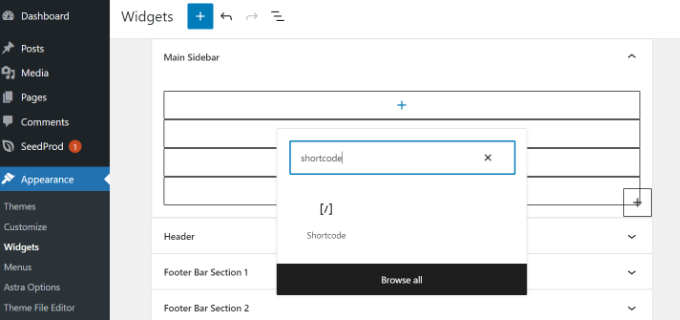
How To Add A Shortcode In WordPress Beginner s Guide

How To Create Shortcode For Plugin In WordPress Practical Example
How To Add A Shortcode In WordPress Beginner s Guide

How to Create a Shortcode in WordPress In 7 Steps Step 1 Create a New Theme File Step 2 Create the Shortcode Function Step 3 Add the Self Closing Shortcode to the Website Step 4 Add Parameters to the Shortcode Step 5 Test the Parameters Step 6 Create an Enclosing Shortcode

WordPress offers a predefined shortcode function to create the shortcode in WordPress plugin For using shortcode function you have to define a handler function that parses the shortcode and return some output Then you need to register a shortcode using add shortcode function

Shortcode Best Practices Best practices for developing shortcodes include the plugin development best practices and the list below Always return Shortcodes are essentially filters so creating side effects will lead to unexpected bugs Prefix your shortcode names to avoid collisions with other plugins Sanitize the input and escape the
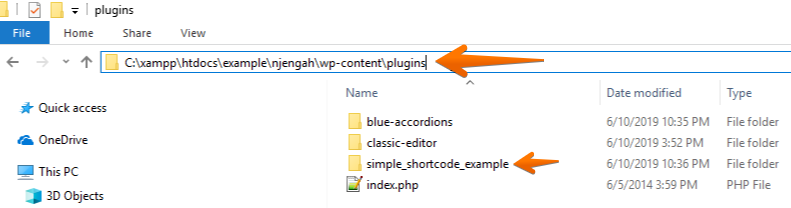
Shortcoder plugin allows to create a custom shortcodes for HTML JavaScript CSS and other code snippets Now the shortcodes can be used in posts pages and the snippet will be replaced in place

When adding add shortcode function in a plugin it s good to add it in a function that is hooked to init hook So that WordPress has time to initialize properly add action init wpdocs add custom shortcode function wpdocs add custom shortcode add shortcode footag wpdocs footag func
When you edit a post or a page you can add the Shortcode block anywhere you want The block includes a single text field where you can enter the shortcode This same field works for every shortcode available on your site be it one of the default options or one added by a plugin Note that the Shortcode block won t display the results of the Step 1 Create your function function any name here All your cool code here You ll want to pick a name for it If this is going to be a single shortcode plugin maybe you want to name it the same as the plugin file
You use add shortcode to register a new shortcode You name your shortcode whatever you want using the first argument of add shortcode You d put the shortcode we just registered onto the page with wpshout sample shortcode With the second argument of add shortcode you name a shortcode handler function