How To Colour Code In Excel Based On Date How To Colour Code In Excel SpreadCheaters How To Highlight Cells In Excel Based On Date Range Printable Templates How To Colour Code In Excel SpreadCheaters How To Colour Code In Excel SpreadCheaters How To Color Code In Excel Based On Text Grady Cindy To find conditional formatting for dates go to Home Conditional Formatting Highlight Cell Rules A Date Occurring You can select the following date options ranging from yesterday to next month
Suppose we would like to change the color of the cells in column A based on the following rules If the date is within 5 days or less make the color red Else if the First off you need to determine the format code of your date Here are just a few examples D1 dd mmm yy or d mmm yy D2 dd mmm or d mmm D3 mmm yy D4 mm dd yy or m d yy or m d yy h mm
How To Color Code In Excel Based On Text Grady Cindy How To Use Conditional Formatting To Color Code Dates In Excel Can You Color Code In Excel Psoriasisguru Colour Codes Swiftwood Tiles Bathrooms How To Make Alternating Colors In Excel Roney Carthersaing Ranking Based On Multiple Criteria In Excel 4 Cases ExcelDemy Ranking Based On Multiple Criteria In Excel 4 Cases ExcelDemy How To Automatically Color Code In Excel TechJunkie How To Separate Data In Excel Based On Criteria SpreadCheaters
How To Colour Code In Excel Based On Date
 How To Colour Code In Excel Based On Date
https://spreadcheaters.com/wp-content/uploads/Final-Image-How-to-colour-code-in-Excel.png
In this section we will apply conditional formatting on the Actual Delivery Date column based on the Expected Delivery Date Steps First Select the Range
Pre-crafted templates offer a time-saving option for creating a varied range of documents and files. These pre-designed formats and layouts can be used for various individual and professional projects, consisting of resumes, invitations, leaflets, newsletters, reports, discussions, and more, streamlining the material development procedure.
How To Colour Code In Excel Based On Date

How To Get Difference Date In Excel Haiper

How To Use Conditional Formatting To Color Code Dates In Excel
Can You Color Code In Excel Psoriasisguru

Colour Codes Swiftwood Tiles Bathrooms

Ranking Based On Multiple Criteria In Excel 4 Cases ExcelDemy

Ranking Based On Multiple Criteria In Excel 4 Cases ExcelDemy

TODAY DATE YEAR A2 1 MONTH A2 DAY A2 61 For Orange Status Enter this formula and select Orange color from Format button TODAY DATE YEAR A2 1 MONTH A2 DAY A2 31 For

Apply a Quick Conditional Formatting Date Rule Create a Custom Conditional Formatting Date Rule Notes on Conditional Formatting Based on Date in Excel Conditional formatting is a terrific feature for
If you have a list of dates in a worksheet you would like to highlight the date with red amber and green colors with conditional formatting For example if the date is past then
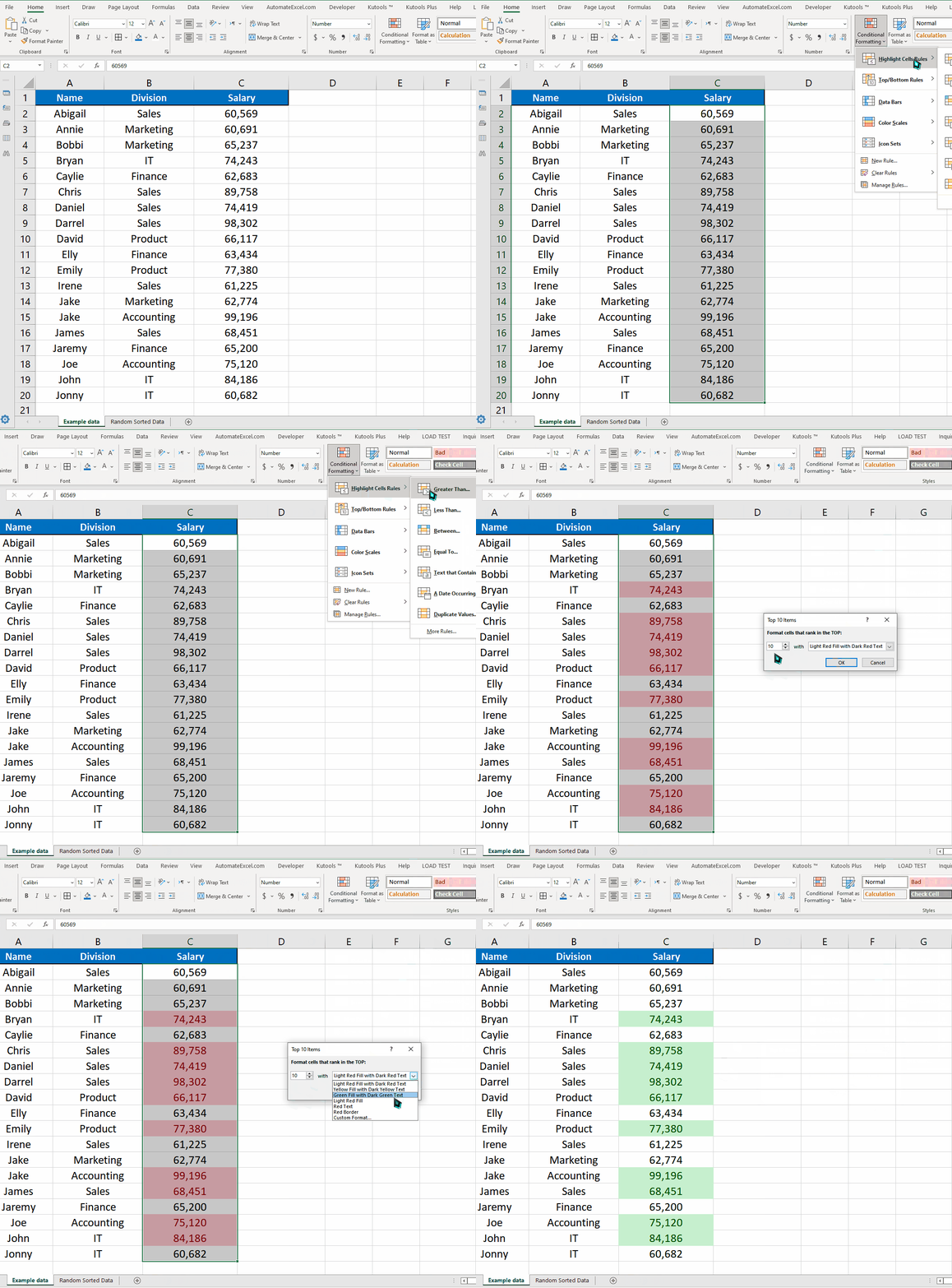
Step 1 Open your Excel spreadsheet and select the range of cells that contain the date values you want to color code Step 2 Go to the Home tab on the Excel ribbon Step

The first rule which if True sets cell background color to red tests a date value in column B against the current date obtained by using the TODAY function in a formula Assign the formula to the first data value in
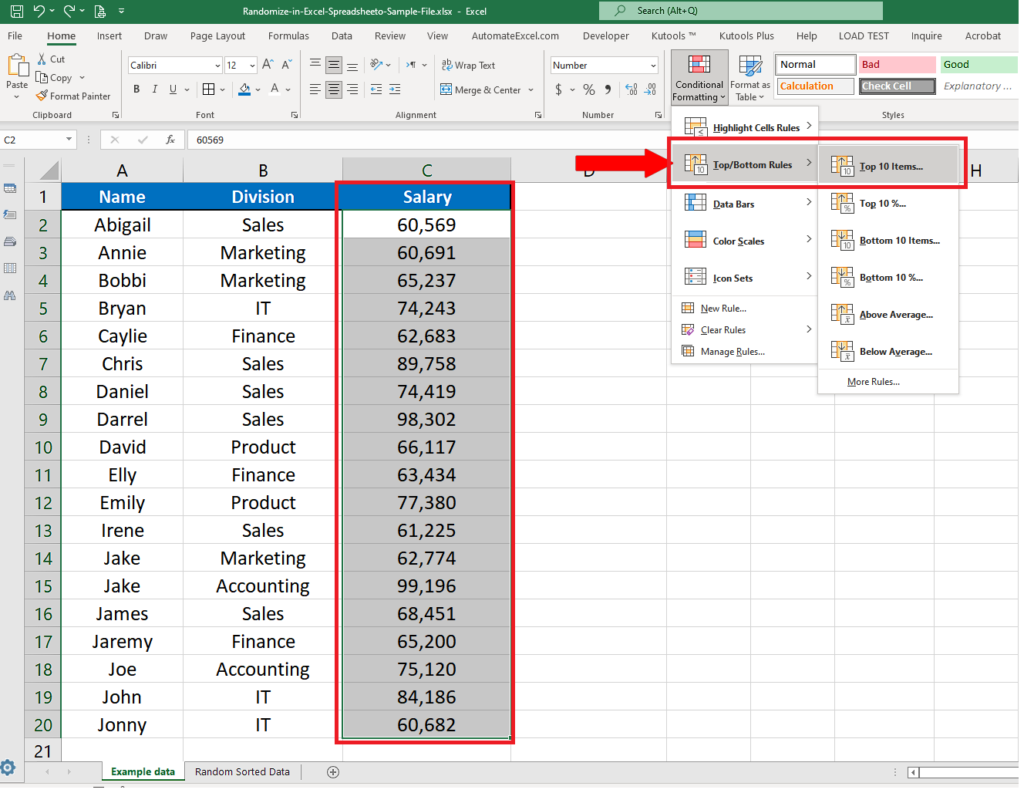
Select the data where you have dates Go to Home Conditional Formatting Highlight Cells Rules From there click on the option A date occurring In the dialog Open the Conditional Formatting dropdown menu and select New Rule Choose Use a formula to determine which cells to format Enter the formula that will highlight cells
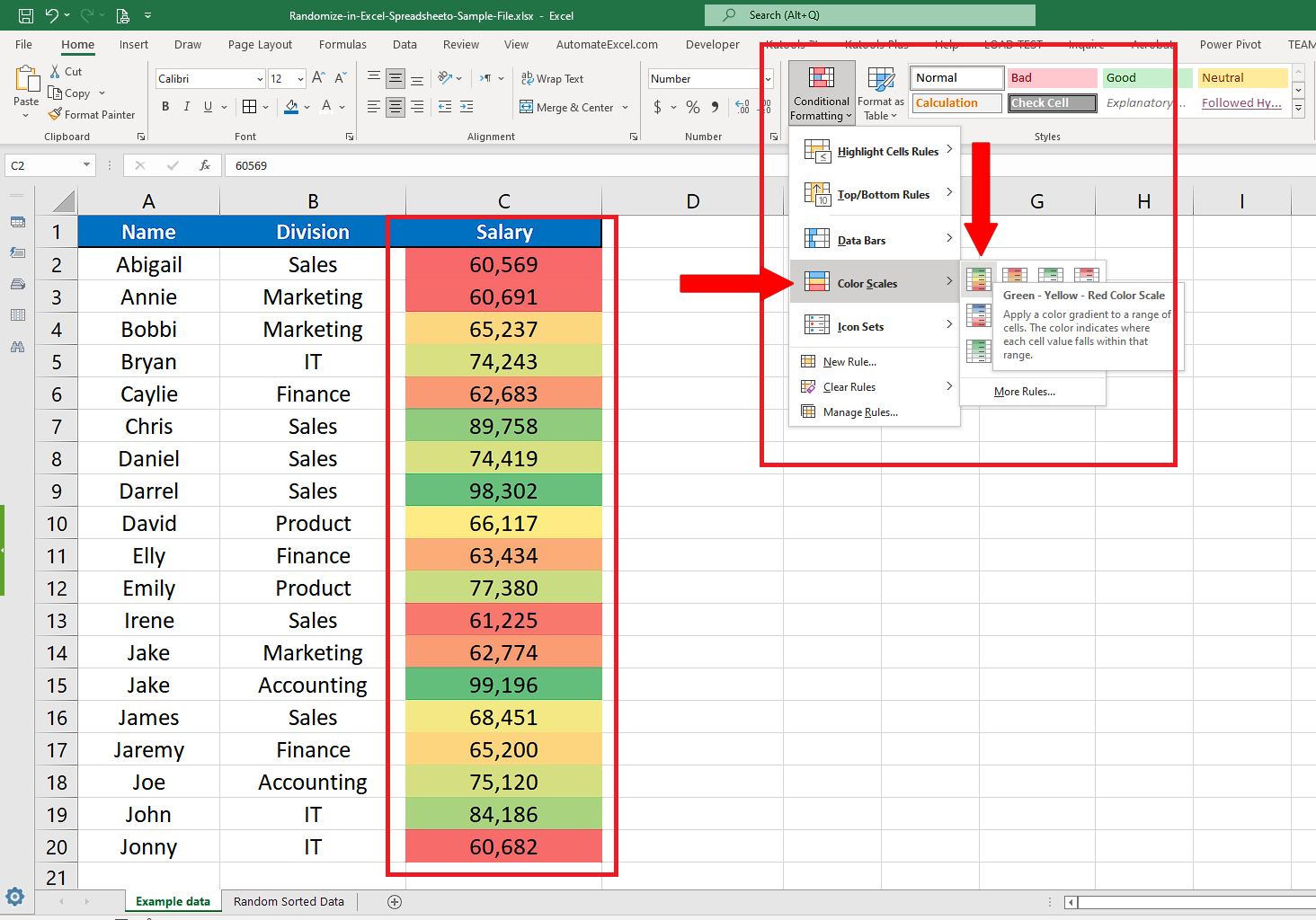
Steps Firstly select the data range on which you want to apply the Conditional Formatting Here I am selecting C5 C11 Then go to Home Tab From here