How To Check Internet Speed Using Cmd 2020 Updated How To Increase Internet Speed Using CMD On Windows How To Test Internet Speed Online And Command Prompt Error Express How To Test Your Internet Speed Using Cmd YouTube How To Test Internet Speed From Command Prompt How To Check Internet Speed From Command Line In Linux Web May 15 2021 nbsp 0183 32 To access the command prompt click on the Start button type cmd and click on the Command Prompt search result when it appears Windows 10 will now open the Command Prompt and wait for
Web Aug 25 2022 nbsp 0183 32 Screenshot of running the Fast CLI from command line Speedtest using the speed test CLI npm This solution works on any system where npm is available including Windows Mac and Linux Install via npm npm install location global speed test Run the speed test speed test Web Jan 20 2021 nbsp 0183 32 In Windows click the start menu and type quot CMD quot to access the command prompt Type quot ping google quot and choose quot enter quot to execute the function and retrieve a list of results The results have
How To Check Internet Speed From Command Line In Linux How To Test Your Internet Speed From The Command Line 100 Working Increase Internet Speed Using Cmd On Windows 7 8 10 How To Check Your Internet Speed Using Run Command On Windows 11 10 YouTube Check Your Internet Speed Using Command Prompt YouTube How To Check Internet Speed In Cmd Windows 10 11 Check Speedtest Via Cmd Speedtest exe YouTube How To Check Internet Speed With Cmd Command How To Check Internet Speed Using Python How To Make Jarvis In Python part 16 How To Check Internet Speed With Cmd Command
How To Check Internet Speed Using Cmd
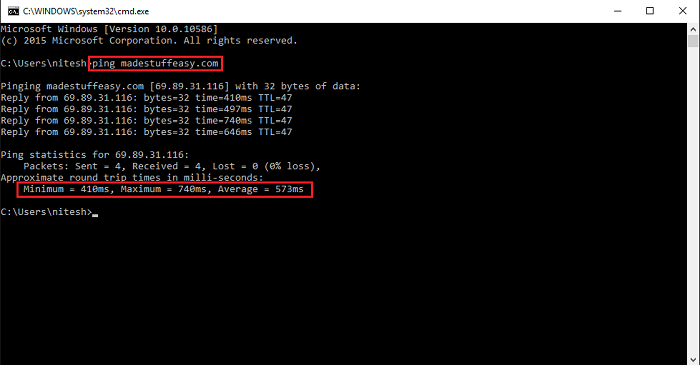 How To Check Internet Speed Using Cmd
https://www.madestuffeasy.com/wp-content/uploads/2017/07/cmd-speed-check.png
Web Step 1 Go to a speed testing website Step 2 Press the Go or Start button Step 3 Wait for the test to finish Step 4 Examine the results Most speed test websites generally show you the download and upload speeds along with the ping time Use the Speed Test provided by your Internet Service Provider ISP
Templates are pre-designed files or files that can be used for various purposes. They can save time and effort by providing a ready-made format and design for developing various sort of content. Templates can be utilized for individual or professional tasks, such as resumes, invites, flyers, newsletters, reports, discussions, and more.
How To Check Internet Speed Using Cmd

How To Check Internet Speed On CentOS 8 Using The Command Line VITUX

How To Test Your Internet Speed From The Command Line

100 Working Increase Internet Speed Using Cmd On Windows 7 8 10

How To Check Your Internet Speed Using Run Command On Windows 11 10 YouTube

How To Check Internet Speed In Cmd Windows 10 11 Check Speedtest Via Cmd Speedtest exe YouTube
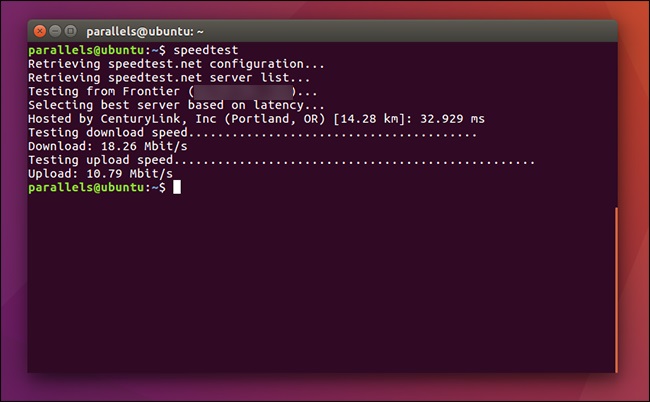
How To Check Internet Speed With Cmd Command
Web May 2 2022 nbsp 0183 32 1 How to check the internet connection in CMD To check whether your internet connection works you can use Command Prompt to test the connection to a particular website or internet location To do that you can use the ping network command followed by a web address or IP address
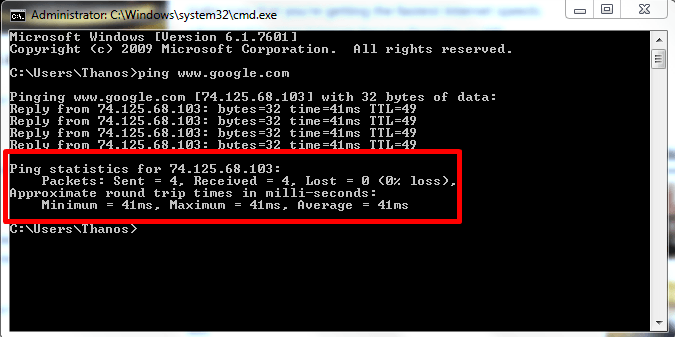
Web Apr 11 2013 nbsp 0183 32 How does it work Think of it like a sonar When you ping any server you send the echo request ICMP to the target And based on the time it took and the amount of the data that came back you can test the reliability and speed of your connection Here is how you use Ping 1 Open command prompt

Web May 13 2022 nbsp 0183 32 Check internet speed using cmd pings to default gateway You can check your internet connection speed by sending ping packets to your default gateway To know your default gateway

Web May 30 2019 nbsp 0183 32 Command line utilities shown above are helpful in performing internet speed checks and for doing comparison of internet speed If you are facing slow internet speed then you can use these command line tools to check your internet speed without the need of opening a browser and visiting any site
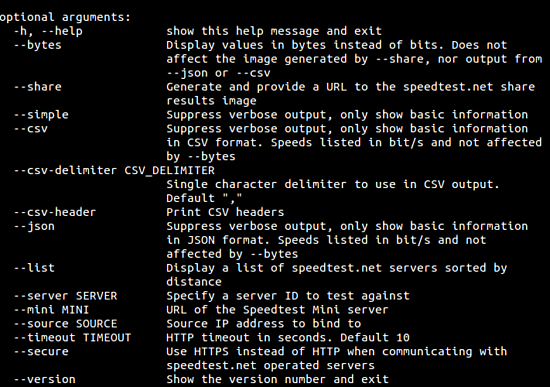
Web Step 1 Open the Start Menu Before we can use ping we need to open Windows Command Prompt To do so right click the start button in the bottom left corner of the screen Step 2 Search for Command Prompt Once the start menu is open click in the quot Search programs and files quot box and type quot Command Prompt quot
[desc-11] [desc-12]
[desc-13]