How To Check Apache Version In Linux How To Check If Apache Is Working Rivermap How To Install OwnCloud On Ubuntu Linux A Tutorial For Newbie Linux Computer Help Security 3 Formas De Verificar El Estado Y El Tiempo De Actividad Del Servidor Apache En Linux Dp Linux How To Check Apache Version In Linux A Step by Step Guide Systran Box How To Check Apache Version In Linux CPanel And WebHost Manager Technology Accent The commands in this guide should work on any modern Linux distribution like Ubuntu 18 04 and CentOS 7 and Debian 9 In Ubuntu and Debian the Apache
To see Apache version on a Debian Ubuntu Linux run apache2 v For CentOS RHEL Fedora Linux server type command httpd v You can locate apache2 or In Ubuntu Linux there are at least three commands available to check the apache version To check Apache Version run the following command in Ubuntu terminal
How To Check Apache Version In Linux CPanel And WebHost Manager Technology Accent How To Secure Apache With Let s Encrypt SSL Certificate On CentOS 8 Linuxhowto Grep Usage In Linux Nipodsinc How To Check The Apache Struts Version In Linux CertSimple How To View The Content Of A JKS File Systran Box How To Check Apache Version On Linux Linux Tutorials Learn Linux Configuration How To Check Version Apache Braincycle1 How To Check Apache Web Server Version In Linux QuyaSoft Install Apache Http Server On Ubuntu Linux Testingdocs Com Vrogue
How To Check Apache Version In Linux
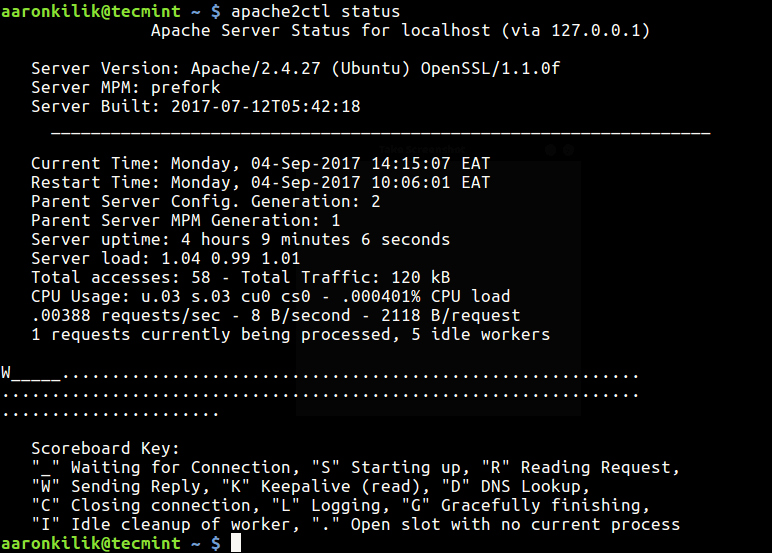 How To Check Apache Version In Linux
https://www.tecmint.com/wp-content/uploads/2017/09/Check-Apache-Status-Using-Apache2ctl.png
If you are using a Linux based operating system you can check the Apache version using the following command in the terminal apache2 v This command will
Pre-crafted templates use a time-saving option for producing a diverse variety of documents and files. These pre-designed formats and designs can be utilized for various individual and expert projects, including resumes, invites, leaflets, newsletters, reports, presentations, and more, simplifying the material creation procedure.
How To Check Apache Version In Linux

How To Check Apache Web Server Version In Linux

How To Secure Apache With Let s Encrypt SSL Certificate On CentOS 8 Linuxhowto
Grep Usage In Linux Nipodsinc

How To Check The Apache Struts Version In Linux CertSimple

How To Check Apache Version On Linux Linux Tutorials Learn Linux Configuration

How To Check Version Apache Braincycle1
2 Answers Sorted by 20 You first need to find out where are those binaries stored For this you may use the whereis command whereis httpd The output will give

There are one or two commands to check the Apache web server version in Linux depending on the Linux distribution you use The apachectl command which available
1 tooshel You could have tried locate locate bin httpd Assuming it s installed not sure it s standard on CentOS J rgen A Erhard

1 Checking the Apache Version from Terminal There are multiple ways to check for Apache versions installed on your VPS Cloud Dedicated Servers and Dedicated Servers Below are some of the most

To check the Apache version via cPanel login to your account and follow these steps 1 Locate the General information section 2 Click the Server Information category
In this case the Apache version running is 2 4 56 WebHost Manager Apache Server Status Check your Apache version with cPanel In cPanel you can Check the Version of Apache using httpd command Running the httpd v command will give you an output that will look like this root server httpd v Server
7 Answers It lists all installed packages that contain apache in their name For example apache2 install apache2 doc install apache2 mpm prefork install apache2