How To Change Default Camera App How To Change Default Camera App On An Android Device For Instagram Video Call Quora How Do I Change My Default Camera App How To Change Default Camera In Windows 11 YouTube Descargar Skin Para Resident 4 Easysitefs How To Change Default Camera Storage Location Android Learn How to Change Default Camera in Windows 10 Simply follow this tutorial to change your default webcam camera on PC 0 00 Intro0 04 How to Change Default
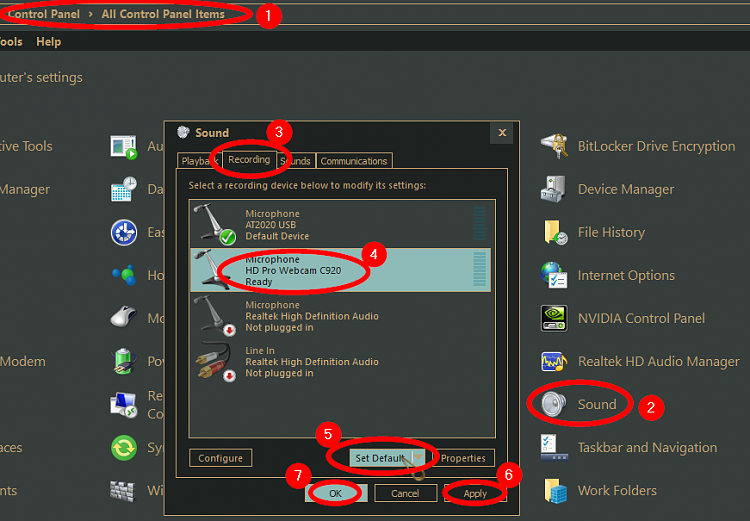
Method 1 By Disabling Other Camera One of the most common workarounds in the way of selecting a default camera is to disable the other camera This way when prompted Windows will be forced to use the camera that you want every time In order to disable the other cameras Press Windows key R to invoke the Run dialog In the Run dialog box type and hit Enter to open Control Panel From the top right corner of the window set the View by option to Large icons or
How To Change Default Camera Storage Location Android 1992x1665 OC IPhone 7 Editing In Default Camera App Took Many Many Attempts But How To Set The Default Camera Mode On IPhone 2022 Guide Bollyinside How To Change Default Camera In Windows 10 Appuals How To Switch Or Change Default Camera In Windows 10 11 TechWiser Windows 10 Change Default Camera Berrypro How To Change Default Camera Mode On IPhone Compsmag Change Default Camera App In IOS YouTube How To Change Default Camera On Windows 10 5 Ways
How To Change Default Camera App
How To Change Default Camera App
https://qph.cf2.quoracdn.net/main-qimg-e9e1800fd331f27f02f979ce1a009242-pjlq
You Can t Change the Default Camera To prevent malicious apps from capturing your location Google has removed the ability to set a third party camera app as default You can continue to use the third party app as usual but if an app requests to use the camera app it will use the preinstalled one
Pre-crafted templates offer a time-saving service for creating a diverse variety of files and files. These pre-designed formats and layouts can be used for various individual and expert jobs, including resumes, invitations, leaflets, newsletters, reports, discussions, and more, enhancing the material production process.
How To Change Default Camera App

How To Change Default Camera Storage Location Android

1992x1665 OC IPhone 7 Editing In Default Camera App Took Many Many Attempts But

How To Set The Default Camera Mode On IPhone 2022 Guide Bollyinside
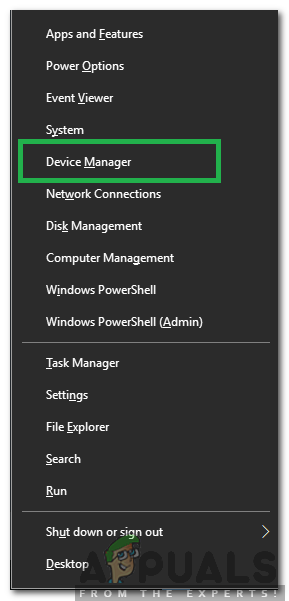
How To Change Default Camera In Windows 10 Appuals

Windows 10 Change Default Camera Berrypro

How To Change Default Camera Mode On IPhone Compsmag
Switch Camera Source Default Camera App I finally got a driver installed for a CIF Single Chip but the problem I now face is how I am suppose to switch camera feed I still don t know if the camera works or if it is any better than my internal camera
Select Start Type manage cameras in the search bar on the Start menu and then select Manage cameras from the results Select the camera from the list of connected cameras Windows will start the camera display a preview and show controls to adjust various settings Use the controls and adjust the image

Apple doesn t let you change the default iPhone Camera app at least officially But a clever little hack to switch to your preferred camera app in Shortcuts means you can use your preferred camera app even when you tap the lock screen shortcut How to Set Up the Camera App Shortcut

3 Answers Sorted by 61 Unintuitively the icon in the upper left that looks like it s meant to switch between your front and back camera will also cycle through your other attached cameras At least this worked for me on a Surface Pro 4 front and rear camera with a USB Microsoft LifeCam attached

Select Open App The script will be to open an alternative Camera app Select Choose and find the alternative default camera app I chose Halide because it gives a lot of control but any Camera app will work Voila You are done Now when you hit any of the Camera icons your new default camera App will open up
How to Change the Default Camera in Windows 10 Some people like to use a third party camera instead of the internal ones that come in laptops monitors tabl The built in Camera app in Windows 10 offers a few options to change the default settings For instance you can change the picture resolution photo quality video quality and brightness via the app Step 1 Open the Camera app Step 2 If you would like to change the photo or video quality click on the gear settings icon located top left
Quick instructions on how to select a different default Camera App in iOS 14 by creating an automation in the Shortcuts app A more detailed version with scre