How To Automatically Sort Columns In Excel How To Set Data Largest To Smallest Sort Data In Excel How To Auto Sort In Excel When Adding Streamlasopa How To Quickly Highlight Columns In Excel Using A Keyboard Shortcut Solved How To Put The Values In Different Columns Into One Column In Delete Hidden Rows And Columns In Excel Quick And Easy YouTube Web Mar 23 2023 nbsp 0183 32 In the opening Sort Options dialog under Orientation choose Sort left to right and click OK Then select the row by which you want to sort In our example we select Row 1 that contains the photo camera names Make sure you have quot Values quot selected under Sort on and quot A to Z quot under Order then click OK The result of your
Web Use the SORT and SORTBY functions to automatically sort your data Also see Filter data in an Excel table or range and Apply conditional formatting in Excel Need more help Want more options Discover Community Explore subscription benefits browse training courses learn how to secure your device and more Microsoft 365 subscription benefits Web Auto sort with Formula in Excel To auto sort with formula we can use the formula LARGE B4 B14 Figure 5 Excel auto sort table We will insert the dollar sign so that the selection does not change as we move the formula from Cell B4 to Cell B5 Figure 6 Inserted dollar sign to formula
Delete Hidden Rows And Columns In Excel Quick And Easy YouTube How To Merge Columns In Excel Pixelated Works How To Unhide All Columns In Excel Techozu 15 Excel Shortcuts For Adding Rows And Columns Pixelated Works Sort Column In Excel Examples How To Sort Column In Excel 2023 Add And Delete Rows And Columns In Excel Automatically Sort Multiple Columns Parabola How To Sort Multiple Columns In Excel Dependently Versam How To Auto Sort Date When Date Is Entered Or Changed In Excel
How To Automatically Sort Columns In Excel
 How To Automatically Sort Columns In Excel
https://i.ytimg.com/vi/4N4o8iPkRKs/maxresdefault.jpg
Web Jun 27 2019 nbsp 0183 32 This will open the Sort dialog box In the Sort dialog box make sure my data has headers is selected In case your data doesn t have headers you can uncheck this In the Sort by drop down select Region or whatever column where you have the colored cells In the Sort On drop down select Cell Values
Templates are pre-designed documents or files that can be utilized for various purposes. They can save effort and time by supplying a ready-made format and design for creating different type of content. Templates can be utilized for individual or expert tasks, such as resumes, invites, leaflets, newsletters, reports, presentations, and more.
How To Automatically Sort Columns In Excel

How To Automatically Sort Dataset In Google Sheets

How To Merge Columns In Excel Pixelated Works

How To Unhide All Columns In Excel Techozu

15 Excel Shortcuts For Adding Rows And Columns Pixelated Works

Add And Delete Rows And Columns In Excel

Automatically Sort Multiple Columns Parabola

Web Mar 14 2023 nbsp 0183 32 Excel SORT function automatically sort with formula The tutorial shows how to use the SORT function to sort data arrays dynamically You will learn a formula to sort alphabetically in Excel arrange numbers in ascending or descending order sort by multiple columns and more
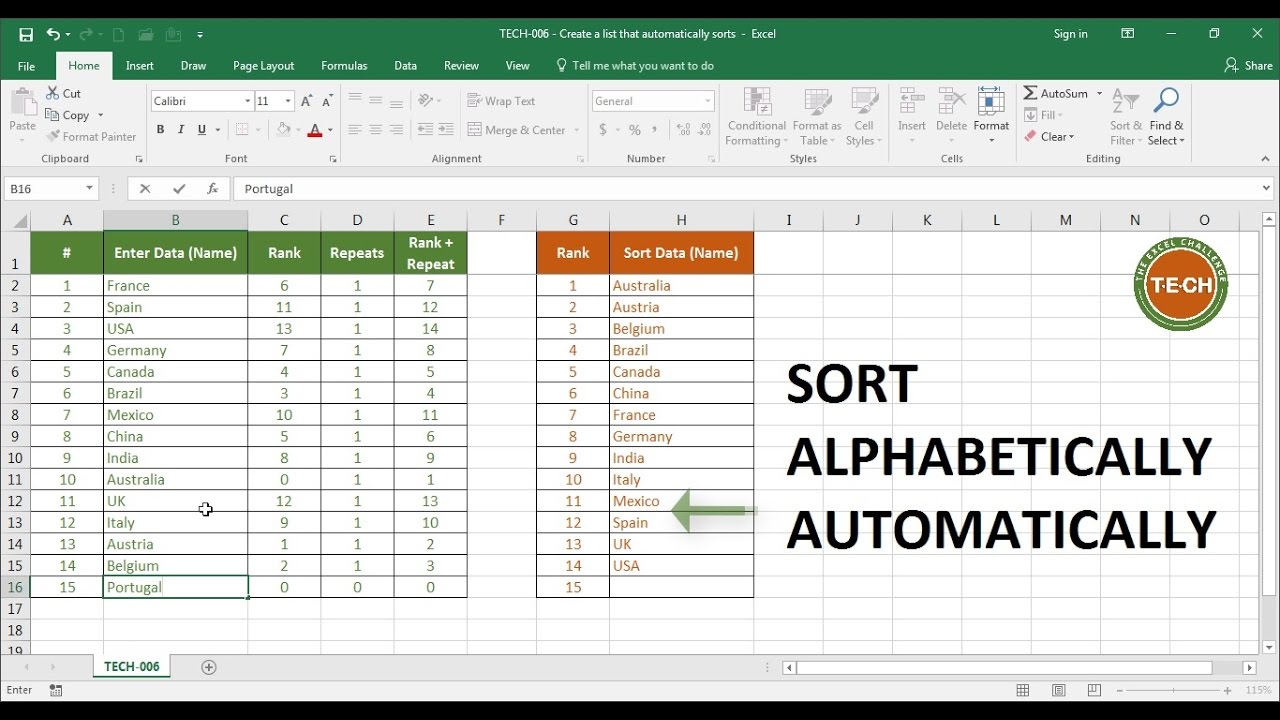
Web Dec 20 2023 nbsp 0183 32 Method 2 Apply Excel SORT Function to Reorder Columns Automatically If you want to automatically rearrange the columns but want to keep the original one you can apply the SORT function in this case The SORT function helps you to organize columns according to your need You can even delete the old column after this

Web Dec 21 2023 nbsp 0183 32 In Microsoft Excel there are numerous procedures to auto sort a table or an array if someone changes data In this article you ll learn how you can use the SORT function or combine it with other necessary functions to sort data automatically when data is changed later

Web Nov 30 2022 nbsp 0183 32 Select your data go to the Data tab and click quot Sort quot in the Sort amp Filter section of the ribbon Then click quot Options quot at the top of the Sort box In the small pop up box mark the Sort Left to Right option check the box for Case Sensitive at the top if you like and click quot OK quot

Web Sort quickly and easily Select a single cell in the column you want to sort On the Data tab in the Sort amp Filter group click to perform an ascending sort from A to Z or smallest number to largest Click to perform a descending sort from Z
Web Apr 19 2023 nbsp 0183 32 Excel SORTBY function The SORTBY function in Excel is designed to sort one range or array based on the values in another range or array Sorting can be done by one or multiple columns SORTBY is one of six new dynamic array functions available in Excel for Microsoft 365 and Excel 2021 Its result is a dynamic array that spills to Web May 22 2022 nbsp 0183 32 1 Use the SORT Function To Auto Sort Data In Excel You can use the SORT function to organize your data set so that it is presented to you in either ascending or descending order However there are three kinds of
Web Select any cell within your dataset and click the Sort amp Filter button on the home tab of the ribbon Select whether you want to sort by ascending or descending order for each column then select Add Level to sort by additional columns Click OK once finished to apply automatic sorting to your Excel sheet