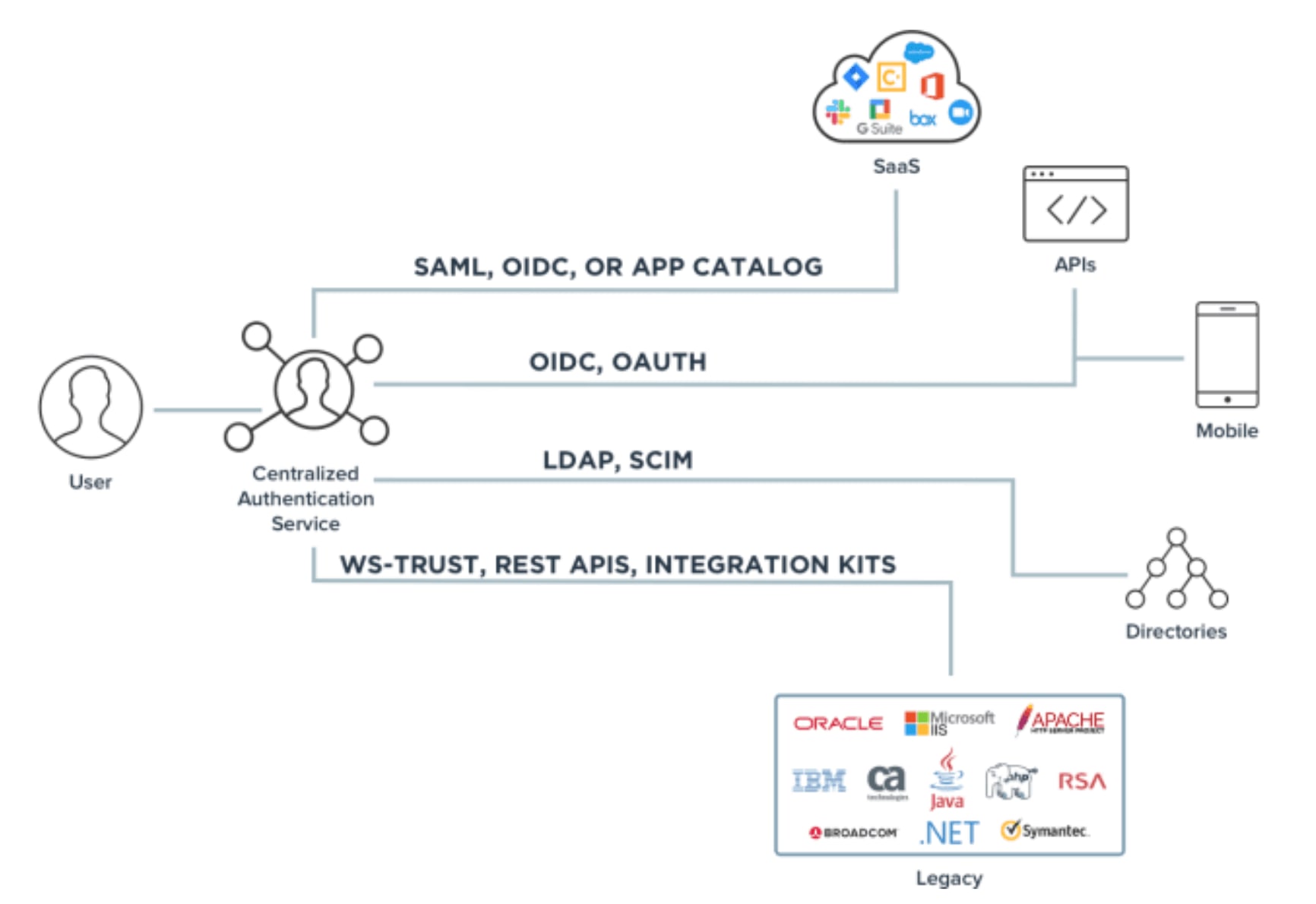
How Does Personal Access Token Work How Does Utility Token Work ModiCoin How Token based Authentication Works Graphic Token Based Authentication What Is It And How It Works AppRiver Flowchart Of Jwt Validation Download Scientific Diagram Gambaran Create A Personal Access Token In Git What are access tokens An access token is a compact digital artifact typically in the form of a JSON Web Token JWT that grants permissions to a user the resource owner to access certain resources These tokens act as an electronic key ensuring that the user has the correct permissions to access the data they are requesting
Personal access tokens can be an alternative to OAuth2 and used to Authenticate with the GitLab API Authenticate with Git using HTTP Basic Authentication In both cases you authenticate with a personal access token in place of your password Personal access token SSH key Authenticating in your browser If you re a member of an enterprise with managed users you will authenticate to GitHub in your browser using your IdP For more information see About Enterprise Managed Users in the GitHub Enterprise Cloud documentation
Create A Personal Access Token In Git OAUTH 2 0 Authentication With Azure Active Directory Microsoft Entra Microsoft Learn Create A GitHub Personal Access Token Example Token Burning What Does Burning Crypto Mean Bybit Learn 2021 09 13 19 43 52 New Personal Access Token Mostly Technical Refresh Token Grant WSO2 Identity Server Documentation How Does KPLC Token Work Kenya Power Token Guide Connected Service Json Authentication Navy Runner Deploy An Azure Pipelines Agent On Windows Azure Pipelines Microsoft Learn
How Does Personal Access Token Work
 How Does Personal Access Token Work
https://www.modicoin.com/wp-content/uploads/2022/01/How-Does-Utility-Token-Work.jpg
How to get a Personal Access Token the Web App Of course the easiest way to manage these tokens it through our Web App In the main navigation choose Space settings and API keys
Pre-crafted templates offer a time-saving service for creating a varied range of files and files. These pre-designed formats and designs can be made use of for various personal and expert jobs, including resumes, invitations, leaflets, newsletters, reports, presentations, and more, improving the material production procedure.
How Does Personal Access Token Work

Coaching On DevOps And Cloud Computing How To Create Personal Access Token Use Personal

OAUTH 2 0 Authentication With Azure Active Directory Microsoft Entra Microsoft Learn
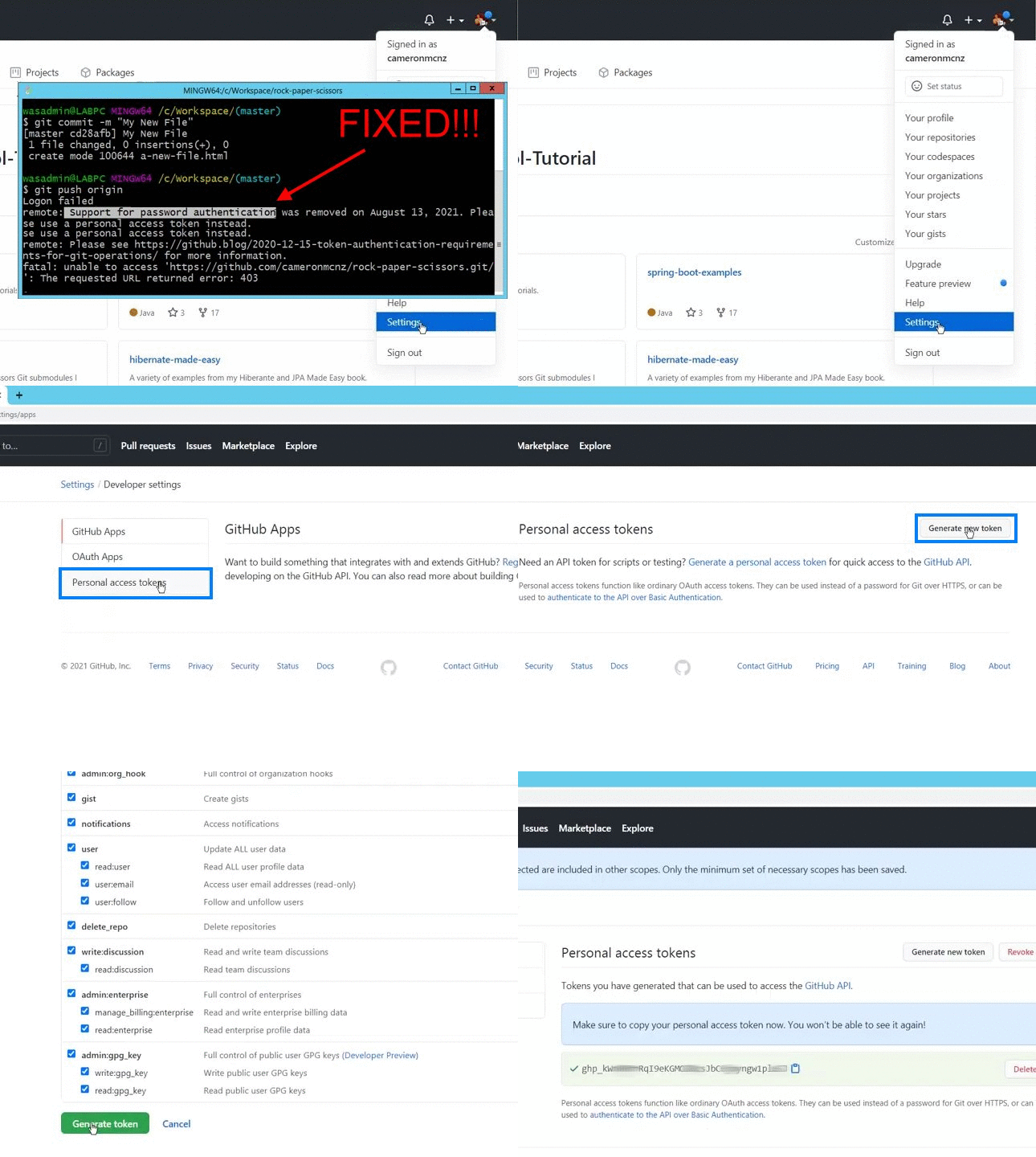
Create A GitHub Personal Access Token Example
Token Burning What Does Burning Crypto Mean Bybit Learn

Refresh Token Grant WSO2 Identity Server Documentation

How Does KPLC Token Work Kenya Power Token Guide

In the left sidebar under Personal access tokens click Tokens classic Select Generate new token then click Generate new token classic In the Note field give your token a descriptive name To give your token an expiration select Expiration then choose a default option or click Custom to enter a date
Personal access tokens can only be used for HTTPS Git operations If your repository uses an SSH remote URL you will need to switch the remote from SSH to HTTPS If you are not prompted for your username and password your credentials may be cached on your computer
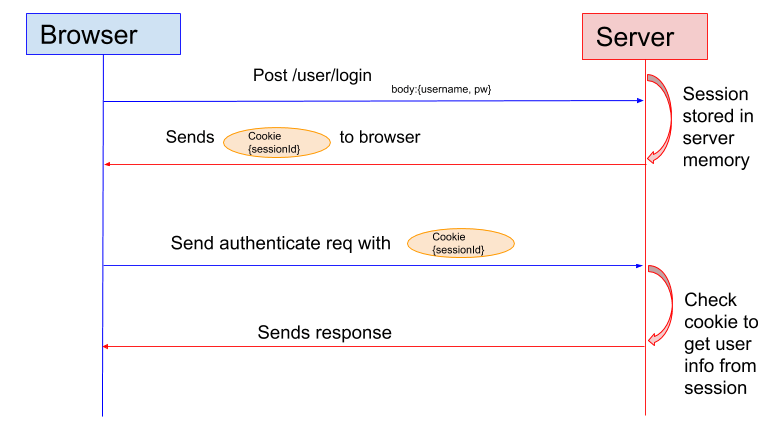
How Do Access Tokens Work Users don t write their own access codes Servers communicate with devices and all the work happens in minutes You ll follow a predictable set of steps Login Use a known username and password to prove your identity Verification The server authenticates the data and issues a token

What Are Personal Access Tokens Making a New Personal Access Token Switching To Personal Access Tokens As of August 2021 Github has removed support for using your account password from the Git command line You can still use HTTPS but you will need to set up a Personal Access Token to use instead of your password

In computing a personal access token or PAT is a string of characters that can be used to authenticate a user when accessing a computer system instead of the usual password
Token generation is decoupled from token verification allowing you the option to handle the signing of tokens on a separate server or even through a different company such us Auth0 Fine grained access control Within the token payload you can easily specify user roles and permissions as well as resources that the user can access From here select the Personal access tokens option and click the Generate new token button On this new page you have a few things to configure You can write a note about the token
How to Create Personal Access Tokens Log into your GitHub account Go to Settings in the upper right hand corner of the page Scroll down to Developer Settings and click on Personal Access Tokens Click on Generate new token and fill in the description of the token When prompted to choose which scopes you would like to