How Does Offline Editing Work Google Docs Incredible How To Make Google Docs Ideas Amitriptylineelavil A Guide To Collaborative Editing With Google Docs UpCurve Cloud Microsoft Office Files Opened In Google Docs Sheets Or Slides Now Make Available Offline Google Docs Mac Holoserint Google Docs Sheets And Slides Finally Get Offline Editing Support For Web Nov 15 2016 nbsp 0183 32 In this tutorial I ll show you how to use Google Docs offline as well as ways to keep your offline documents in sync after editing them You ll also learn how to work with the files from multiple Google accounts on the same computer plus review the limitations of using the service offline that you need to be aware of
Web There are two methods you can use to work offline and both are covered in this lesson Watch the video below to learn how to view and edit documents while offline Before you set up the offline features you will need to be connected to the Internet Web Apr 8 2022 nbsp 0183 32 1 Open Google Drive Image credit Future 2 Tap on the three dots icon next to your chosen file in either the document view or list view Image credit Future 3 Tap on quot Make available
Google Docs Sheets And Slides Finally Get Offline Editing Support For How Does In context Learning Work A Framework For Understanding The How To Enable Offline Editing In Google Docs Its Linux FOSS How To Use Google Docs Offline How To Clear Formatting In Google Docs TechWiser How To Use Google Docs Offline How To Enable Offline Editing In Google Docs Its Linux FOSS Edit Anywhere Google Docs Now Available Offline In 2023 Now It Is Easier To See Who Is Editing Shared Documents On Google Docs
How Does Offline Editing Work Google Docs
 How Does Offline Editing Work Google Docs
https://i2.wp.com/www.wikihow.com/images/f/fe/Edit-Google-Docs-Offline-Step-9.jpg
Web If you aren t connected to the internet you can still create view and edit files on Google Docs Google Sheets Google Slides Make recent files available offline On your iPhone or
Pre-crafted templates provide a time-saving service for developing a varied range of documents and files. These pre-designed formats and layouts can be used for different personal and expert projects, including resumes, invitations, leaflets, newsletters, reports, presentations, and more, improving the material development process.
How Does Offline Editing Work Google Docs

Google Docs For IOS Updated With Word Count And IPad Pro Support
How Does In context Learning Work A Framework For Understanding The

How To Enable Offline Editing In Google Docs Its Linux FOSS

How To Use Google Docs Offline
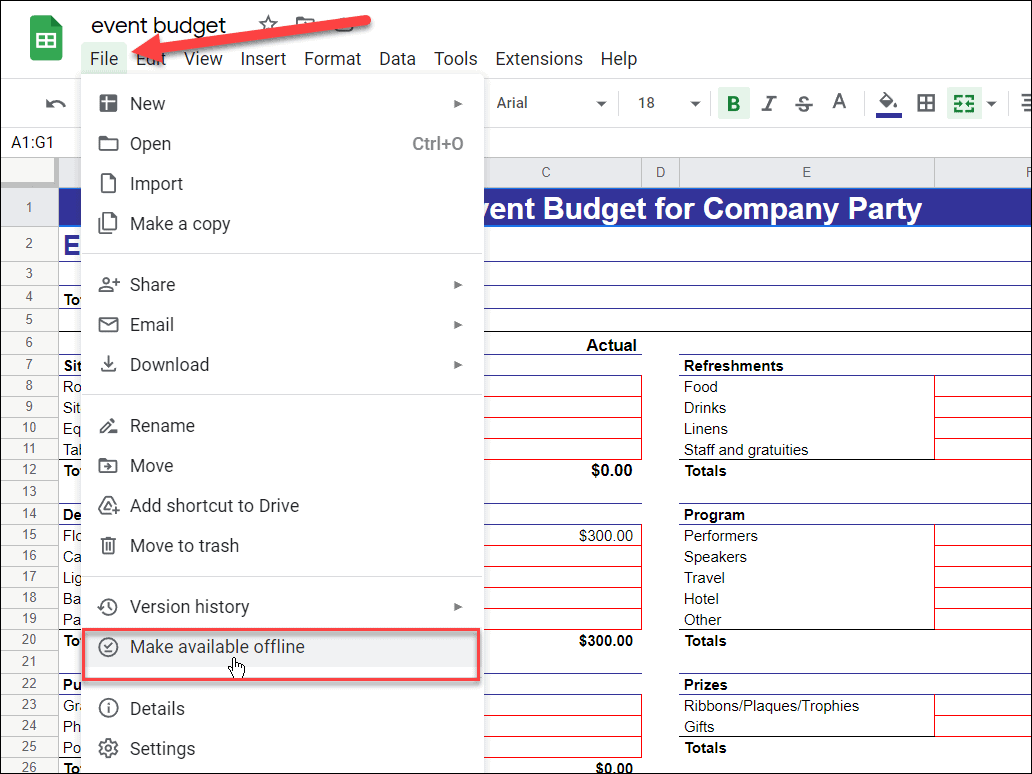
How To Use Google Docs Offline

How To Enable Offline Editing In Google Docs Its Linux FOSS

Web Feb 12 2019 nbsp 0183 32 In the Settings window toggle the quot Offline quot switch to the on position and then click quot OK quot Doing this enables offline mode across all the Google Drive applications Docs Sheets and Slides In an attempt to save space locally Google Docs only saves recently accessed files locally for use offline

Web Jul 3 2023 nbsp 0183 32 How to Set Up and Use Google Docs Offline Whether commuting to work or flying in first class you can still access Google Drive files offline Just follow these steps to edit Docs

Web 1 Open the Google Docs app and find the file that you want to edit offline 2 Tap the three dots next to its name and select Make available offline Your file will download and a

Web If you aren t connected to the Internet you can still create view and edit files in Google Docs Google Sheets Google Slides Use Google Docs Sheets and Slides offline You can

Web Nov 23 2021 nbsp 0183 32 To enable offline mode for a specific document follow these steps Locate the Google doc you wish to view or edit offline and highlight it On a Mac locate the three dot menu on a PC right click on the document and click the toggle bar next to
Web May 3 2019 nbsp 0183 32 Go to https drive google drive settings check the box next to Offline to enable your system to Create Open And Edit Your Recent Google Docs Sheets And Slides Files On This Device Web 4 days ago nbsp 0183 32 Click the gear icon top right choose Settings and then General and check the option labeled Create open and edit your recent Google Docs Sheets and Slides files on this device while offline
Web Jul 3 2023 nbsp 0183 32 On the desktop open Google Drive and sign into your account Click the Settings menu gear icon in the top left corner select Settings Under Offline check the box under Create open and edit your recent Google Docs Sheets and Slides files on this device while offline Offline access can also be turned on directly in Docs Sheets or