How Do You Delete Charts In Google Docs How To Make A T Chart On Google Docs How To Make A Chart In Google Docs Vegadocs How To Quickly Delete Extra Blank Lines In Your Word Document Riset How To Delete A Page In Google Docs Delete Blank Page How To Delete A Table In Google Docs Solve Your Documents We re adding new features that give users more options to easily customize their charts in Google Sheets Now you can click directly on data labels chart titles or legends and drag to reposition them Or you can easily delete these elements using the delete or backspace keys
Go to the Insert menu and select Chart Select the type of chart to use e g bar column line or pie This will add a default chart of the type selected However you will need to edit the chart to enter your data We ll look at how that works next How to Edit Charts in Google Docs 0 00 0 51 Google Sheets tutorial Quickly delete a chart in Sheets 1 minute video 2022 In 30 Minutes 11 1K subscribers Subscribe 1 6K views 1 year ago Google Drive
How To Delete A Table In Google Docs Solve Your Documents How To Delete A Table In Google Docs A Quick 5 Step Guide Solveyourtech How To Get Rid Of Extra Page In Word Template Printable Online How To Use Charts In Google Docs Moyens I O How To Make A Chart On Google Docs Vegadocs How To Delete A Row In Table In Google Docs YouTube Google Docs For IOS Updated With Word Count And IPad Pro Support How To Make A Flowchart In Google Docs Step by Step Guide ClickUp How To Delete A Row In A Table In Google Docs On Chromebook Templates
How Do You Delete Charts In Google Docs
 How Do You Delete Charts In Google Docs
https://i2.wp.com/i.ytimg.com/vi/_ZeKJ32nxSM/maxresdefault.jpg
Delete Chart Graph in Google Sheets How to remove created chart in Google spreadsheet Explanation To delete chart click down arrow present in the top right corner of the chart and select Delete chart option
Pre-crafted templates provide a time-saving solution for developing a diverse range of files and files. These pre-designed formats and layouts can be utilized for different individual and expert tasks, consisting of resumes, invitations, leaflets, newsletters, reports, presentations, and more, simplifying the content development procedure.
How Do You Delete Charts In Google Docs
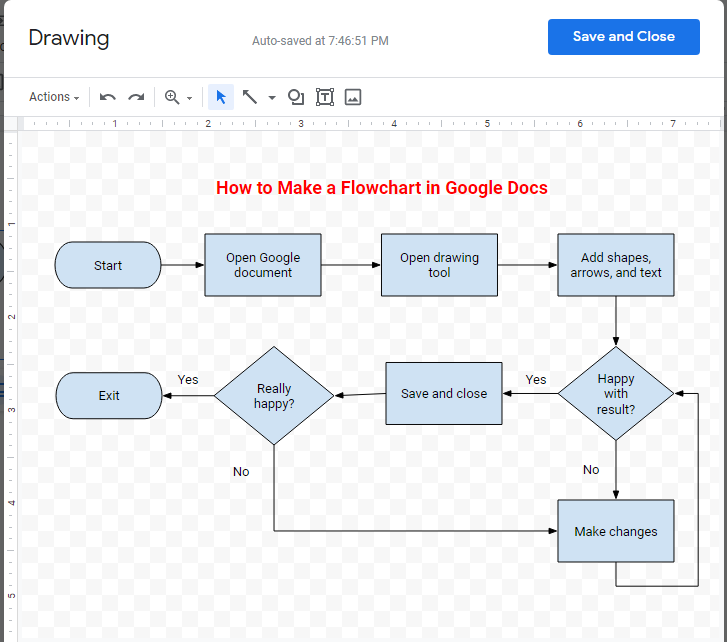
Make A Flow Chart In Google Docs
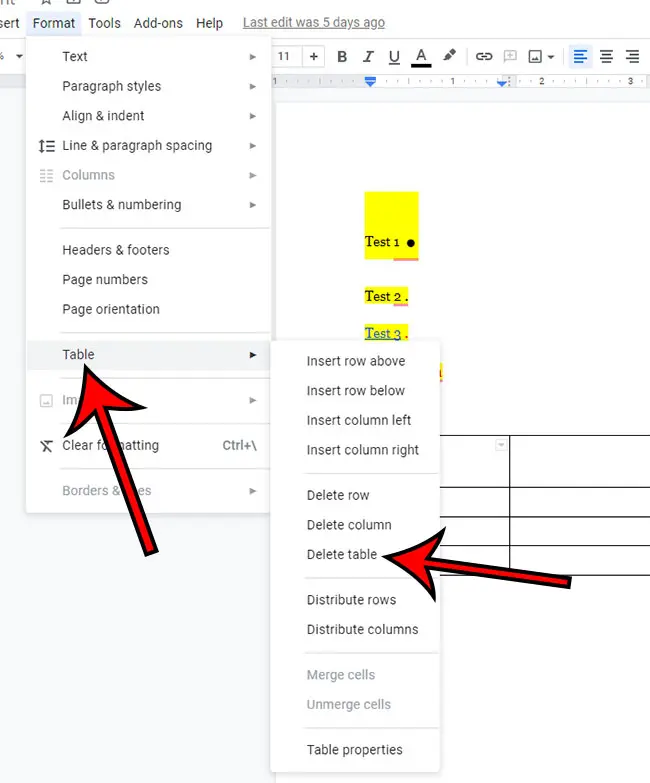
How To Delete A Table In Google Docs A Quick 5 Step Guide Solveyourtech
How To Get Rid Of Extra Page In Word Template Printable Online

How To Use Charts In Google Docs Moyens I O

How To Delete A Row In Table In Google Docs YouTube

Google Docs For IOS Updated With Word Count And IPad Pro Support

You can delete some chart items like titles legends data labels and error bars To delete items To delete a specific item on the chart double click the item

Step 1 Open Your Google Sheets Document Open the Google Sheets document that contains the graph or chart you want to delete When you open your document make sure you re on the correct sheet Google Sheets documents can have multiple sheets which you can switch between at the bottom of the screen Step 2
Step 1 First click on the chart you need to remove from the spreadsheet Step 2 Next press the three dots menu at the top right hand corner of the chart Step 3 Finally choose the Delete chart option from the list Just like that your chart will be deleted from the spreadsheet

Similarly if you wish to remove a chart from your Google Docs document right click on it and select choose the Delete option You can also select the chart and press the Delete

Step 1 Sign into your Google Drive at https drive google and open the file containing the chart or graph you want to delete Step 2 Click on the object to select it Step 3 Click the three dots at the top right of the chart or graph then choose the Delete chart option
You can add a new table to your Google Docs file by selecting Insert Table and then choosing the number of rows and columns you need You can add tables in Google Docs and Google Slide for quick presentations while Google Sheets is ideal for large scale data maintenance Why Use a Table in Google Docs By Alexander Trifuntov updated on May 5 2023 The tutorial explains how to build charts in Google Sheets and which types of charts to use in which situation You will also learn how to build 3D charts and Gantt charts and how to edit copy or delete charts Analyzing data very often we evaluate certain numbers
Want advanced Google Workspace features for your business Try Google Workspace today You can delete a document spreadsheet or presentation from the Google Docs Sheets and Slides