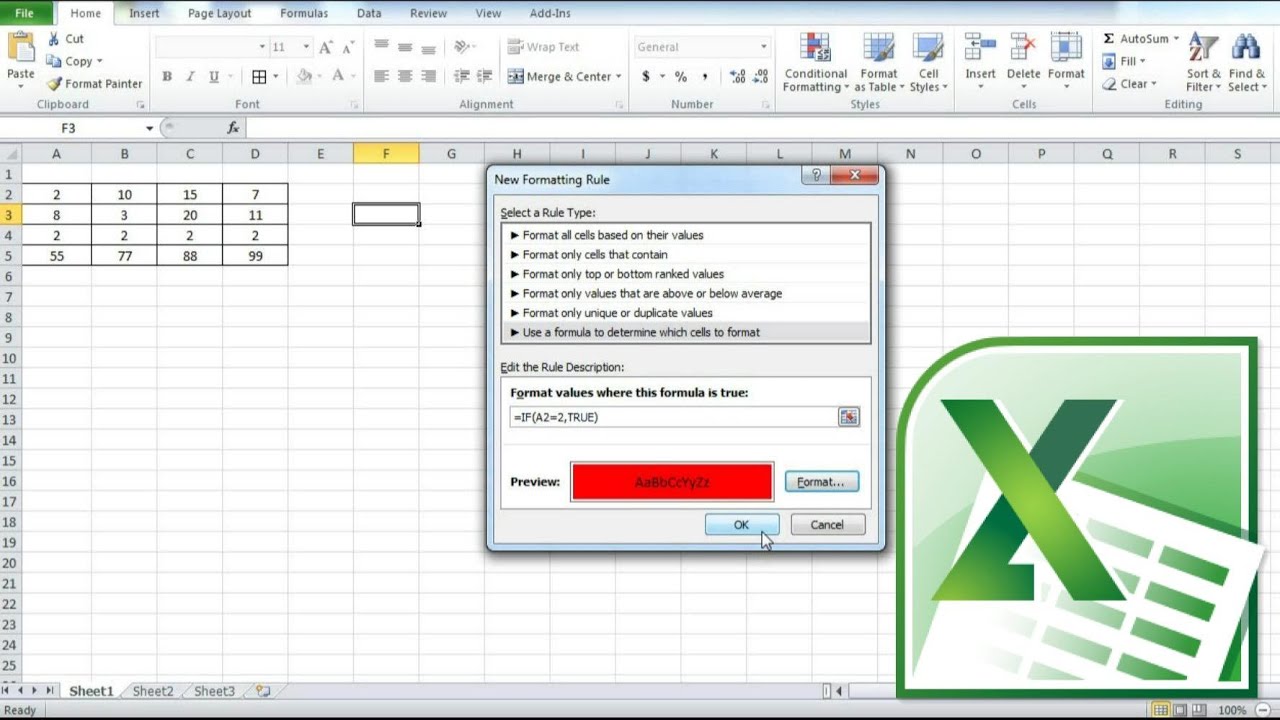
How Do You Color Code In Excel Based On Condition How To Color Code In Excel Based On Text How To Remove Formula In Excel Without Copy Paste Riset How To Create Automatically Color code In Excel YouTube Exception Formula In Conditional Formatting Excel Riset How To Color Code In Excel Zebra BI Select the range of cells the table or the whole sheet that you want to apply conditional formatting to On the Home tab click Conditional Formatting Do one of the following More options Apply conditional formatting to text Create a custom conditional formatting rule Format only unique or duplicate cells
How to color code in Excel Below are the steps you can use to color code your data 1 Input your data on an Excel spreadsheet The first step to using the color code formatting in Excel is to input the data you want to format Click the Format button and switch to Fill tab to choose the background color If the default colors do not suffice click the More Colors button to pick the one to your liking and then click OK twice You can also use any other formatting options such as the font color or cells border on the other tabs of the Format Cells dialog
How To Color Code In Excel Zebra BI Excel Conditional Formatting Based On Another Cell Heelpbook Riset Ranking Based On Multiple Criteria In Excel 4 Cases ExcelDemy How To Color Code In Excel Based On Text Grady Cindy Can You Color Code In Excel Psoriasisguru How To Color Code In Excel Ranking Based On Multiple Criteria In Excel 4 Cases ExcelDemy How To Automatically Color Code In Excel TechJunkie How To Separate Data In Excel Based On Criteria SpreadCheaters
How Do You Color Code In Excel Based On Condition
 How Do You Color Code In Excel Based On Condition
https://www.grafixfather.com/blog/wp-content/uploads/2022/01/oSDGVVTb3s8-1024x576.jpg
Choose Fill Color in the Home tab of the ribbon to apply colors to cells or ranges Use contrasting colors that stand out For instance use red text on white background for one set and green text on light blue background for another This makes data more visually appealing and easier to read
Templates are pre-designed files or files that can be utilized for numerous functions. They can conserve time and effort by providing a ready-made format and layout for developing different kinds of material. Templates can be utilized for individual or expert projects, such as resumes, invites, flyers, newsletters, reports, discussions, and more.
How Do You Color Code In Excel Based On Condition

Final Reflection Lily Macias
Excel Conditional Formatting Based On Another Cell Heelpbook Riset

Ranking Based On Multiple Criteria In Excel 4 Cases ExcelDemy

How To Color Code In Excel Based On Text Grady Cindy

How To Color Code In Excel

Ranking Based On Multiple Criteria In Excel 4 Cases ExcelDemy

First create the IF statement in Column E IF D4 C4 Overdue Ontime This formula can be copied down to Row 12 Now create a custom formula within the Conditional Formatting rule to set the background color of all the Overdue cells to red Select the range you want to apply formatting to
Microsoft Excel provides you with several conditional formatting rules for color scales that you can apply with a quick click These include six two color scales and six three color scales Select the cells that you want to apply the formatting to by clicking and dragging through them

If you want to fill a cell with color based on a condition you will need to use the Conditional Formatting feature Fill a cell with color based on a condition Before learning to conditionally format cells with color here is how you can add color to any cell in Excel Cell static format for colors

Dynamically Change Cell Color Based on a Value With this method your cell color won t be permanent The color of the cell will change according to the rule you have set if you change the value in it For this I will be using conditional formatting To demonstrate the procedure I will be using the following dataset

Conditional Formatting essentially allows you to set specific rules in an if then sort of language Using our spreadsheet below we can create easy rules to color code bills that have yet
In this tutorial we will show you how to color code your Excel document using three different methods Method 1 Using Conditional Formatting The first method to color code your Excel document is by using Conditional Formatting Here are the steps Step 1 Select the cells you want to apply colors to Select the cells that you want to Steps First select the range of Marks and then go to Home Conditional Formatting Highlight Cell Rules Greater Than After that a dialog box will show up Insert 80 in the Format cells that are GREATER THAN section and then select Custom Format Next select Fill Fill Color from the Format Cells Here I chose Green Later
To highlight an entire row we use Conditional Formatting and enter a formula based on the required or given criteria Step 1 Select the cells to be formatted In this case select cells B4 E10 Figure 3 Selection of the data range for conditional formatting Step 2