How Do I Run A Powershell Script From The Command Line With Parameters Run Powershell Script Using CMD How To Save PowerShell Scripts In Notepad What Is Mark Down How To Run Powershell Ise BEST GAMES WALKTHROUGH How To Deploy PowerShell Script From Intune Askme4Tech How To Run A PowerShell Script From A Console Window When There Is Run a PowerShell Command Silently from a Prompt As stated You can use PowerShell exe to start a PowerShell session from the command line of another tool such as Cmd exe or use it at the PowerShell command line to start a new session Use the parameters to customize the session
The Invoke Command cmdlet runs commands on a local or remote computer and returns all output from the commands including errors Using a single Invoke Command command you can run commands on multiple computers To run a single command on a remote computer use the ComputerName parameter 5 Answers Sorted by 77 Make this in your test ps1 at the first line param string a Write Host a Then you can call it with
How To Run A PowerShell Script From A Console Window When There Is C te Alliage Londres How To Run Ps1 File Sagesse Accessoires Dent How To Run A PowerShell Script From Command Line Run Powershell Script Using CMD Powershell Run Bat File Top Answer Update Brandiscrafts Run A PowerShell Script From Within The Python Program Delft Stack SOLVED Run Command Powershell File Spiceworks C te Alliage Londres How To Run Ps1 File Sagesse Accessoires Dent How To Write And Run A PowerShell Script File On Windows 11 2022
How Do I Run A Powershell Script From The Command Line With Parameters
 How Do I Run A Powershell Script From The Command Line With Parameters
https://www.talkofweb.com/wp-content/uploads/2020/11/powershell-thumbnail.jpg
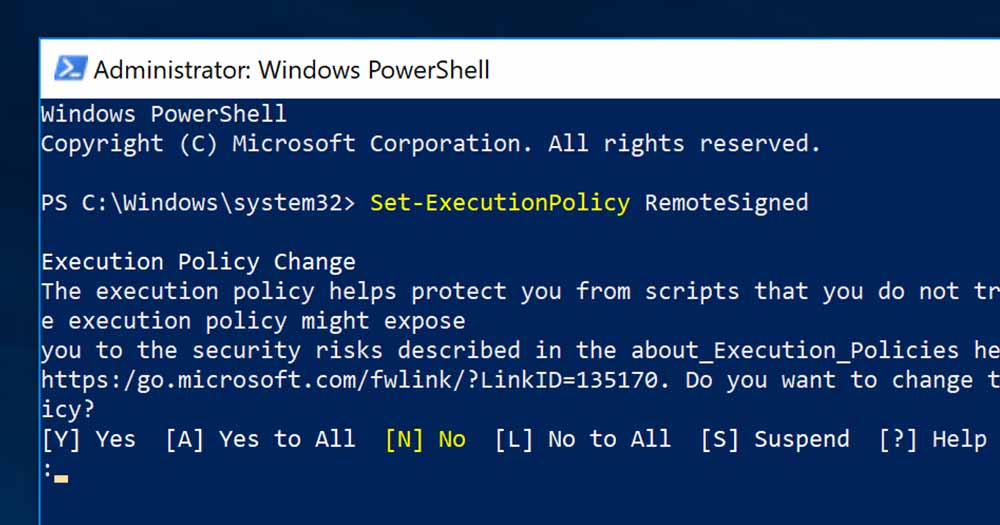
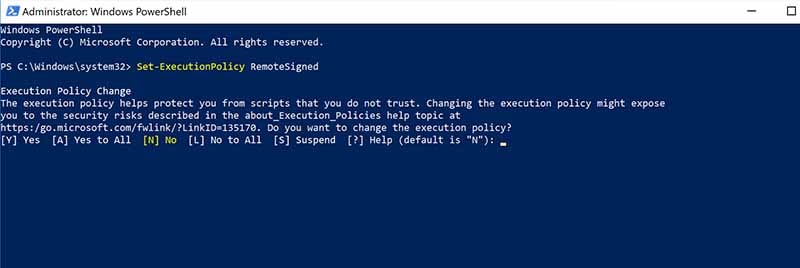
Run the command below Set ExecutionPolicy RemoteSigned You should now be able to run PowerShell Scripts Run a PowerShell Script There are a couple of options to run a PowerShell script The most convenient way is to simply right click the file and choose Run with PowerShell Run PowerShell Script But this method comes with a downside
Pre-crafted templates offer a time-saving service for producing a diverse variety of files and files. These pre-designed formats and designs can be used for different personal and expert tasks, consisting of resumes, invitations, leaflets, newsletters, reports, discussions, and more, improving the content production process.
How Do I Run A Powershell Script From The Command Line With Parameters
How To Run PowerShell Script From A Batch File StackHowTo
C te Alliage Londres How To Run Ps1 File Sagesse Accessoires Dent
How To Run A PowerShell Script From Command Line
Run Powershell Script Using CMD

Run A PowerShell Script From Within The Python Program Delft Stack

SOLVED Run Command Powershell File Spiceworks
992 How do I run a PowerShell script I have a script named myscript ps1 I have all the necessary frameworks installed I set that execution policy thing I have followed the instructions on this MSDN help page and am trying to run it like so powershell exe C my path yada yada run import script ps1 with or without noexit

PowerShell returns the error message above when you try to run a PowerShell with an execution policy set to Restricted Remote Signed or All Signed Restricted Restricted is the default policy set for Windows client computers If you are using PowerShell for the first time your default policy would probably be set to restrict all the scripts

4 Answers Sorted by 63 Try quoting the argument list Start Process FilePath C Program Files MSBuild test exe ArgumentList genmsi f MySourceDirectory src Deployment Installations xml You can also provide the argument list as an array comma separated args but using a string is usually easier Share Improve this answer Follow

For any shell in any operating system there are three types of commands Shell language keywords are part of the shell s scripting language Examples of bash keywords include if then else elif and fi Examples of cmd exe keywords include dir copy move if and echo

A script is a plain text file that contains one or more PowerShell commands PowerShell scripts have a ps1 file extension Running a script is a lot like running a cmdlet You type the path and file name of the script and use parameters to submit data and set options You can run scripts on your computer or in a remote session on a different
Long description Most PowerShell commands such as cmdlets functions and scripts rely on parameters to allow users to select options or provide input The parameters follow the command name and have the following form parameter name parameter value parameter name parameter value The name of the parameter is preceded by a hyphen The first and arguably see what I did there the easiest way to get command line arguments is to write something like the following 1 2 param1 args 0 write host param1 If you run this from within the PowerShell ISE by pressing F5 nothing interesting will happen
Install VS Code To install Visual Basic Code on Windows 11 or 10 use these steps Open the Visual Studio Download page Click the Windows button to download the installation file Image credit