How Do I Keep Formatting When Pasting In Gmail Why Does Formatting Get So Messed Up When Pasting Between Different Microsoft Office Products How To Keep Formatting When Copying And Pasting PowerPoint Slides YouTube Vba Remove All Formatting When Copy And Pasting With Word Stack Overflow Solved Keep Source Formatting With Copy paste Between 9to5Answer Keep Source Formatting When Pasting In Excel For A Mac Fasratwork To paste without formatting press Ctrl Shift V instead of Ctrl V This works in a wide variety of applications including web browsers like Google Chrome It should work on Windows Chrome OS and Linux On a Mac press Command Option Shift V to paste and match formatting instead This works in most Mac apps too
Merge Formatting Keeps the formatting of the text you copied without changing the formatting of the destination document e g if you cut and paste a sentence from another document that had a different font type or size Word gives you other options for copying and pasting things such as bulleted or numbered lists or hyperlinks Paste conditional formatting only Only applies conditional formatting rules to a range of cells Paste transposed Pastes a rotated version of the copied cells For example if you copy a column of cells and use paste transpose it will paste them into a row and vice versa Choose a format after pasting content You can format the content
Keep Source Formatting When Pasting In Excel For A Mac Fasratwork Pasting Outlines In Blackboard How To Keep Formatting When Pulling Data From Another Cell Smartsheet Community Translate Document Keep Formatting 2023 How To Copying And Pasting From Word To The Web Frequently Asked Questions FAQs Teaching Contingency How To Keep Formatting In Excel When Referencing Cells 2 Methods How To Paste Text Without Formatting Almost Anywhere How To Keep Formula And Formatting When Copying And Pasting In Excel Verizon 1836 99 8valuesgithubio 8values Results Economic Axis Market 317 683 MARKETS EQUALITY
How Do I Keep Formatting When Pasting In Gmail
How Do I Keep Formatting When Pasting In Gmail
https://qph.cf2.quoracdn.net/main-qimg-a62cfa549a74bf070417896947cd50b0
This help content information General Help Center experience Search Clear search
Templates are pre-designed documents or files that can be utilized for different functions. They can save effort and time by providing a ready-made format and layout for creating various kinds of content. Templates can be used for personal or professional projects, such as resumes, invitations, leaflets, newsletters, reports, presentations, and more.
How Do I Keep Formatting When Pasting In Gmail

When I Copy Code To One Note from Eclipse It Loses All The Syntax Highlighting And

Pasting Outlines In Blackboard

How To Keep Formatting When Pulling Data From Another Cell Smartsheet Community
Translate Document Keep Formatting 2023 How To
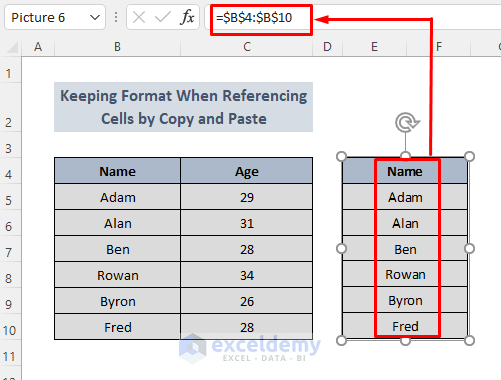
How To Keep Formatting In Excel When Referencing Cells 2 Methods

How To Paste Text Without Formatting Almost Anywhere
1 Cut or copy the desired text This will move or copy the data to the clipboard 2 Locate Paste Special Paste Special is a suite of options for formatting pasted text in your destination software How to access these options will vary depending on the software in use

Go to File Options Advanced Under Cut copy and paste select the down arrow for the setting to change Pasting within the same document When you paste content into the same document from which you copied the content Pasting between documents When you paste content that was copied from another Word document

This help content information General Help Center experience Search Clear search

This help content information General Help Center experience Search Clear search

If you re using Chrome you can paste text into your emails without carrying over its formatting by using the keyboard shortcut Ctrl Shift V Command Shift V for OS X If you d like to keep
Method 1 Add a shift On some but not all apps when you press Ctrl V Win Cmd V Mac you can press Shift too This activates Paste and Match Style which converts the text to the Pasting from outside Word for the web When you paste text from outside Word for the web you have 2 options for how to paste the text keep source formatting and paste text only For the default paste keep source the text is inserted into the document with as many of the original formatting properties that can be copied Characteristics of the text such as bold italics or a particular
End users To format and display code in a Doc select Insert Building blocks Code blocks choose your programming language or search Code blocks choose your programming language Visit the Help Center to learn more about inserting smart chips building blocks in your Google Doc