How Do I Import Data From Multiple Workbooks Into One Worksheets For Combine Multiple Workbooks Into One Pivot Table MS Excel Combine Multiple Workbooks Into One YouTube How To Merge Excel Worksheets Free Printable Math Worksheets Combine Multiple Excel Workbooks Into One Exceljunction Com Youtube Riset Production Management NaveenvarthaanExcel Web Oct 20 2023 nbsp 0183 32 To combine multiple csv files into one Excel workbook these are the steps you need to follow Put all your CSV files into one folder Make sure that folder does not
Web Sep 14 2015 nbsp 0183 32 Importing data from many excel workbooks and sheets into a single workbook table I have 54 excel files with three sheets each each sheet has a different Web Mar 27 2015 nbsp 0183 32 You can import data into your master workbook from any number of other workbooks by using data connections in excel I had done this along time ago and it
Production Management NaveenvarthaanExcel Merge Multiple Workbooks Into One In Excel Google Sheets Automate Excel FD Merge Excel Workbooks 2 5 4 Free Download Excel Tutorial Combine Multiple Workbooks Worksheets Into One How To Combine Multiple Workbooks Into A Single Workbook With VBA Code How To Combine Multiple Workbooks To One Workbook In Excel 6 Ways How To Consolidate Data From Multiple Workbooks In A Single Worksheet Excel Tutorial Combine Multiple Workbooks Worksheets Into One Download Append Data From Multiple Workbooks Into One Table In Excel
How Do I Import Data From Multiple Workbooks Into One
 How Do I Import Data From Multiple Workbooks Into One
https://i.pinimg.com/originals/94/46/dc/9446dcd9f0e553ce5238939f016c8800.png
Web Dec 21 2021 nbsp 0183 32 Select a cell to insert the combined data If you have a cell range you can choose the upper left cell Head to the Data tab and the Data Tools section of the ribbon Click quot Consolidate quot When the
Templates are pre-designed documents or files that can be utilized for different purposes. They can save effort and time by offering a ready-made format and design for producing different kinds of material. Templates can be utilized for personal or expert projects, such as resumes, invites, flyers, newsletters, reports, presentations, and more.
How Do I Import Data From Multiple Workbooks Into One
Combine Multiple Workbooks Into One DataXL Tool
Merge Multiple Workbooks Into One In Excel Google Sheets Automate Excel

FD Merge Excel Workbooks 2 5 4 Free Download

Excel Tutorial Combine Multiple Workbooks Worksheets Into One
How To Combine Multiple Workbooks To One Workbook In Excel 6 Ways
How To Consolidate Data From Multiple Workbooks In A Single Worksheet

Web Each of these data sources can have more than one object to import An Excel workbook can have multiple worksheets Excel tables or named ranges An Access

Web Combine by position For consolidation by position to work the range of data on each source sheet must be in list format without blank rows or blank columns in the list Open

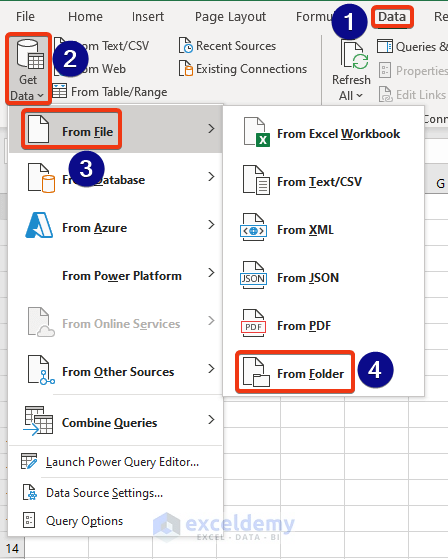
Web Jun 25 2023 nbsp 0183 32 If you want to merge multiple Excel files into a single workbook you can do it with Power Query This article will show you 2 techniques to do the job Step 1 Import from Folder Power Query is a
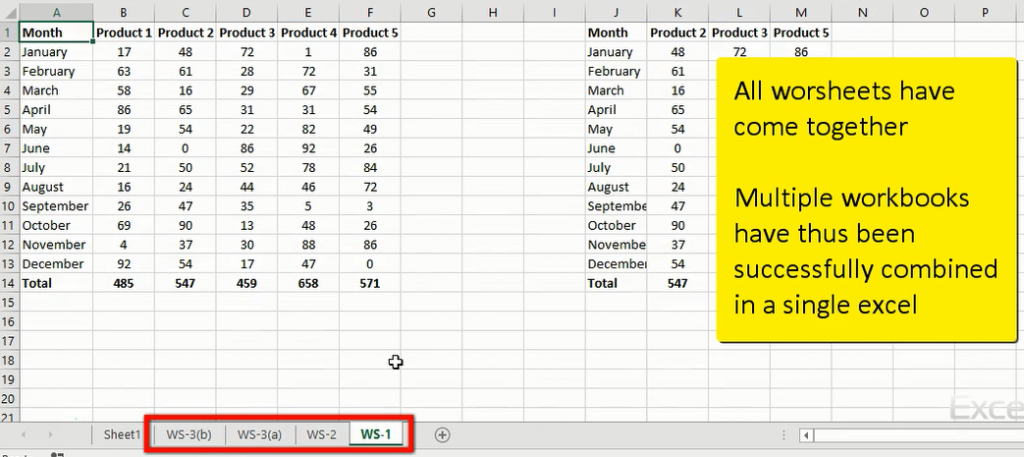
Web We can copy data from multiple worksheets into one by following the simple steps outlined below In this tutorial we will learn how to merge

Web Ask Question Asked 10 years ago Modified 7 years ago Viewed 431k times 15 I have a few dozen excel files which are all of the same format i e 4 worksheets per Excel file I
Web Open the workbook run the add in and select Copy data from the selected worksheets to one sheet Choose the workbooks sheets and ranges to copy Choose how to paste and Web When you open an Excel workbook in Access in the File Open dialog box change the Files of Type list box to Microsoft Office Excel Files and select the file you want Access
Web Go to the Data tab In the Get amp Transform Data group click on the Get Data option Go the From Other Sources option Click the Blank Query option This will open the Power