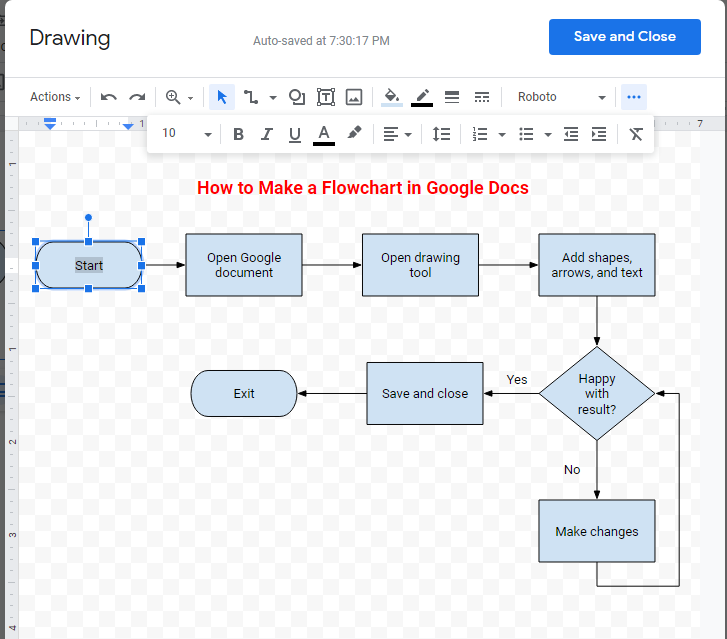
How Do I Create A Flow Chart In Google Docs How To Make A T Chart On Google Docs How Do I Create A Groupplot In Overleaf Latex Stack Overflow How To Rearrange Organizational Charts In Word 2013 Asevour How To Set Up A Flowchart In Google Docs In 2022 2022 How To Make Flow Chart In Google Docs Diagrams Also The TechVin Web Mar 16 2023 nbsp 0183 32 Step 1 Go to Google Docs and open the relevant document Open Google Docs Step 2 In the menu bar click on Insert Step 3 Then go to Drawing and click on New Step 4 Here click on
Web Jan 29 2021 nbsp 0183 32 Gleek io makes flowchart creation simple and fast 20 editable flowchart templates amp examples Get a step by step guide to creating a flowchart in Google Docs with Gleek the diagramming tool for developers Web Apr 11 2023 nbsp 0183 32 How to Design a Flowchart in Google Docs Sarah Joy Apr 11 2023 10 min read Finance Financial Statements Management Strategy Google Docs Flowcharts enable you to visualize the process behind something Many different industries use this tool If you re in one of these industries knowing how to make a flowchart in Google Docs can
How To Make Flow Chart In Google Docs Diagrams Also The TechVin How To Build A Process Flow Chart In Excel Design Talk How Do I Create A drilled down Chart In Dashboard Smartsheet Community How Do I Create A Chart Using A Form With Checkboxes Smartsheet How To Make A Flow Chart In Excel Tutorial Youtube Riset Upsells HelpDocs How To Create Flowchart On Powerpoint Design Talk DIAGRAM Process Flow Diagram In Excel MYDIAGRAM ONLINE Step by step Powerpoint Roadmap Template Guide Risk Management
How Do I Create A Flow Chart In Google Docs
 How Do I Create A Flow Chart In Google Docs
https://i2.wp.com/i.ytimg.com/vi/_ZeKJ32nxSM/maxresdefault.jpg
Web Method 1 Using Drawing in Google Docs Open docs google in your desktop browser and open the desired document where you wish to add a flow chart using the Drawing feature Click on Insert at the top and select Drawing Click on New As long as you don t add a background to your canvas your drawing will have a transparent
Pre-crafted templates offer a time-saving solution for developing a varied range of files and files. These pre-designed formats and designs can be utilized for different personal and expert projects, including resumes, invites, leaflets, newsletters, reports, presentations, and more, streamlining the content production procedure.
How Do I Create A Flow Chart In Google Docs
Make A Flowchart Google Docs SMM Medyan
How To Build A Process Flow Chart In Excel Design Talk

How Do I Create A drilled down Chart In Dashboard Smartsheet Community

How Do I Create A Chart Using A Form With Checkboxes Smartsheet

Upsells HelpDocs
How To Create Flowchart On Powerpoint Design Talk

Web Oct 10 2019 nbsp 0183 32 You can use LucidChart for either Docs or Slides but you have to install it in both To add LucidChart to your document open a new or existing file in Google Docs or Sheets click quot Add ons quot and then click quot Get Add ons quot Next type quot LucidChart quot in the search bar and hit Enter Click the LucidChart icon

Web Feb 2 2021 nbsp 0183 32 Go to Extensions gt Add ons gt Get add ons Use the search bar to find and install a flowchart maker We used Lucidchart Diagrams for the rest of these steps Return to the Add ons menu and choose Lucidchart Diagrams gt Insert Diagram Select Sign in with Google and follow the prompts

Web Click the quot Insert quot option find quot Drawing quot then click on quot New quot A window for the drawing will appear over the Google Document All basic elements are available in the Shape tool The Shape tool s icon is a circle and square Click on that select shapes in flowchart you can see all the options If you want to know the symbols functions
Web Click quot Create New quot Start editing the blank document or choose a basic flowchart template to customize Drag and drop shapes and edit text to create your flowchart within the Lucidchart editor When you re finished return to your Google Doc and select your newly created flowchart in the sidebar

Web Jan 18 2024 nbsp 0183 32 This guide will show you how to make a flow chart in Google Docs using the drawing tool You can do this in a few minutes and it works for smaller flow charts But if you have to make a larger flowchart we recommend using a third party app and then pasting the flowchart as an image into your Google Doc Luckily we also cover how to
Web Jun 26 2019 nbsp 0183 32 Method 1 Create the Charts Manually Google Docs comes with a native app called Google Drawings You can use it to draw all kinds of shapes or objects and it s perfect for creating flow charts Here is what you need to do Open Google Docs and create a new blank file Web How To Create A Flowchart In Google Docs Learn how to create a flowchart in Google Docs by watching this video Googledocs Googledocstutorial Googledocsfeature Googledocsdraw Googledoc Show
Web Dec 5 2022 nbsp 0183 32 Here we present a step by step guide on how to create a flowchart in Google Docs through multiple methods Part 1 How to Create a Flowchart in Google Docs Google Docs provides users with a dedicated drawing window from where they can create flowcharts easily Follow the below steps to learn how to create a Google