How Do I Combine Multiple Rows Into One Row How To Combine Multiple Rows Into One Cell In Excel 6 Ways Excel Combine Multiple Rows Into One While Transposing Its Column How To Transform Multiple Row Data Into A Single Row YouTube How To Combine Multiple Rows In Pivot Table Brokeasshome Html How To Combine 2 Rows Into 1 Row Stack Overflow Step 3 Select the first cell containing the value you want to combine Step 4 Type a comma to separate the first value from the next one Step 5 Select the next cell containing the value you want to combine Step 6 Repeat steps 4 and 5 for all the values you want to combine Step 7 Type and press Enter
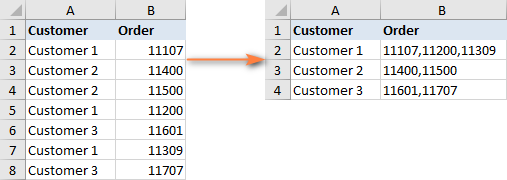
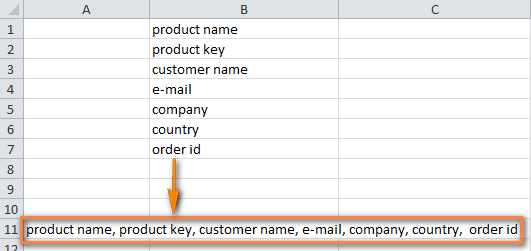
Learn how to automatically concatenate or merge multiple rows of data into a comma separated list in a single cell in Excel without using VBA or macros Just choose a range select what to merge pick a delimiter to separate values click the Merge button your cells are combined in a second with no values lost Free download For Microsoft Excel 365 2021 2016 Ultimate Suite for Excel
Html How To Combine 2 Rows Into 1 Row Stack Overflow Concatenate Rows In Excel Topcrowd Microsoft Excel Combine Multiple dynamic rows Into One Cell Super User R Combine Multiple Rows Into One How To Combine PDF Files Into One Document Split One Single Row Into Multiple Rows In Excel YouTube How To Merge Rows In Excel Without Losing Data Postgresql Concatenate Rows Top Answer Update Brandiscrafts How To Create A Pivot Table In Excel With Multiple Rows Brokeasshome
How Do I Combine Multiple Rows Into One Row
 How Do I Combine Multiple Rows Into One Row
https://www.exceldemy.com/wp-content/uploads/2021/10/multiple-rows-in-one-cell-excel-7-1.png
See what formulas you can use to merge rows in Excel the add ins that will help you do it quicker and learn how you can combine duplicate rows and keep all
Templates are pre-designed documents or files that can be used for various functions. They can conserve time and effort by providing a ready-made format and layout for developing different kinds of material. Templates can be used for personal or expert projects, such as resumes, invitations, leaflets, newsletters, reports, discussions, and more.
How Do I Combine Multiple Rows Into One Row
How To Merge Rows In Excel Without Losing Data
Concatenate Rows In Excel Topcrowd
Microsoft Excel Combine Multiple dynamic rows Into One Cell Super User

R Combine Multiple Rows Into One

Split One Single Row Into Multiple Rows In Excel YouTube
How To Merge Rows In Excel Without Losing Data

To merge two or more rows into one here s what you need to do Select the range of cells where you want to merge rows Go to the Ablebits Data tab Merge group click the Merge Cells arrow and then click Merge Rows into One

To consolidate data in Excel from multiple rows open the sheets you wish to merge cells in Here click on the cell which will be the top left cell of the table Now click on Data in the top bar and then click on the Consolidate button in the Data Tools section This will open a new window

Sub CombineRowsRevisitedAgain Dim myCell As Range Dim lastRow As Long lastRow Cells Rows Count A End xlUp Row For Each myCell In Range Cells A2 Cells lastRow 1 If myCell myCell Offset 1 And myCell Offset 0 4 myCell Offset 1 4 Then myCell Offset 0 3 myCell Offset 1 3 myCell Offset 1 EntireRow Delete

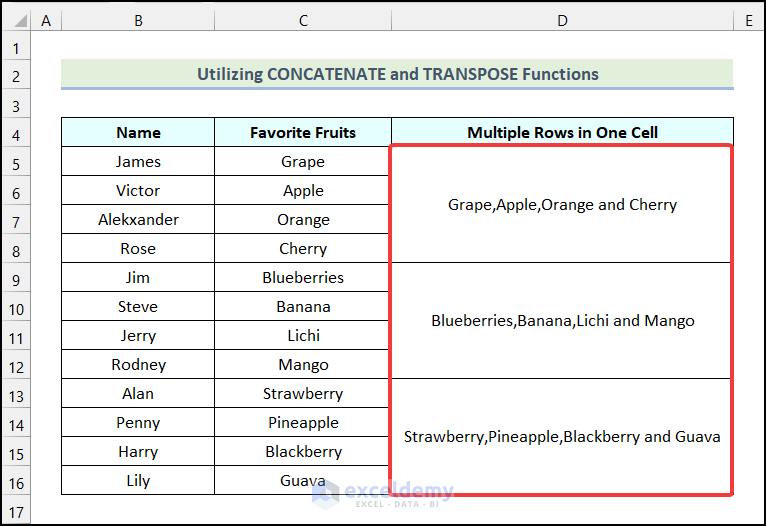
Using the Ampersand Operator is one of the easiest ways to combine multiple rows in one cell in Excel The Ampersand operator allows us to join multiple text strings together Now let s follow the steps mentioned below to do this Steps Firstly use the following formula in cell D5 C5 C6 C7 C8

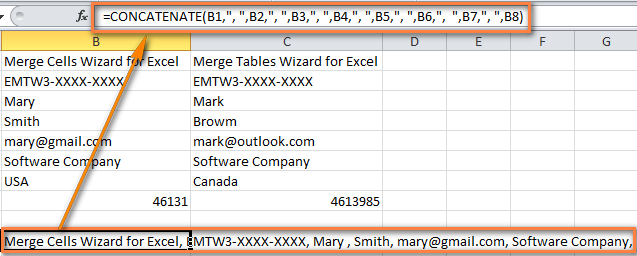
In this tutorial I will discuss how to concatenate cell contents that are spread over several rows in Excel Basically concatenate means merge combine join two or more cells contents into a single cell To illustrate often we have to concatenate names and parts of addresses to specific desired formats
1 Answer Given your sample data I think a PivotTable is one of the easiest ways to accomplish this To do this select your data and go to the tab Insert PivotTable Press OK to insert the table into a new worksheet Drag the Days into the Rows field and the Chemicals into the Values field Excel 2010 how can I combine 2 rows of data into 1 row multiple columns of data across numerous rows 0 Combine two rows into a single series in a line graph Excel 3 Creating multiple rows from one row of Excel Data 0
With a working knowledge of Excel VBA we can use Excel VBA code to easily combine all rows that have the same ID Step 1 Press Alt F11 to open the Visual Basic Editor VBE window Step 2 In the Project window right click your workbook and go to Insert Module Step 3 In the new module enter the following VBA code