How Do I Clean Up Data In Excel 2 Entering And Cleaning Up Data In Microsoft Excel For A Seamless JASP Experience YouTube How To Use Macro To Clean Up Data In Excel 4 Easy Methods How To LOOKUP The Data You Want To Find In An Excel Range FM Pivot Table Is Not Picking Up Data In Excel 5 Reasons In 2022 Pivot Table Excel Data How To Plot A Graph In Excel Using Macro Kickkop Web Result Dec 13 2022 nbsp 0183 32 Table of Contents How To Clean Data In Excel 1 Fix spelling mistakes with quot find and replace quot 2 Remove unnecessary data 3 Remove duplicated data 4 Make sure data is in correct format 5 Replace any missing or invalid data with appropriate values 6 Remove outliers Conclusion How To Clean Data In
Web Result Dirty data on your mind Just spray the amazing quot data cleaner quot on it In this video learn how you can use 5 Excel features to clean data with 10 examples You Web Result May 20 2023 nbsp 0183 32 Introduction Data cleaning is the process of identifying and removing errors inconsistencies and inaccuracies from datasets While it s not the most glamorous task it s an essential part of data analysis In this blog post we ll explore some of the most effective techniques to clean data in Excel
How To Plot A Graph In Excel Using Macro Kickkop How To Use Macro To Clean Up Data In Excel 4 Easy Methods How To Clean Up Data In Excel Google Sheets Automate Excel How To Remove Duplicates In Microsoft Excel To Clean Up Data In Individual Or Multiple Columns How To Make A Bar Graph In Excel Globe Echo How To Clean Up Data In Excel Google Sheets Automate Excel Download Excel Shortcuts Sum Background Petui Solved Need To Know How To Set Up Data In Excel Or Minitab Chegg How To Clean Up Data In Excel Google Sheets Automate Excel
How Do I Clean Up Data In Excel
 How Do I Clean Up Data In Excel
https://i.ytimg.com/vi/JhxBATM81r4/maxresdefault.jpg
Web Result Mar 12 2024 nbsp 0183 32 Our definitive guide will show you 15 ways to clean data in Excel Learn more about data cleansing through useful examples Clean data and string manipulation formulas in Excel are critical Besides the well known techniques we will introduce special VBA codes to make the process quicker and more effective
Pre-crafted templates use a time-saving solution for creating a varied series of files and files. These pre-designed formats and layouts can be utilized for various individual and expert projects, including resumes, invites, flyers, newsletters, reports, presentations, and more, simplifying the content development procedure.
How Do I Clean Up Data In Excel
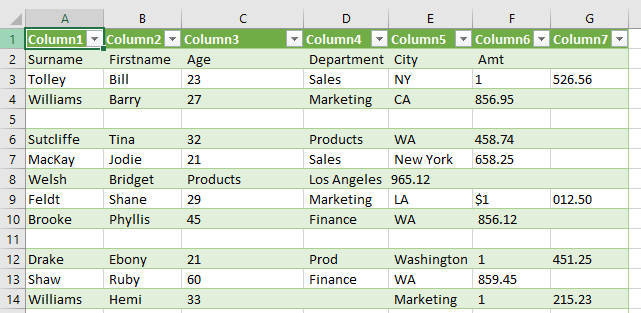
How To Clean Up Data In Excel Google Sheets Automate Excel

How To Use Macro To Clean Up Data In Excel 4 Easy Methods
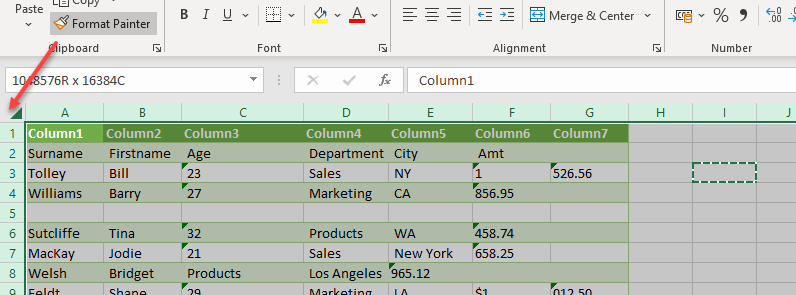
How To Clean Up Data In Excel Google Sheets Automate Excel
How To Remove Duplicates In Microsoft Excel To Clean Up Data In Individual Or Multiple Columns
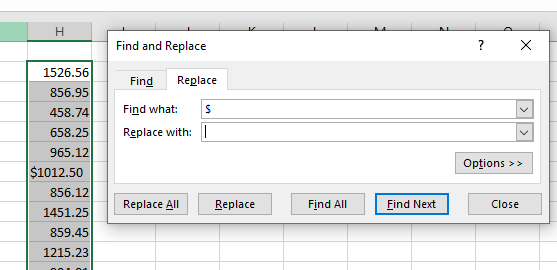
How To Clean Up Data In Excel Google Sheets Automate Excel
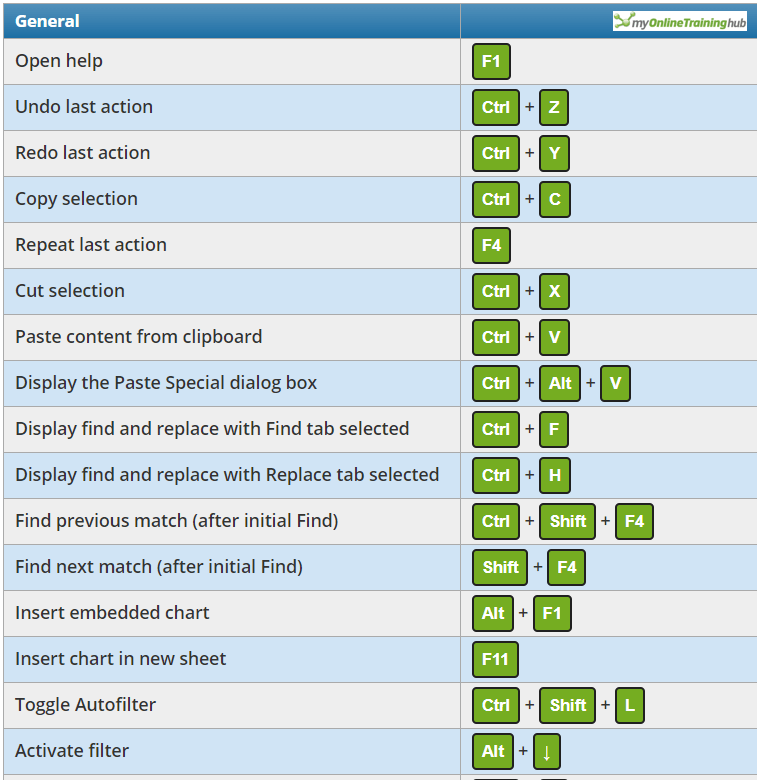
Download Excel Shortcuts Sum Background Petui

Web Result 1 Get Rid of Extra Spaces 2 Select and Treat All Blank Cells 3 Convert Numbers Stored as Text into Numbers 4 Remove Duplicates 5 Highlight Errors 6 Change Text to Lower Upper Proper Case 7 Parse Data Using Text to Column 8 Spell Check 9 Delete all Formatting 10 Use Find and Replace to Clean Data in Excel

Web Result Nov 8 2022 nbsp 0183 32 When it comes to cleaning up data in Excel Find and Replace is essential You can easily identify and adjust formatting find and eliminate all zeros change formula references and more And it s pretty easy to use You ll see the Find and Select option in the Home ribbon tab

Web Result Dec 27 2023 nbsp 0183 32 How to Clean Data in Excel There are many functions in Excel that are being widely used for data cleaning We can change text cases merge columns reconcile table data check data type insert or remove text from a specific position etc with Excel functions as part of the data cleaning process

Web Result Jun 18 2023 nbsp 0183 32 1 Eliminate Extra Spaces 2 Remove Non Printing Characters 3 Delete Blank Rows 4 Correct the Letter Case 5 Find and Remove Duplicates 6 Clear the Formatting 7 Convert Text to Columns 8 Highlight Errors Frequently Asked Questions 1 Eliminate Extra Spaces Whether from importing or mistyping
Web Result Sep 16 2019 nbsp 0183 32 1 Deduplicate your data with the EXACT and COUNTIF commands 2 Clear out extra spaces with TRIM 3 Replace junk characters with SUBSTITUTE 4 Edit capitalization with PROPER UPPER and LOWER 5
Web Result Aug 24 2014 nbsp 0183 32 Get Rid of Extra Spaces leading trailing and extra spaces between words 10 Super Neat Ways to Clean Data in Excel TrumpExcel 333K subscribers Subscribe Subscribed 21K 1 8M views 9 Web Result Dec 19 2023 nbsp 0183 32 In Excel it is a common thing that you need to clean up your raw data You might need to remove duplicates or find and replace some specific cells or change the casings of your letters and so on In this article I will show you the 10 coolest and easiest ways to clean up raw data in Excel Table of Contents Expand
Web Result Dec 27 2022 nbsp 0183 32 1 Get Rid of Extra Spaces 2 Select and Treat All Blank Cells 3 Convert Numbers Stored as Text into Numbers 4 Remove Duplicates 5 Highlight Errors 6 Change Text to Lower Upper Proper Case 7 Parse Data Using Text to Column 8 Spell Check 9 Delete all Formatting 10 Use Find and Replace to