How Do I Adjust Column Width In Google Sheets How To Autofit Column Width In Google Sheets Full Details How Do I Adjust Multiple Cells In Google Sheets How To Adjust Column Width In Google Sheets How To Readers How To Autofit Column Width In Google Sheets Full Details Skuto n Z i Ple at Change Table Column Width Javascript Connect Prieh adn Suradam Web To add 100 rows to your spreadsheet On your spreadsheet scroll to the bottom Next to quot more rows at the bottom quot enter the number of rows you d like to add Click Add Change row height or
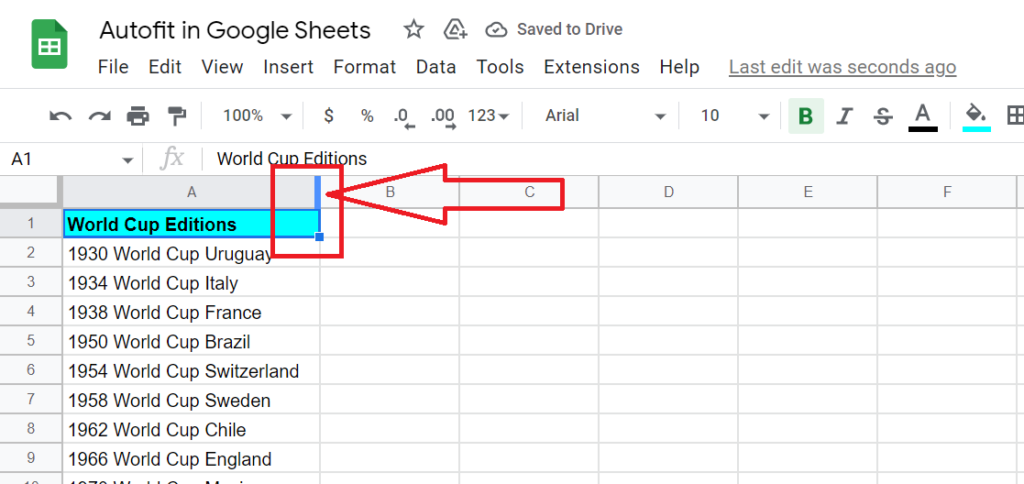
Web Oct 21 2023 nbsp 0183 32 Make cells wider or narrower To adjust the horizontal size of cells you have to adjust the width of columns To make cells wider increase the column width To make cells narrower decrease the column width To make cells wider or narrower in Google Sheets follow these steps Web Aug 1 2021 nbsp 0183 32 Open your Google Sheet and select the column you want to edit Hover over the line on the right side column header The mouse cursor will change into a double arrow Double click the line
Skuto n Z i Ple at Change Table Column Width Javascript Connect Prieh adn Suradam How To Resize Column Width In Google Sheets LiveFlow How To Adjust Column Width In Excel Shortcut How To Readers How To Automatically Adjust Column Width In Excel Technipages How To Autofit Column Width In Google Sheets Full Details How To Auto Adjust Column Width In Excel Earn Excel How To Adjust Column Width In Google Sheets On Ipad How To Change Column Width In Google Sheets The Easy Way How To Autofit Column Width In Google Sheets Full Details
How Do I Adjust Column Width In Google Sheets
 How Do I Adjust Column Width In Google Sheets
https://abidakon.com/wp-content/uploads/2022/06/0-How-To-Autofit-Column-Width-In-Google-Sheets-1024x484.png
Web To autosize a column s width The autosizing feature will allow you to set a column s width to fit its content automatically Hover the mouse over the line between two columns The cursor will turn into a double arrow Double click the mouse
Pre-crafted templates use a time-saving solution for producing a varied range of files and files. These pre-designed formats and designs can be made use of for different personal and professional projects, consisting of resumes, invitations, flyers, newsletters, reports, discussions, and more, enhancing the content development process.
How Do I Adjust Column Width In Google Sheets

How Do I Adjust Multiple Cells In Google Sheets

How To Resize Column Width In Google Sheets LiveFlow

How To Adjust Column Width In Excel Shortcut How To Readers

How To Automatically Adjust Column Width In Excel Technipages

How To Auto Adjust Column Width In Excel Earn Excel

How To Adjust Column Width In Google Sheets On Ipad
Web If you need to set the width of a column or columns in Google Sheets follow these steps Step 1 Highlight the column or columns you want to select To highlight multiple items hold down Ctrl on Windows or Command on Mac while you select the columns Step 2 Right click on the columns and select Resize Column Step 3 In the dialog that

Web Oct 28 2023 nbsp 0183 32 Method 1 Click and drag the mouse to change column width The easiest way to adjust column width in Google Sheets is by using the click and drag method with your mouse To adjust column width in Google Sheets follow these steps Select the columns that you want to adjust the width of

Web Oct 25 2023 nbsp 0183 32 The easiest way to automatically resize column width in Google Sheets is to use the quot fit to data quot shortcut When using the fit to data shortcut instead of clicking and dragging your cursor to manually adjust column width all you have to do is double click to fit the column width to the text in the cells
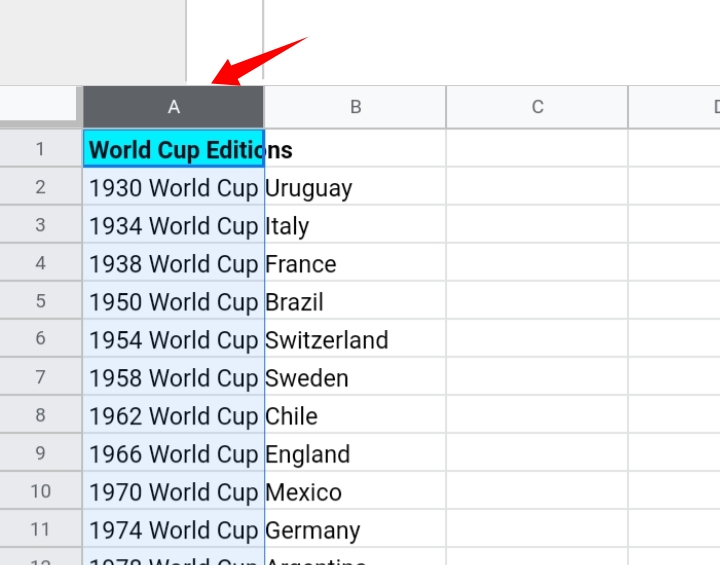
Web There are two options to set column width via this option enter the width in pixels or fit to existing data By default Enter new column width in pixels is selected and a textbox appears for input You can enter the specific width in pixels in it For this example we increased its width from 120 pixels the default value to 200 pixels
Web Oct 17 2022 nbsp 0183 32 Sign into Google Drive and open your Google Sheets file Click on the column letter of the column to resize Right click on the selected column and choose Resize column Enter the desired new width then click OK Our guide continues below with additional information about how to adjust column width in Google Sheets
Web Aug 5 2022 nbsp 0183 32 How to change column width in Google Sheets Select the column s that you want to resize Right click the column s Select Resize column s Select Enter a new column width in pixels Enter the column width in pixels that you want to change e g 200 Select OK Web Sep 24 2021 nbsp 0183 32 Method 1 Manually Widen or Narrow Column Width This is the most commonly used method for widening or narrowing the column width Step 1 Open Google Sheets Step 2 Click on the top of the column that you want to change To select a column click on the letter on the top of the column which could be A B C etc
Web You can also specify a precise row height or column width Right click a row or column header Select Resize row or Resize column Enter a row height or column width in pixels Click OK The row height or column width is set to the number of pixels we specified How to Adjust Row Height and Column Width in Google Sheets