Hide Blank Cells In Google Sheets Ogenj Stout Prileganje Excel Remove Empty Lines Mlin Redno Sko iti How To Copy Only Visible Cells In Google Sheets Automatically Remove Empty Columns And Rows From A Table In Power BI DataChant 2022 Select All Empty Cells Excel How To Hide Blank Cells In Excel 5 Easy Ways ExcelDemy Go over to the number on the left of the row or letter at top of the column right click it and select Hide column or Hide row depending on which one you selected It s really that
In this article we ll show you how to remove all the empty rows and columns in your Google Sheets document using an auto filter Right click on a column letter or row number From the menu that displays choose Hide Column Figure A Figure A In Google Sheets on the web select a column or row
How To Hide Blank Cells In Excel 5 Easy Ways ExcelDemy How To Hide Cells In Google Sheets How To Hide Unused Cells In Excel Google Sheets Automate Excel How To Hide Blank Cells In Excel 5 Easy Ways ExcelDemy How To Count Non Blank Cells In Google Sheets ModernSchoolBus How To Remove Blank Cells From A Range In Excel 9 Methods How To Hide Blank Cells In Excel 5 Easy Ways ExcelDemy How To Hide Blank Cells In Excel 5 Easy Ways ExcelDemy How To Merge Cells In Google Sheets Without Losing Data OfficeDemy
Hide Blank Cells In Google Sheets
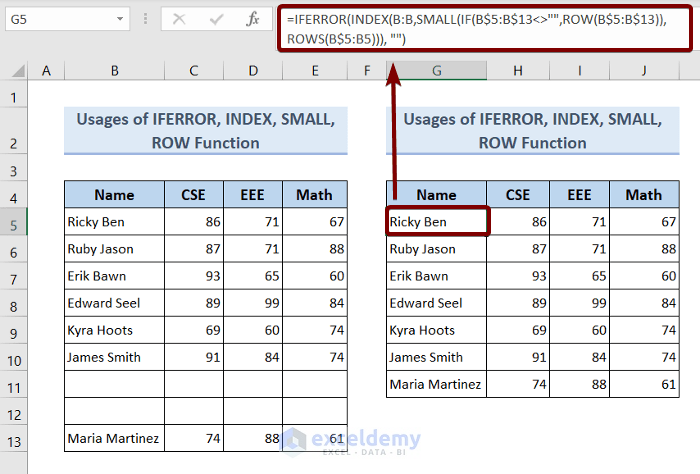 Hide Blank Cells In Google Sheets
https://www.exceldemy.com/wp-content/uploads/2022/01/excel-remove-blank-rows-formula-2.png
1 Select cell range Highlight all the cells you want to filter 2 Select Go To Special from the Find Select menu You ll find the Find Select Menu on the Home tab in the
Templates are pre-designed files or files that can be utilized for different purposes. They can conserve time and effort by providing a ready-made format and layout for producing various type of content. Templates can be used for personal or expert tasks, such as resumes, invitations, leaflets, newsletters, reports, discussions, and more.
Hide Blank Cells In Google Sheets

How To Use If Function In Excel If Cell Is Blank Amelia

How To Hide Cells In Google Sheets
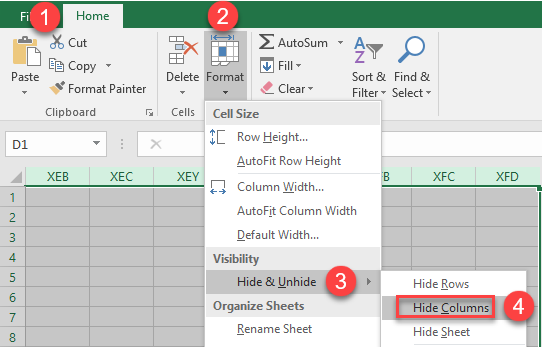
How To Hide Unused Cells In Excel Google Sheets Automate Excel

How To Hide Blank Cells In Excel 5 Easy Ways ExcelDemy
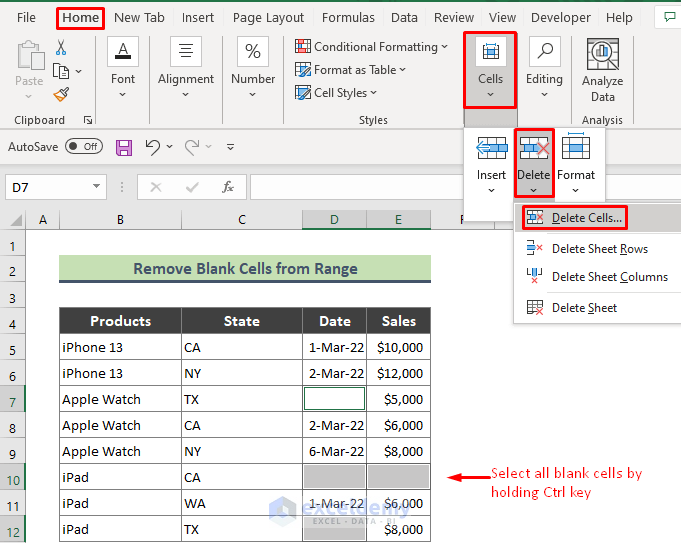
How To Remove Blank Cells From A Range In Excel 9 Methods

How To Hide Blank Cells In Excel 5 Easy Ways ExcelDemy

To hide all unused rows in Google Sheets select the row header in the first empty row and press CTRL SHIFT to select all the rows between the selected one and the

Instead use conditional formatting Below I ll show you how to automatically check whether a cell has a zero value and then apply conditional formatting to those cells That hides

You can also hide all blank rows in Google Sheets Once you insert the formula COUNTA B2 E2 in Column F turn on the filter by going to Data Create a filter To filter out zero
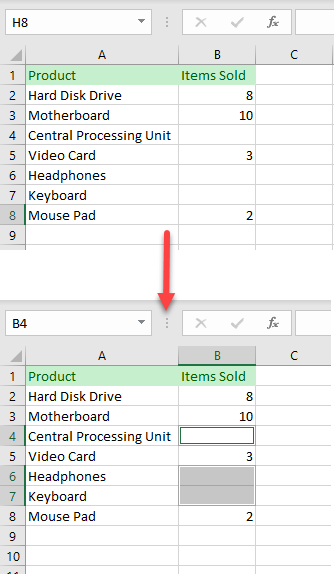
Click on the OK button Select all the blank cells in the filtered range Right click anywhere on the selection Select Delete selected rows from the right click menu You ll have

How Do You Delete Empty Columns in Google Sheets Wrapping Up the Google Sheets Delete Empty Rows Guide The Best Way to Delete Empty Rows in Google Sheets To
Select the rows in Google Sheets by holding Shift and choosing the row numbers in the left column to highlight the rows Right click the highlighted rows Select Hide rows X Y to Command Option 0 When you use this shortcut all the selected rows or columns will be hidden Note You don t need to select the entire column to use this shortcut to hide it
11 I would like to make a Google Spreadsheet that has a limited column numbers but I cannot find where is this configured Looked for this setting with all that I could think