Hibernate Command Windows 10 Windows 10 Hibernate Not Working Why How To Fix Android er Enable Or Disable Hibernate Option In Windows 10 5 Best Ways To Enable Or Disable Hibernate Mode In Windows 11 5 Best Ways To Enable Or Disable Hibernate Mode In Windows 11 Enable Or Disable The Hibernate Option In Windows 10 Winaero Web Nov 14 2023 nbsp 0183 32 In the Search box type power options Click or touch Power amp sleep settings System settings in the list of programs Click Additional power settings
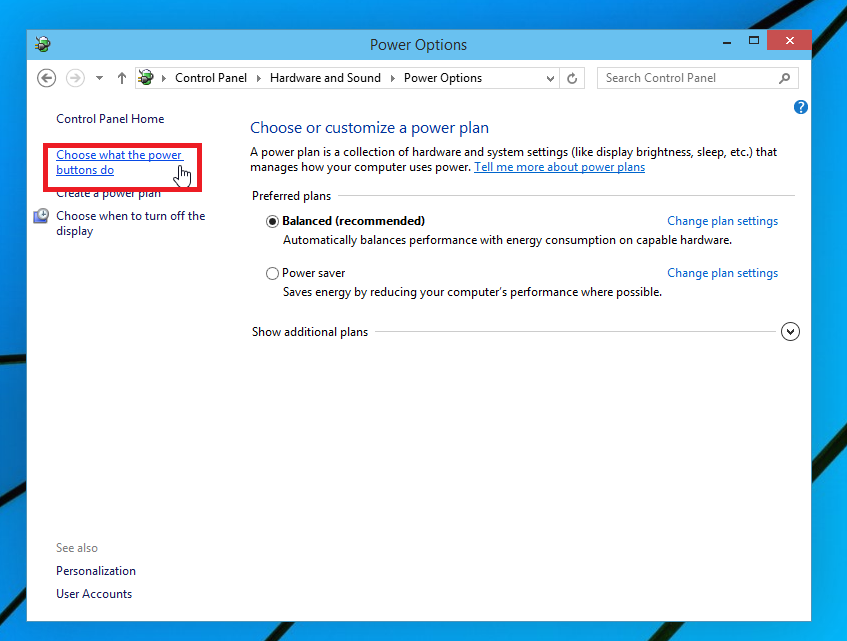
Web Apr 6 2018 nbsp 0183 32 How To How to hibernate Windows 10 Whether you want to turn it on or off here s how to enable and disable hibernate in Windows 10 how to configure it and how to find out if your PC supports hibernate By Web Sep 3 2019 nbsp 0183 32 Control Panel Go to Hardware and Sound Look for the Power Options and click or tap on them Control Panel Go to Power Options In the left column click or tap the link that says quot Choose what
Enable Or Disable The Hibernate Option In Windows 10 Winaero How To Use Hibernation To Extend Battery Life On Windows 10 Windows 4 Add Hibernate To The Start Menu In Windows 10 Winaero How To Use Hibernation On Your Windows 10 PC To Improve Stand by TURN OFF HIBERNATE IN WINDOWS 7 8 10 HOW TO TURN OFF HIBERNATE IN How To Enable Hibernate And Sleep In Power Options On Windows 10 8 1 Hibernate Logging GP Coder L p Tr nh Java How To Enable The Hibernate Feature In Windows 10 Version 1809
Hibernate Command Windows 10
 Hibernate Command Windows 10
https://cdn.windowsreport.com/wp-content/uploads/2020/04/fix-hibernate-sleep-issues-windows.jpg
Web Oct 31 2021 nbsp 0183 32 OPTION ONE To Hibernate Computer from Start Menu 1 Open the Start menu click tap on the Power button and click tap on Hibernate see screenshots below OPTION TWO To Hibernate
Templates are pre-designed files or files that can be utilized for different purposes. They can conserve time and effort by offering a ready-made format and design for creating various sort of content. Templates can be used for personal or expert tasks, such as resumes, invitations, flyers, newsletters, reports, presentations, and more.
Hibernate Command Windows 10
How To Enable Hibernate In Windows 10

How To Use Hibernation To Extend Battery Life On Windows 10 Windows

4
Add Hibernate To The Start Menu In Windows 10 Winaero

TURN OFF HIBERNATE IN WINDOWS 7 8 10 HOW TO TURN OFF HIBERNATE IN

How To Enable Hibernate And Sleep In Power Options On Windows 10 8 1

Web Hibernate This option was designed for laptops and might not be available for all PCs For example PCs with InstantGo don t have the hibernate option Hibernate uses less

Web Mar 6 2021 nbsp 0183 32 Go to Settings gt System gt Power amp Sleep gt Additional Power Settings gt Choose what the power button does gt Hibernate gt Save Changes Or go to Additional

Web Feb 11 2016 nbsp 0183 32 In the Command Prompt window type powercfg exe hibernate off and press the Enter key Exit the Command Prompt window Sarah Jacobsson Purewal CNET 3 To enable hibernate in

Web Jan 15 2019 nbsp 0183 32 1 Run command as an administrator and run psshutdown d t 0 to suspend the computer and make it sleep more parameter could refer to this Psshutdown yilia

Web Jul 29 2022 nbsp 0183 32 Option One Enable or Disable Hibernate in Elevated Command Prompt Option Two Enable or Disable Hibernate using a REG File Download Option Three Enable or Disable Hibernate in Registry
Web Sep 22 2017 nbsp 0183 32 The usual way to hibernate or sleep for a desktop is from the power button on the Start menu If those options do not appear you can add them Add or Remove Web 30 The command rundll32 exe powrprof dll SetSuspendState 0 1 0 for sleep is correct however it will hibernate instead of sleep if you don t turn the hibernation off Here s
Web Updated October 27 2021 By default when you open the Start menu in Windows 10 and select the power button there is no option for Hibernate Here s how to enable it