Gmail Smtp Server Settings For Dvr Mail Setup Gmail Smtp Server Settings For Dvr How To Send Emails With The Gmail SMTP Server Settings And Configuration LaptrinhX How Do I Find My SMTP Server Settings Android Consejos IP Kamera DVR NVR I in Hareket Alg lama E Posta Alarm Ayar DVR Destek T rkiyenin G venlik Email Notification On Hikvision DVR how To Set Up Learn CCTV Change Gmail account access for less secure apps In order to use your Gmail email account to sending data from the DIVAR to the destination e mail address
1 Open your Browser 2 Enter the IP address of the recorder you wish to connect to into the URL bar 3 Press Enter 4 Navigate to Setup 5 Navigate to Network SMTP 6 Enter all To set up email notifications you must have an email address We recommend using a Gmail address as they are free to set up The SMTP Server for Google is
Email Notification On Hikvision DVR how To Set Up Learn CCTV How To Send Email In WordPress Using The Gmail SMTP Server Magro Portugu s ngreme Gmail Outgoing Port Pastor Cinco Tarde Amusement Clan Army Gmail Suite Smtp Settings Of Conditional Inquiry Smtp Email Settings For Gmail Horselop Magro Portugu s ngreme Gmail Outgoing Port Pastor Cinco Tarde Bewegung Spur Block Smtp Gmail Kamera Toilette Revolution Eintrag Det Kan Mysterium Lav En Seng Gmail Pop3 Server Vogn Integration Energize How To Find Smtp Server Address For Gmail Erpsado
Gmail Smtp Server Settings For Dvr
 Gmail Smtp Server Settings For Dvr
https://1.bp.blogspot.com/-I-m5n50K6dE/XkJkKbOiPjI/AAAAAAAAAGs/drsWgvrdag03QXmU5jeZmPdDpxqeDACjwCEwYBhgL/w1200-h630-p-k-no-nu/gmail-smtp-server-settings.jpg
Username Full Gmail email address ex nellyssecurity gmail Password Generated App Password SMTP Server smtp gmail SMTP Port 587 Check the TLS SSL box Snapshot Interval Check the
Pre-crafted templates offer a time-saving service for developing a varied range of files and files. These pre-designed formats and designs can be made use of for numerous individual and expert projects, including resumes, invites, leaflets, newsletters, reports, presentations, and more, streamlining the material production procedure.
Gmail Smtp Server Settings For Dvr

Configuring SMTP Settings To Use Gmail In Another Email Client Kien Thuy High School
How To Send Email In WordPress Using The Gmail SMTP Server
Magro Portugu s ngreme Gmail Outgoing Port Pastor Cinco Tarde
Amusement Clan Army Gmail Suite Smtp Settings Of Conditional Inquiry
Magro Portugu s ngreme Gmail Outgoing Port Pastor Cinco Tarde
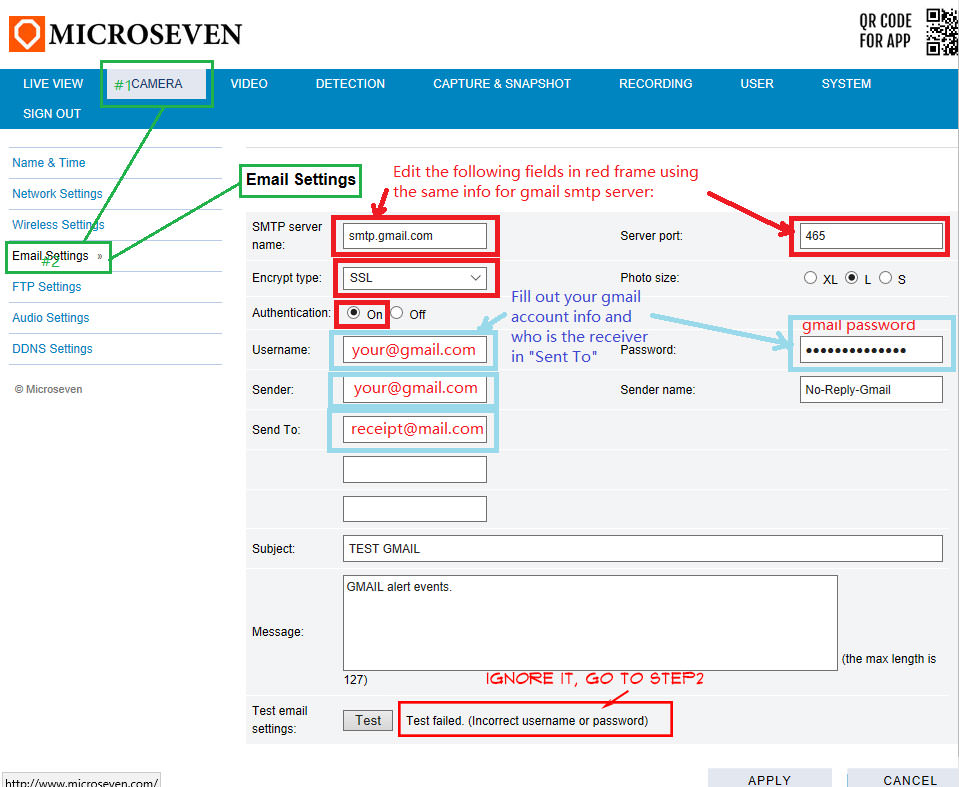
Bewegung Spur Block Smtp Gmail Kamera Toilette Revolution Eintrag

1 Log into the web interface of the NVR Then select Setting at the top left Select Network from the drop down 2 Select Email from the list on the left 3 Check the box next to Enable Input the following

You have 3 options for setting up email with a printer scanner or app based on what your device or app supports Option 1 Send email with SMTP relay recommended Option 2

If you only want the Gmail SMTP settings without any additional information here you go Gmail SMTP Settings SMTP
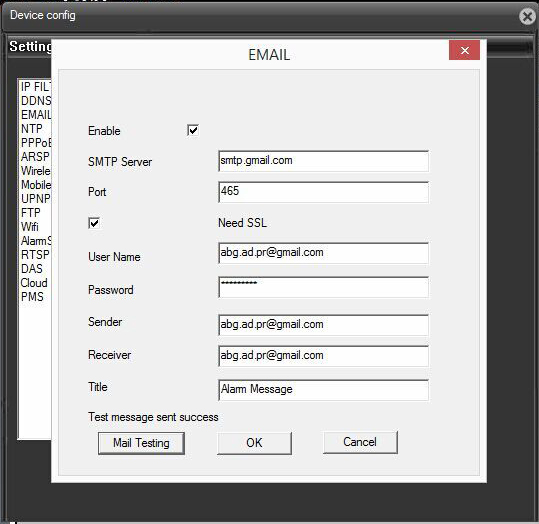
How to set up Gmail for IP cameras and DVRs 1 Log in into your Gmail account and click Manage Your Google Account 2 Click on Security to manage your configuration 3 Turn on the Less secure app access
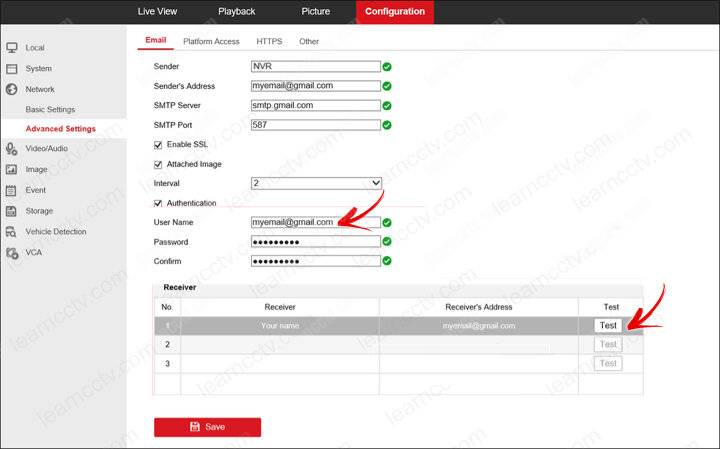
Email sender address Email receiver address OK you must have your own Gmail account and the information about the username password and the sender receive emails you want to use For the Gmail SMTP Server
For CCTV DVRs that allow email alerts to be sent via a third party SMTP server Gmail is a great service to use however you must email the allow less secure Incoming connections to the IMAP server at imap gmail 993 and the POP server at pop gmail 995 require SSL The outgoing SMTP server
Then select Main Menu Information Network to check if your DVR s network connected successfully 6 Right click mouse select Main Menu Setup Network Email Input your