Github Remove Last Commit Remove Commit From Master Git Polizbazar How To Remove Git From Android Studio Project Remove Git From Android GitHub Remove Data Pack Stack Overflow How To Remove Last Commit On GIT YouTube Sunny Setia Blog GIT Remove Last Commit Or Go To Previous Commit Web Delete the last commit For example your last commit git push origin aa61ab32 master Now you want to delete this commit then an Easy way to do this following Steps First reset the branch to the parent of the current commit Force push it to the remote git reset HEAD hard git push origin f For particular commit you want to reset is
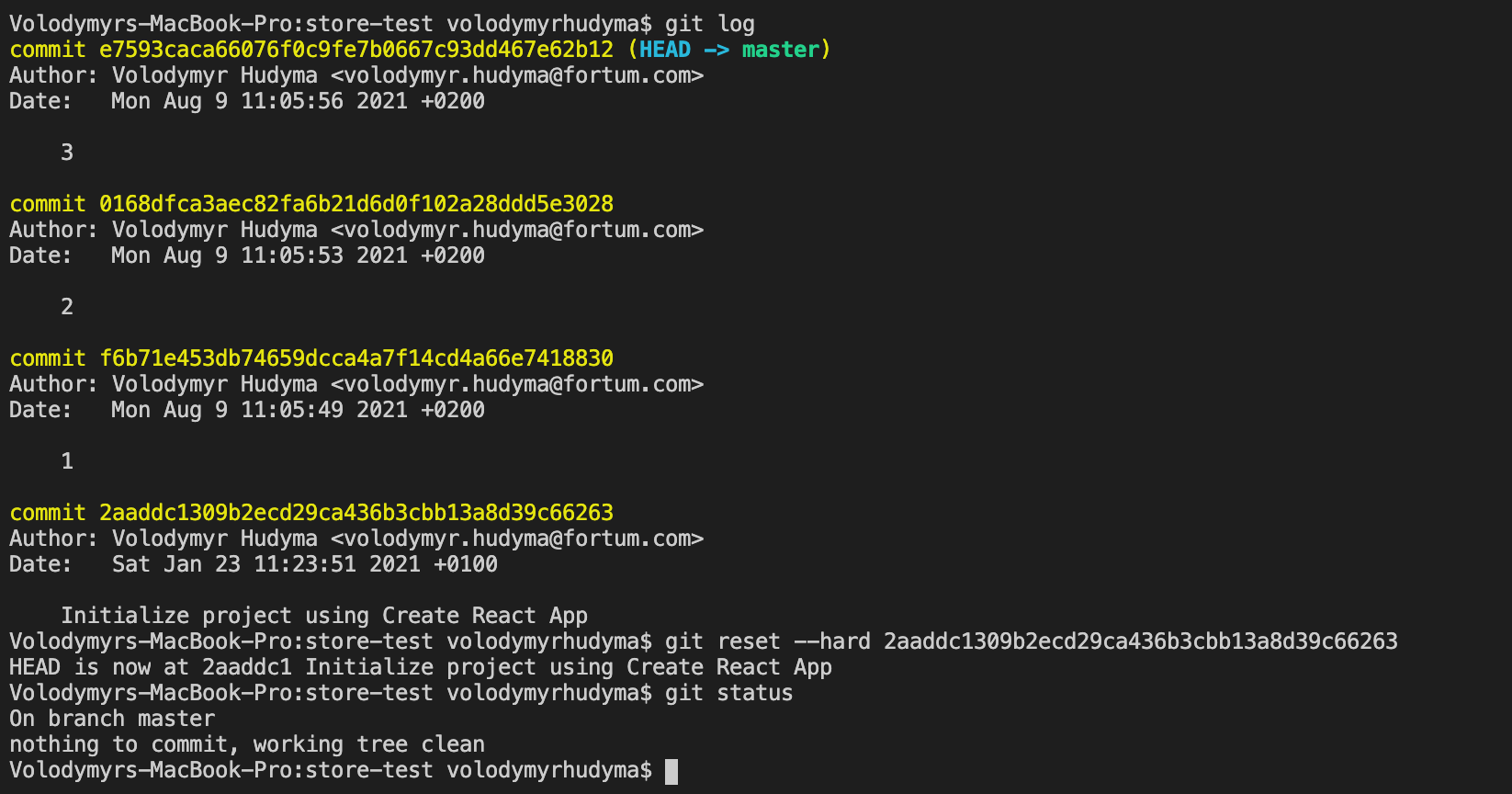
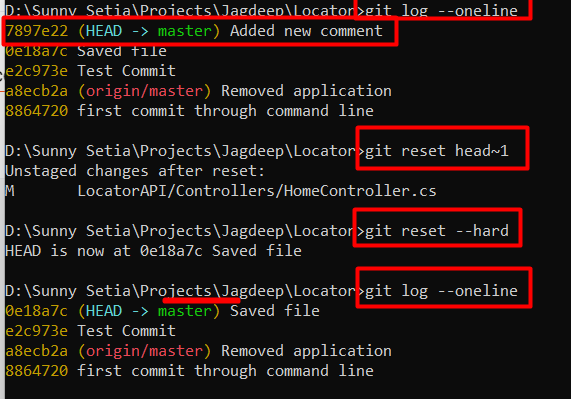
Web Removing the last commit To remove the last commit from git you can simply run git reset hard HEAD If you are removing multiple commits from the top you can run git reset hard HEAD 2 to remove the last two commits You can increase the number to Web Nov 22 2011 nbsp 0183 32 Remove last commit from remote Git repository Ask Question Asked 11 years 9 months ago Modified 3 months ago Viewed 426k times 480 How can I remove the last commit from a remote Git repository such as I don t see it any more in the log If for example git log gives me the following commit history A gt B gt C gt D HEAD ORIGIN how
Sunny Setia Blog GIT Remove Last Commit Or Go To Previous Commit Sunny Setia Blog GIT Remove Last Commit Or Go To Previous Commit How To Undo Last Commit In Git Scratch Code GitHub Remove Data Pack Stack Overflow Remove Last Commit From Git Remote Repository Coder Sathi How TO Remove Last Commit From Local In Git Solved Remove Last Commit From Remote Git Repository 9to5Answer How To Cancellare Un Repository Da GitHub Meccanismo Complesso Git Remove Multiple Deleted Files DiscoPosse
Github Remove Last Commit
 Github Remove Last Commit
https://vhudyma-blog.eu/img/screenshot-2021-08-09-at-11.06.15.png
Web In case you re using the Tower Git client you can simply hit CMD Z or CTRL Z on Windows to undo the last commit You can this familiar keyboard shortcut to undo many other actions such as a failed merge or a deleted branch Undoing Multiple Commits The same technique allows you to return to any previous revision git reset hard 0ad5a7a6
Templates are pre-designed documents or files that can be used for numerous functions. They can save effort and time by supplying a ready-made format and layout for developing various type of material. Templates can be used for individual or expert projects, such as resumes, invitations, leaflets, newsletters, reports, presentations, and more.
Github Remove Last Commit

Rebase To A Specific Commit In Git Delft Stack
Sunny Setia Blog GIT Remove Last Commit Or Go To Previous Commit
How To Undo Last Commit In Git Scratch Code

GitHub Remove Data Pack Stack Overflow

How TO Remove Last Commit From Local In Git

Solved Remove Last Commit From Remote Git Repository 9to5Answer

Web Jan 16 2009 nbsp 0183 32 First remove the commit on your local repository You can do this using git rebase i For example if it s your last commit you can do git rebase i HEAD 2 and delete the second line within the editor window that pops up Then force push to GitHub by using git push origin branchName force

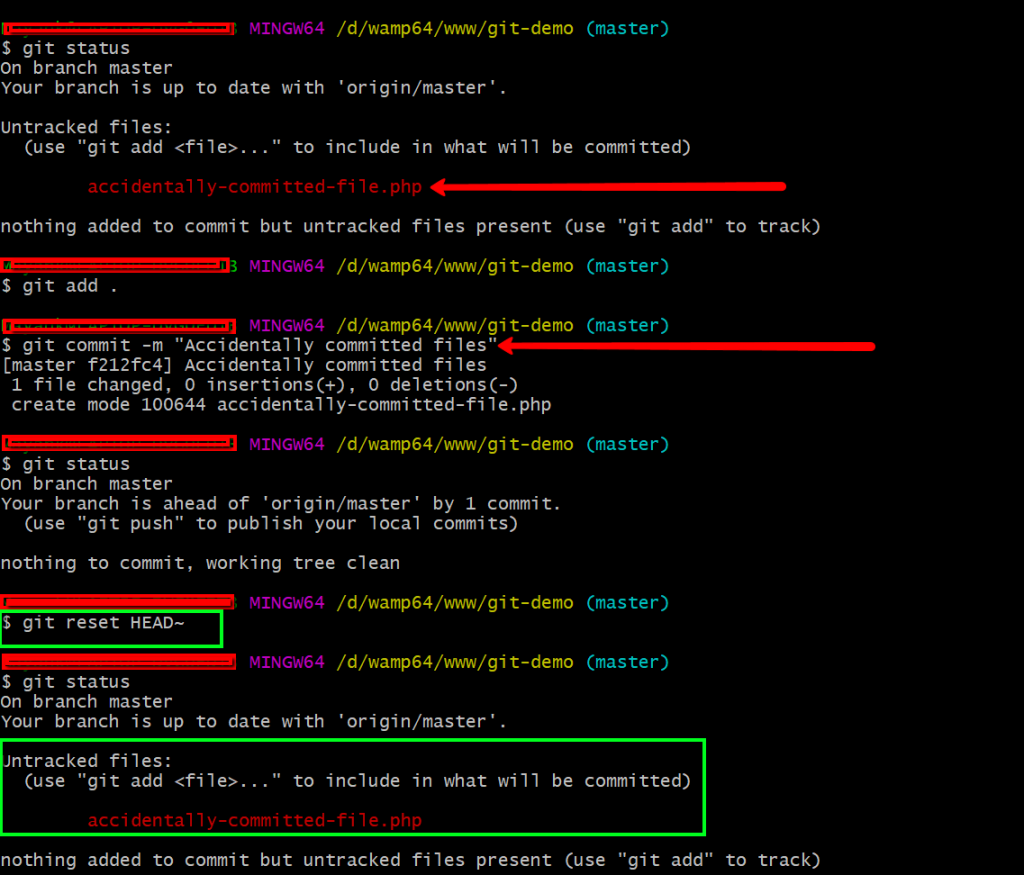
Web Sep 21 2022 nbsp 0183 32 After that use the following command to undo the commit git reset soft HEAD Now let s use git log again You should see the commit hash and a HEAD gt main origin main at the end The last commit you made is no longer part of the repository s history and has been removed The command above restored everything to the version of

Web Nov 23 2021 nbsp 0183 32 If you want to undo the changes from a commit you already pushed to Github the safe way to do that is with a revert Reverting will generate an quot opposite commit quot which will basically undo all the changes from a specific commit If you added a line it s removed and if you deleted a file it s added back

Web Jan 12 2016 nbsp 0183 32 If you did commit your changes in your local repository you could do a straight rebase git fetch origin git rebase origin master This unwinds your local commits from the local master applies new commits from

Web Git command to undo the last commit previous commits Warning Do Not use hard if you do not know what you are doing hard is too dangerous and it might delete your files Basic command to revert the commit in Git is git reset hard lt COMMIT ID gt or git reset hard HEAD lt n gt COMMIT ID ID for the commit
Web Aug 31 2021 nbsp 0183 32 There are two possible ways to undo your last commit We ll look at both of them in this article The revert command The revert command will create a commit that reverts the changes of the commit being targeted You can use it to revert the last commit like this git revert lt commit to revert gt Web To remove the last commit from git you can simply run git reset hard HEAD If you are removing multiple commits from the top you can run git reset hard HEAD 2 to remove the last two commits You can increase the number to remove even more commits
Web Jan 30 2020 nbsp 0183 32 1 this may help from GitHub Removing the last commit To remove the last commit from git you can simply run git reset hard HEAD If you are removing multiple commits from the top you can run git reset hard HEAD 2 to remove the last two commits You can increase the number to remove even more commits