Git Undo Checkout Files Card Checkout Page Search By Muzli Checkout Git Checkout How To Undo Beginner Git Tutorial Git Checkout To Checkout GIT EBook StudyEasy Organisation Web Apr 28 2019 nbsp 0183 32 Understanding key terms Don t undo save changes for later use Don t undo Add something to the latest commit or change the message Unstage files precommit Revert changes precommit Remove new untracked files and directories Revert a commit in a new commit Remove latest commit s without a new commit Change history
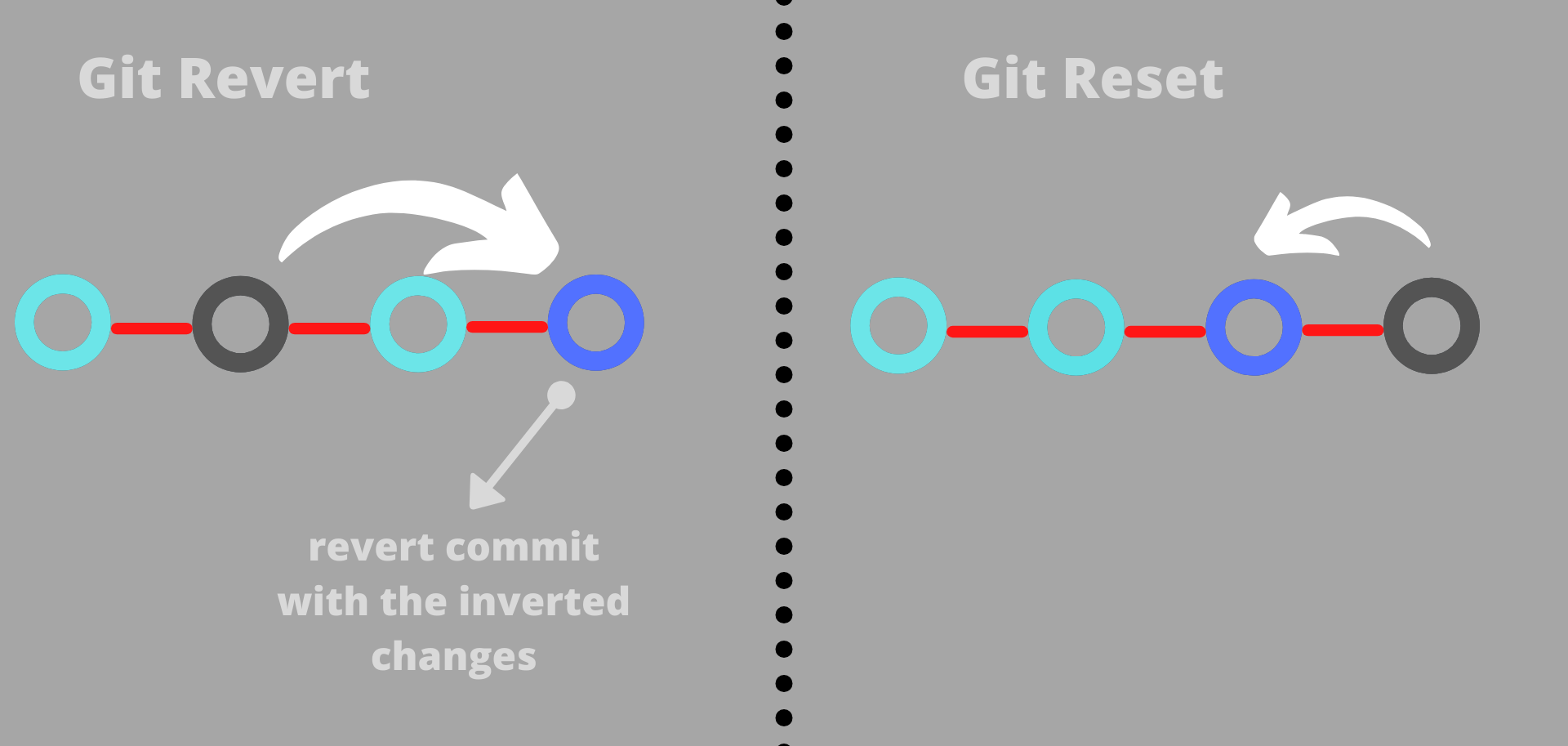
Web The git reset git checkout and git revert commands are some of the most useful tools in your Git toolbox They all let you undo some kind of change in your repository and the first two commands can be used to manipulate either commits or individual files Web Feb 2 2024 nbsp 0183 32 The git checkout command can also be used to restore a file or directory that has been accidentally removed using some git commands It can also be used to undo a git move to another folder command Undo Checkout in Git
GIT EBook StudyEasy Organisation Git Git Checkout W3Docs Online Git Tutorial All Things Checkout In Git Programmer Hat How To Undo Changes In Git reset Vs Revert Vs Restore How To Fix A Blunder And Get Squashed Commits Back Git Undo Part 6 Git Tutorial Git Commands Undo Changes With Git Checkout How To Undo git Reset Restore Data Gone In hard Resets Undo Changes In Git Git Checkout Git Revert Git Reset Git
Git Undo Checkout Files
 Git Undo Checkout Files
https://assets.materialup.com/uploads/a4f643a1-1520-4dae-b68f-698b5d44a563/preview.png
Web Oct 11 2020 nbsp 0183 32 1 Amending the Most Recent Commit Be Careful with Force Pushes 2 Resetting a Branch to an Older Commit Soft Resetting a Branch Creating a Backup Branch 3 Interactive Rebases Deleting Old Commits Rewording Commit Messages Editing Old Commits Squashing 4 Reverting Commits 5 Checking Out Files 6 Using
Pre-crafted templates offer a time-saving solution for producing a varied series of files and files. These pre-designed formats and designs can be made use of for various personal and professional projects, including resumes, invitations, leaflets, newsletters, reports, discussions, and more, enhancing the material development procedure.
Git Undo Checkout Files
Git Revert Studytonight

Git

Git Checkout W3Docs Online Git Tutorial
All Things Checkout In Git Programmer Hat
How To Fix A Blunder And Get Squashed Commits Back Git Undo
Part 6 Git Tutorial Git Commands Undo Changes With Git Checkout

Web May 9 2022 nbsp 0183 32 Go to the page and click undo for me command z and it will go back to exactly where you were before you hit the good old git checkout This will not work if your page has been closed and then you hit git checkout It
Web It s important to understand that git checkout lt file gt is a dangerous command Any local changes you made to that file are gone Git just replaced that file with the last staged or committed version Don t ever use this command unless you absolutely know that you don t want those unsaved local changes

Web Jun 8 2015 nbsp 0183 32 What s happening git checkout alters files in the working directory to a state previously known to Git You could provide a branch name or specific SHA you want to go back to or by default Git will assume you want to checkout HEAD the last commit on the currently checked out branch Keep in mind any changes you undo this way are

Web For example git checkout filename is equivalent to svn revert filename Of course git checkout branchname does something completely different If a branch and a file share the same name git will default to switching branches but that doesn t stop bash autocomplete from ruining the day

Web The most commonly used undo tools are git checkout git revert and git reset Some key points to remember are Once changes have been committed they are generally permanent Use git checkout to move around and review the commit history git revert is the best tool for undoing shared public changes git reset is best used for undoing local
Web Dec 10 2014 nbsp 0183 32 Check the git stash to see if you had stashed any of those files previously git stash list git stash show stash 0 If you had added staged the files previously you can try git fsck lost found Git will save all the dangling blobs to git lost found other directory although they will not have their original filenames Web Jan 27 2024 nbsp 0183 32 To discard changes made to unstaged files you can use the git checkout command Here s how git checkout lt file gt This will revert the specified file to its last committed state If you want to discard changes made to all modified files you can use git checkout It s crucial to note that this command cannot be undone
Web DESCRIPTION Updates files in the working tree to match the version in the index or the specified tree If no pathspec was given git checkout will also update HEAD to set the specified branch as the current branch git checkout lt branch gt