Git Set Origin To Local Branch Set Origin To Geometry Does Not Give Expected Results Basics Git Remote Add Theormos Reset The Object Origin Ex Nihilo Digital How To Snap Origin Point To The Base Of An Object Modeling Blender How To Change Git Remote Origin What Is Git Remote Git Remote Add Web When a local branch is started off a remote tracking branch Git sets up the branch specifically the branch lt name gt remote and branch lt name gt merge configuration entries so that git pull will appropriately merge from the remote tracking branch This behavior may be changed via the global branch autoSetupMerge configuration flag
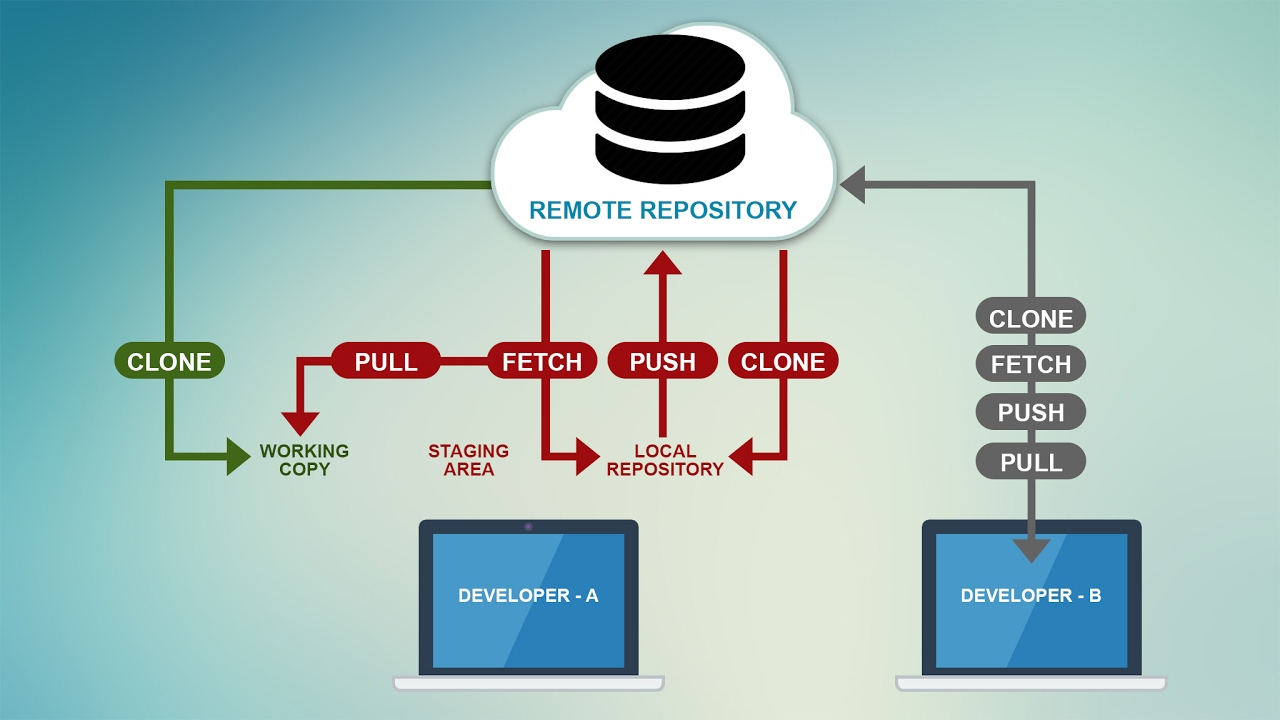
Web Mar 8 2021 nbsp 0183 32 git commit a m quot Branch backup quot git branch branch backup Now run the command below to reset your remote branch to origin If you have a different remote and default branch name not origin or main respectively just replace them with the appropriate name git fetch origin git reset hard origin main Web Remote repositories can be on your local machine It is entirely possible that you can be working with a remote repository that is in fact on the same host you are The word remote does not necessarily imply that the repository is somewhere else on the network or Internet only that it is elsewhere
How To Change Git Remote Origin What Is Git Remote Git Remote Add Learn How To Use Local And Remote Repositories In Git YouTube Git URL Delft What Is Git ORIGIN The Git Remote Add Command GIT Branch And Its Operations An Easy Understanding Digital Varys Comment Configurer Une Branche En Amont Sur Git StackLima Git Branch set upstream to origin Shell Bash Git Push Programmer Sought Version Control With Git Remotes In Bitbucket
Git Set Origin To Local Branch
 Git Set Origin To Local Branch
https://blenderartists.org/uploads/default/original/3X/b/c/bc71702dee6446c1602f0090d080c21708ffa0a7.jpg
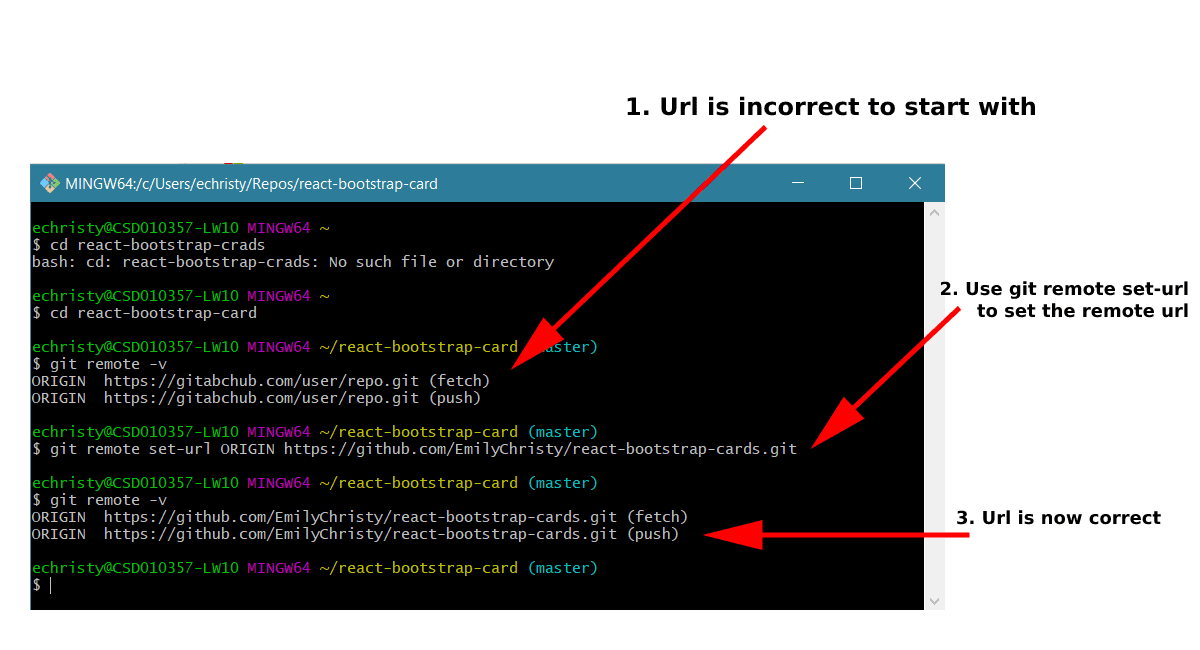
Web Feb 25 2017 nbsp 0183 32 From your local repo git push origin all I am assuming that the new repo on the restored server has the same URL If the URL has changed then do git remote set url origin lt new URL gt first but this will only push all your checkout branches if you did not checkout locally all the branches they will not be pushed
Pre-crafted templates provide a time-saving service for developing a varied series of files and files. These pre-designed formats and layouts can be used for different individual and professional jobs, including resumes, invites, flyers, newsletters, reports, presentations, and more, enhancing the content production procedure.
Git Set Origin To Local Branch
Git Fatal The Current Branch Has No Upstream Branch
Learn How To Use Local And Remote Repositories In Git YouTube

Git URL Delft
What Is Git ORIGIN The Git Remote Add Command

Comment Configurer Une Branche En Amont Sur Git StackLima

Git Branch set upstream to origin Shell Bash

Web Jul 13 2022 nbsp 0183 32 It looks like this git checkout b lt branch name gt Assume we want to create a new Git branch named quot pagination quot from the main branch To accomplish this we will use the quot git checkout quot command with the quot b quot option and the branch name quot pagination quot

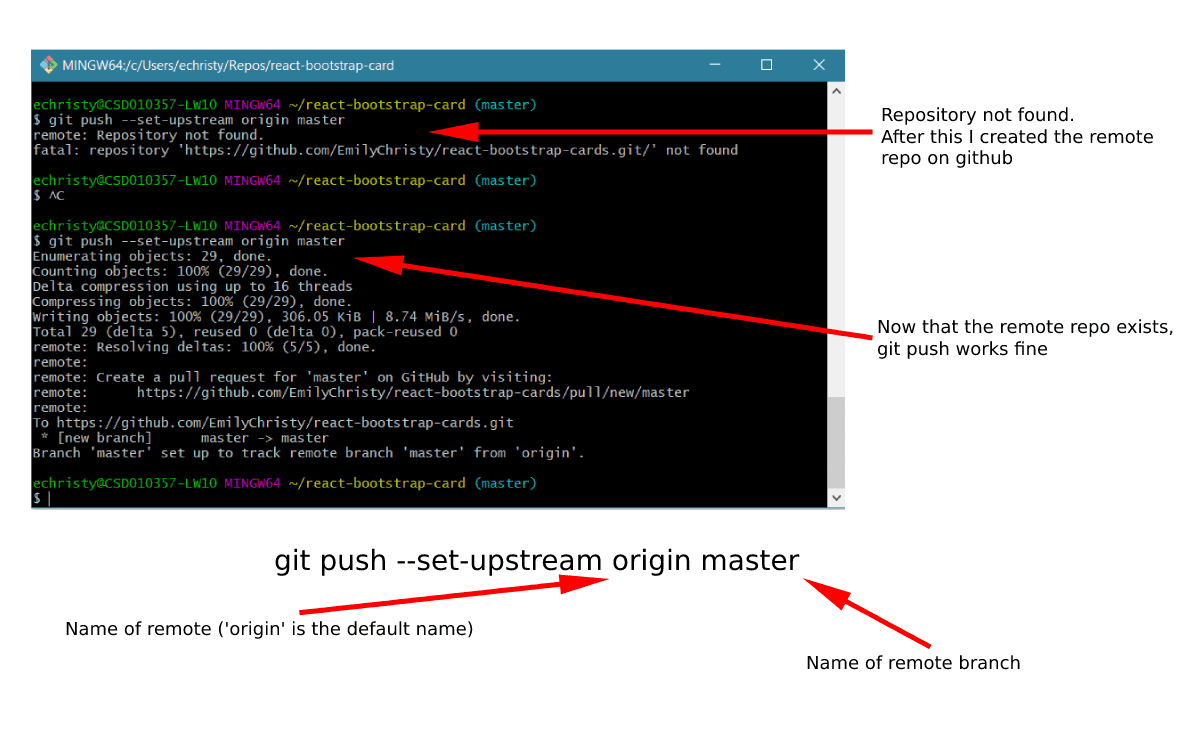
Web When you re publishing a local branch Let s now look at the opposite scenario you started a new local branch and now want to publish it on the remote for the first time git push u origin dev You can tell Git to track the newly created remote branch simply by using the u flag with quot git push quot

Web June 22 2022 Git Git Reset Origin How to Reset a Local Branch to Remote Tracking Branch Dionysia Lemonaki Git is a free and open source version control system It is the most popular version control system in use today Git keeps track of the changes made to a project over time

Web Apr 26 2021 nbsp 0183 32 The general form of the command is this git push lt remote gt lt branch gt By default Git chooses origin for the remote and your current branch as the branch to push If your current branch is main the command git push will supply the two default parameters effectively running git push origin main

Web Jan 4 2019 nbsp 0183 32 Git does not define an origin but does use the word origin as the default first name for what Git calls a remote A remote is essentially a short name for a URL Whoever answers the quot phone call quot the request for service at that URL should be a Git repository so a remote like origin is a short name for quot how to call up another Git
Web Oct 5 2023 nbsp 0183 32 Each remote has a default branch that can be set with git remote set head This setting is local to your clone and independent from the remote repository but you can tell Git to assign the value from the remote In the specific example you listed git reset hard origin your local branch will be reset to what Git knows of the Web Feb 20 2022 nbsp 0183 32 After running the below command in cmd Now you need to set the upstream branch using the Git push command with the u option Replace lt branch name gt with your branch name git push u origin lt branch name gt Alternatively you can use the set upstream command as well to set the Upstream branch git push set upstream
Web Dec 15 2022 nbsp 0183 32 git push origin is a git command that pushes a local branch es to a remote repository origin origin is the conventional shorthand name of the url for the remote repository usually in GitHub or another cloud