Git Reset Global Username And Password How To Set Git Config Username And Email Git What Are Differences Between Revert Revert Commit And Reset Hot How To Get Git Config Username And Email How To Set GitHub User name And User email Per Repository Different Free Webkinz Account Username And Password 2012 YouTube Web Git provides two methods to reduce this annoyance Static configuration of usernames for a given authentication context Credential helpers to cache or store passwords or to interact with a system password wallet or keychain The first is simple and appropriate if you do not have secure storage available for a password
Web Jun 15 2022 nbsp 0183 32 git config global user email quot GFGexample gmailg quot Step 4 To set your password type the below command as depicted git config global user password quot 1234321 quot Step 5 To save the credentials forever type the below command as depicted git config global credential helper store This is how you set git username and Web Here we tell git credential store to save some credentials the username bob and the password s3cre7 are to be used when https mygithost is accessed Now we ll retrieve those credentials
Free Webkinz Account Username And Password 2012 YouTube How To Find Mysql Username And Password In Linux Systran Box Login Username And Password Interface 1330142 Vector Art At Vecteezy AGIKgqNPBFvYYLu8Up97DTqoWPtgGu3T344xvAs8igcs s900 c k c0x00ffffff no rj ESET PREMIUM NOD32 SMART SECURITY USERNAME AND PASSWORD LICENSE 2022 Git Config Username And Email Configuration Mazer dev Git Config Configure Your Username Email Learn Git How To Set Up Git Username And Email In Ubuntu Make Tech Easier Github Git Prompts For Username And Password For Git Push Origin
Git Reset Global Username And Password
 Git Reset Global Username And Password
https://www.brainstormcreative.co.uk/wp-content/uploads/git-config-set-username.png
Web Feb 6 2024 nbsp 0183 32 If Git needs a username and password to access a remote connection it takes the following steps to prompt the user for input First it tries to invoke an application that allows the users to input credentials The following values are checked in order to determine the application to use GIT ASKPASS environment variable
Templates are pre-designed documents or files that can be utilized for numerous purposes. They can save time and effort by supplying a ready-made format and design for developing various type of content. Templates can be utilized for personal or expert tasks, such as resumes, invitations, leaflets, newsletters, reports, discussions, and more.
Git Reset Global Username And Password
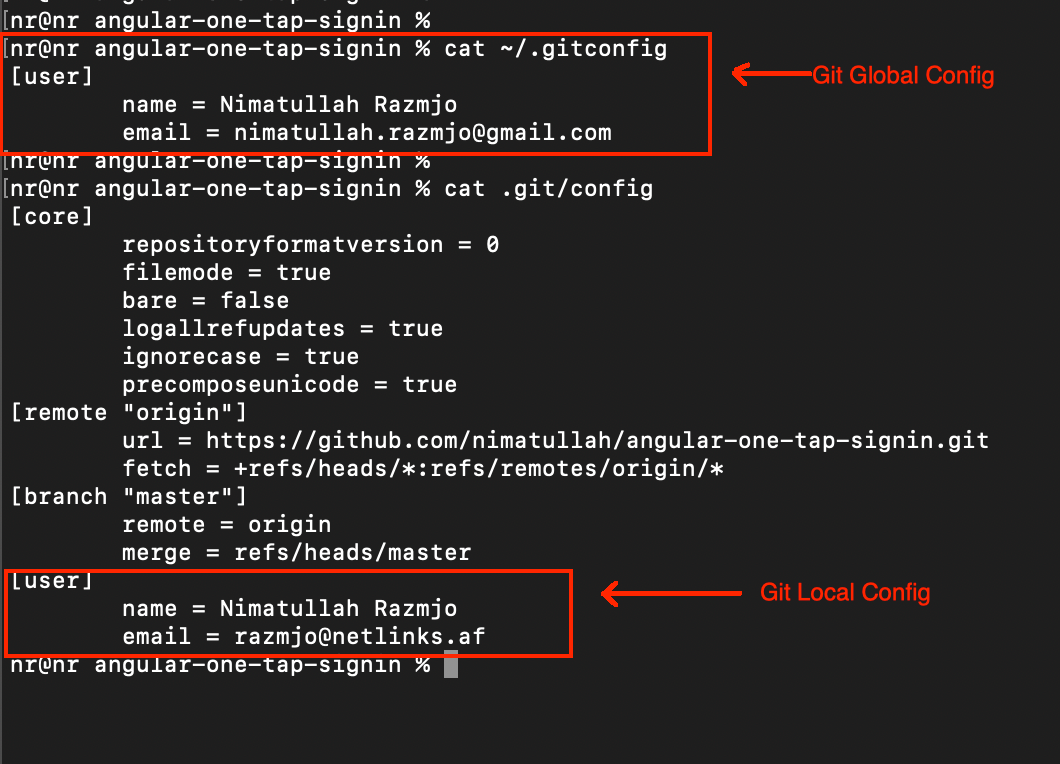
Git Config With Multiple Email Addresses By Nimatullah Razmjo Medium

How To Find Mysql Username And Password In Linux Systran Box
Login Username And Password Interface 1330142 Vector Art At Vecteezy

AGIKgqNPBFvYYLu8Up97DTqoWPtgGu3T344xvAs8igcs s900 c k c0x00ffffff no rj
Git Config Username And Email Configuration Mazer dev
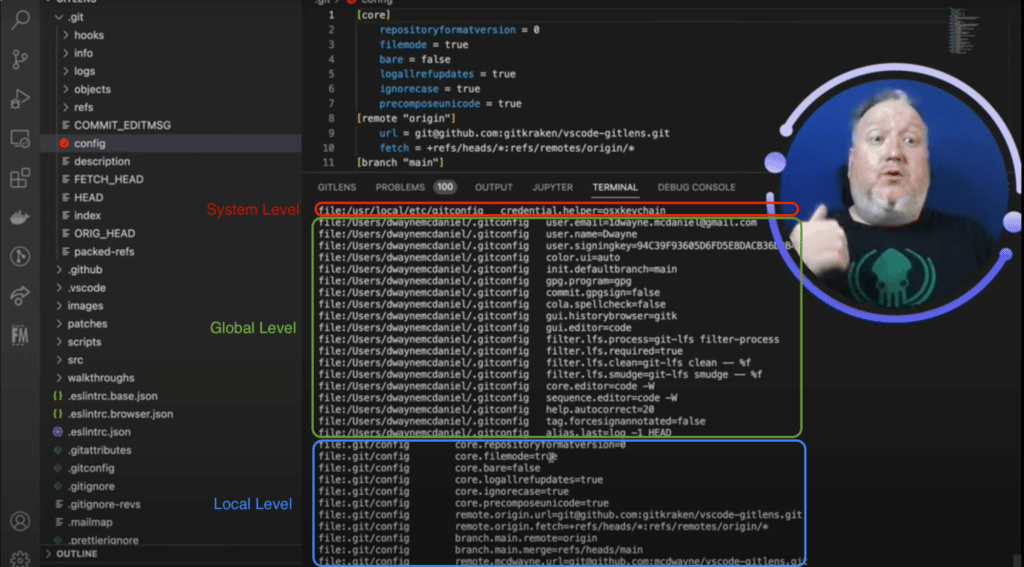
Git Config Configure Your Username Email Learn Git

Web Jul 29 2018 nbsp 0183 32 5 Answers Sorted by 94 It seems that your credential manager stored wrong authentication and reuses it Reset it git config system unset credential helper More information Remove credentials from Git GitLab remote HTTP Basic Access denied and fatal Authentication

Web Mar 13 2013 nbsp 0183 32 How can I reset the credentials on my system so Git will ask me for the password of that repository I have tried git config global unset core askpass in order to unset the password git config credential helper cache timeout 1 in order to avoid credentials cache Nothing seems to work does anyone have a better idea windows git

Web Setting your Git username for every repository on your computer Open Terminal Terminal Git Bash Set a Git username git config global user name quot Mona Lisa quot Confirm that you have set the Git username correctly git config global user name gt Mona Lisa Setting your Git username for a single repository Open Terminal Terminal Git Bash

Web Sign in to GitHub In the upper right corner of any page click your profile photo then click Settings In the quot Access quot section of the sidebar click Password and authentication Under quot Change password quot type your old password a strong new

Web To reset your cached credentials so that Git prompts you to enter your credentials access the Credential Manager in the Windows Control Panel under User Accounts gt Credential Manager Look for the GitHub entry and delete it For more information or to report issues with GCM see the official GCM docs at quot Git Credential Manager quot
Web Jul 30 2019 nbsp 0183 32 Windows In your terminal navigate to the repo you want to make the changes in Execute git config list to check current username amp email in your local repo Change username amp email as Web Posted on July 19 2019 by admin To connect to a Git repository with authentication over HTTP S every time it needs to set a username and password You can configure Git to remember a username and password by storing them in a remote URL or by using Git credential helper
Web Apr 6 2022 nbsp 0183 32 1 Introduction In this article we will focus on how to update the password for Git on Windows and macOS Everyone who worked in a corporation in which changing the domain password is required every often and the Git system is connected with the domain account probably faces that problem 2 How to update the password for Git