Git Delete All Untracked Files CoderJony How To Delete Untracked Files In Git Solved Git How To Delete All Untracked Files 9to5Answer Darleen Aiyer Delete Untracked Files In Git Git How To Delete All Untracked Files 4 Solutions YouTube Git Restore All Unstaged And Untracked Files Back To Their Latest Web Feb 28 2022 nbsp 0183 32 Step 1 Create a folder named git mkdir git Step 2 Switch to the git folder and create a folder named files cd git mkdir files Step 3 Create three files named tracked txt untracked txt and gitignore in the git folder touch tracked txt untracked txt gitignore Step 4 Create two files in the files folder names file1 txt and file2 txt
Web Delete Untracked Files git clean f Delete the directory of the untricked git clean fd Put Gitignore s Untrack File The directory is also deleted together careful use usually this is used to delete the compiled o git clean xfd In front of the above Git Clean it is highly recommended to add n Parameters Let s see which files will be deleted prevent Web Dec 11 2021 nbsp 0183 32 Here we re removing all files that are currently being ignored in gitignore git rm r cached git add git commit m quot Removes all gitignore files and folders quot The first command removes all the files from the index The second command re adds all the files without those in gitignore and the last
Git Restore All Unstaged And Untracked Files Back To Their Latest How To Remove Untracked Files In Git Bash HOWTORMEOV Git Clean 4 Examples To Remove Untracked Files How To Remove Local Untracked Files In Git Working Directory Delete All Local Branches In Git How To Remove Untracked Files In Git Command HOWTOEROMV What Do I Do With deleted Files In Git Stack Overflow How To Remove Local untracked Files From The Current Git Branch Iodocs Solved Telling Git Its Ok To Remove Untracked Files 9to5Answer
Git Delete All Untracked Files
 Git Delete All Untracked Files
https://coderjony.com/img/blogs/how-to-delete-untracked-files-in-git/default-w1240-h700.png
Web 1 day ago nbsp 0183 32 Some of those repositories contain untracked directories not tracked yet but still used When I run git status within one of those it gives On branch develop Untracked files use quot git add lt file gt quot to include in what will be committed projects demo in2a projects demo in2b But the repo status lists all the files like this
Pre-crafted templates offer a time-saving service for producing a varied range of files and files. These pre-designed formats and designs can be used for various individual and professional projects, consisting of resumes, invitations, leaflets, newsletters, reports, discussions, and more, streamlining the material production procedure.
Git Delete All Untracked Files

Deleting Untracked Files From Git George Nance

How To Remove Untracked Files In Git Bash HOWTORMEOV
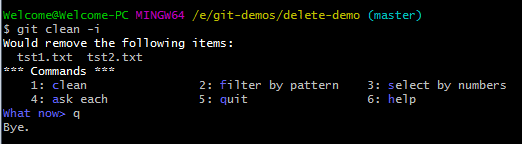
Git Clean 4 Examples To Remove Untracked Files

How To Remove Local Untracked Files In Git Working Directory
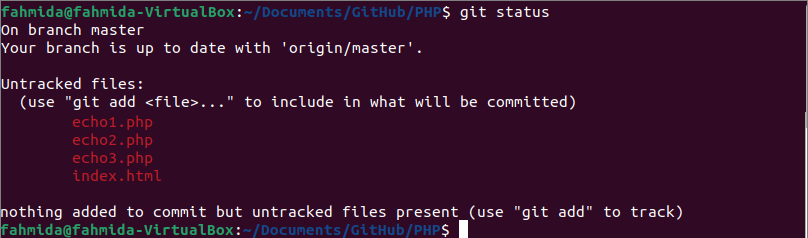
How To Remove Untracked Files In Git Command HOWTOEROMV

What Do I Do With deleted Files In Git Stack Overflow
Web If you want to blow away all untracked files the simplest way is git clean f use git clean n instead if you want to see what it would destroy without actually deleting anything Otherwise you can just delete the files you don t want by hand

Web Jul 9 2020 nbsp 0183 32 To remove the all ignored and untracked files use the x option git clean d n x If you want to remove only the ignored files and directories use the X option git clean d n X The command above will delete all files and directories listed in your gitignore and keep the untracked files Conclusion

Web Nov 18 2020 nbsp 0183 32 You can use the git clean command to remove untracked files The fd command removes untracked directories and the git clean fx command removes ignored and non ignored files You can remove untracked files using a gitignore file There are two types of files in a Git repository tracked and untracked files

Web Oct 18 2021 nbsp 0183 32 Resetting in Git only resets files that are actually tracked by Git This includes code and resources that receive changes However there are also files like packages local config build artifacts output log files and other transitory items that aren t stored in the Git repository and ignored in gitignore

Web Aug 4 2023 nbsp 0183 32 git clean f Permanently delete untracked files git clean f d Remove untracked files and directories git clean f X Delete only ignored files git clean f x Delete both ignored and non
Web git clean Remove untracked files from the working tree SYNOPSIS gitclean d f i n q e lt pattern gt x X lt path gt DESCRIPTION Cleans the working tree by recursively removing files that are not under version Web Mar 29 2023 nbsp 0183 32 Step 2 Remove Untracked Files To remove untracked files from your local Git repository run the following command in your terminal ADVERTISEMENT git clean f This command will remove all untracked files from your local repository Note that this command is irreversible so be sure to check which files will be removed before
Web Jan 18 2019 nbsp 0183 32 The most basic way to remove untracked files and folders is using clean git command with the f option like below f means remove and clean forcibly without asking anything git clean f Delete or Remove Untracked Files and Folders Forcibly Remove Untracked Directories Only If we just need to remove or delete untracked directories