Git Cherry Pick Multiple Commits Sourcetree Git Sourcetree Cherry Pick YouTube Azure DevOps Tips And Tricks 14 How To Combine Multiple Commits O Que git Cherry pick Git Cherry Pick The Definitive Crystal Clear Guide ACompiler Git Cherry Pick Tutorial YouTube Web If you want to cherry pick multiple commits for a given file until you reach a given commit then use the following Directory from which to cherry pick GIT DIR Pick changes only for this file FILE PATH Apply changes from this commit FIST COMMIT master Apply changes until you reach this commit LAST COMMIT
Web Cherry picking is the act of picking a commit from a branch and applying it to another git cherry pick can be useful for undoing changes For example say a commit is accidently made to the wrong branch You can switch to the correct branch and cherry pick the commit to where it should belong Web May 23 2017 nbsp 0183 32 As mentioned below by Keith Kim Git 1 7 2 introduced the ability to cherry pick a range of commits but you still need to be aware of the consequence of cherry picking for future merge git cherry pick quot learned to pick a range of commits
Git Cherry Pick Tutorial YouTube Unleash Git Cherry pick Command As We All Know Git Is One Of The Most Git Cherry Pick Commit Examples Explained PROPERLY GoLinuxCloud Cherry Pick Your Teammate s Changes Without Push n Pull ing To Your 034 Avoid Multiple Cherry Picks Using Git Flow YouTube Git Cherry pick Javatpoint How To Cherry Pick Git Commits Studytonight Copying Commits Using Cherry Pick Mastering Visual Studio 2017 Book GIT Cherry pick When And How To Use GIT Cherry pick With Example
Git Cherry Pick Multiple Commits Sourcetree
 Git Cherry Pick Multiple Commits Sourcetree
https://i.ytimg.com/vi/g3DYDg8VWyQ/maxresdefault.jpg
Web Apr 16 2021 nbsp 0183 32 it seems sourcetree is letting you cherry pick multiple commits at one go it doesn t let me do that I m using the Windows version Marco Montebello Medium Git Cherry Pick Selecting
Templates are pre-designed documents or files that can be utilized for numerous functions. They can conserve time and effort by supplying a ready-made format and design for creating different kinds of content. Templates can be utilized for personal or expert projects, such as resumes, invitations, leaflets, newsletters, reports, presentations, and more.
Git Cherry Pick Multiple Commits Sourcetree
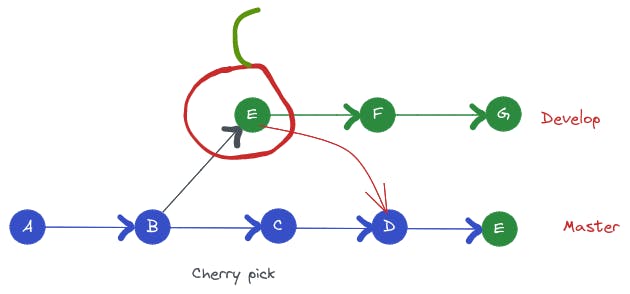
GIT Cherry Pick
Unleash Git Cherry pick Command As We All Know Git Is One Of The Most

Git Cherry Pick Commit Examples Explained PROPERLY GoLinuxCloud

Cherry Pick Your Teammate s Changes Without Push n Pull ing To Your
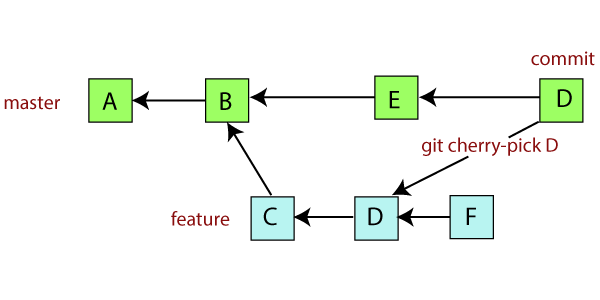
Git Cherry pick Javatpoint

How To Cherry Pick Git Commits Studytonight

Web Apr 21 2016 nbsp 0183 32 1 Answer Sorted by 3 there are several ways to achieve it you have to be on the branch you want to apply the commit to you can create a patch of the commit you want then apply it git format patch lt commit sha1 gt git apply lt patch path gt or you can indeed cherry pick the commit you want git cherry pick lt commit sha1 gt

Web Feb 3 2017 nbsp 0183 32 Cherry Picking multiple commits We have recently migrated from SVN to GIT our code is hosted on Atlassian Bitbucket and using Atlassian SourceTree as our desktop client Now we have a couple of projects with branches for our code base ie Integration branch for UAT and Release branch for Stage
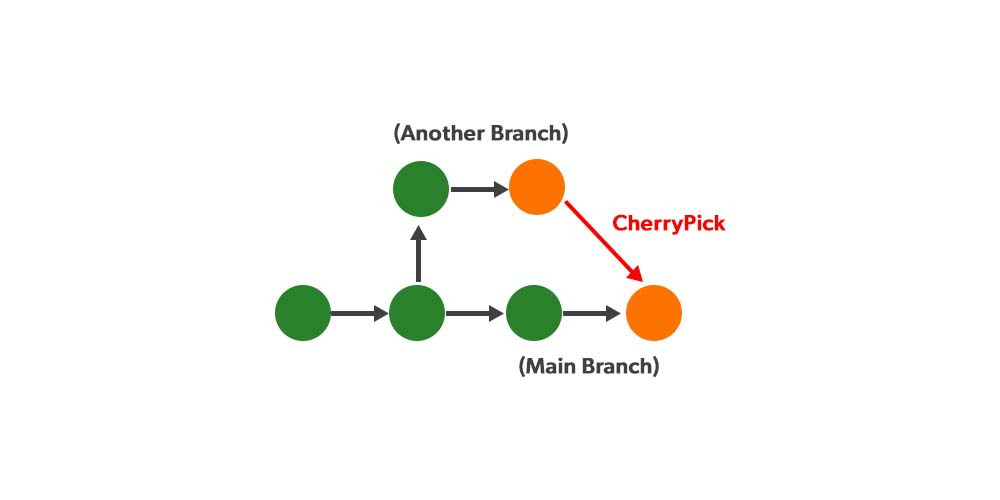
Web Aug 3 2018 nbsp 0183 32 Hi I am a user of TortoiseGit but one of my client is using Sourcetree I try to teach him with cherry pick cherry pick multi commits I find it s not possible to do this the option is disabled Is this a bug I am using the version 2 6 10 0 of source tree By the way cherry pick multi commits is possible in TortoiseGit Watch

Web Mar 9 2020 nbsp 0183 32 Git Tips Cherry Picking using SourceTree When there is a situation where you want to get only the changes or lines of code from some branch but not merge the whole branch you can make use of cherry pick

Web Apr 9 2021 nbsp 0183 32 If you look at the console quot fix conflicts and run quot git cherry pick continue quot When fixing conflicts the normal way without the cherry pick the console will mention to commit after the conflicts have been fixed As such even with a single cherry pick I think that git cherry pick continue is the way to go
Web Feb 17 2017 nbsp 0183 32 How to use Cherry Pick in Git SourceTree 64 381 views Cherry Pick is a useful feature in Git that can save you a lot of time when you accidentally made a commit on top of a wrong Web DESCRIPTION Given one or more existing commits apply the change each one introduces recording a new commit for each This requires your working tree to be clean no modifications from the HEAD commit When it is not obvious how to apply a change the following happens
Web Show 1 more comment 48 Cherry pick is to pick changes from a specific quot commit quot The simplest solution is to pick all changes of certain files is to use git checkout source branch lt paths gt In example git branch master twitter integration git checkout twitter integration app models avatar rb db migrate 20090223104419 create avatars rb