Git Change Log Author Change Log Version 1 35 Bitfinex Blog GitLink IntelliJ IDEs Plugin Marketplace How To Setup Multiple Git Accounts In The Same Machine Automate Git Change Log JPG Programming To Change September 2022 Product Update WEB To change the author information for the most recent commit run Terminal git commit amend author quot New Author Name lt new author example gt quot This command
WEB Note that using d gives you some insight into the tool operations For more complex range selections you can use git log arguments as shown below git changelog author WEB Jun 9 2023 nbsp 0183 32 git commit amend author quot New Author Name lt author name gt quot no edit To do this to any earlier commit in the commit history happens with the same
September 2022 Product Update Git How To Change Commit Author with Real Examples Logilax Lending Professional Change Log June 2021 Tamil Mugam Change An Author And Email Of A Git Commit In 3 Easy Steps Git Changelog Scaler Topics Visualize Git Log Tree Tech serhatteker A Beginner s Guide To Git What Is A Changelog And How To Generate It Change The Author And Committer Of A Git Commit Git Log Command Explained How To Use Updated 2022
Git Change Log Author
 Git Change Log Author
https://blog.bitfinex.com/wp-content/uploads/2021/12/Changelog_v1.32-1-1.png
WEB Intended to speed up tools that read log messages from git log output by allowing them to allocate space in advance L lt start gt lt end gt lt file gt L lt funcname gt lt file gt Trace the
Templates are pre-designed files or files that can be utilized for different purposes. They can conserve time and effort by providing a ready-made format and layout for developing various type of content. Templates can be used for personal or professional tasks, such as resumes, invitations, leaflets, newsletters, reports, presentations, and more.
Git Change Log Author
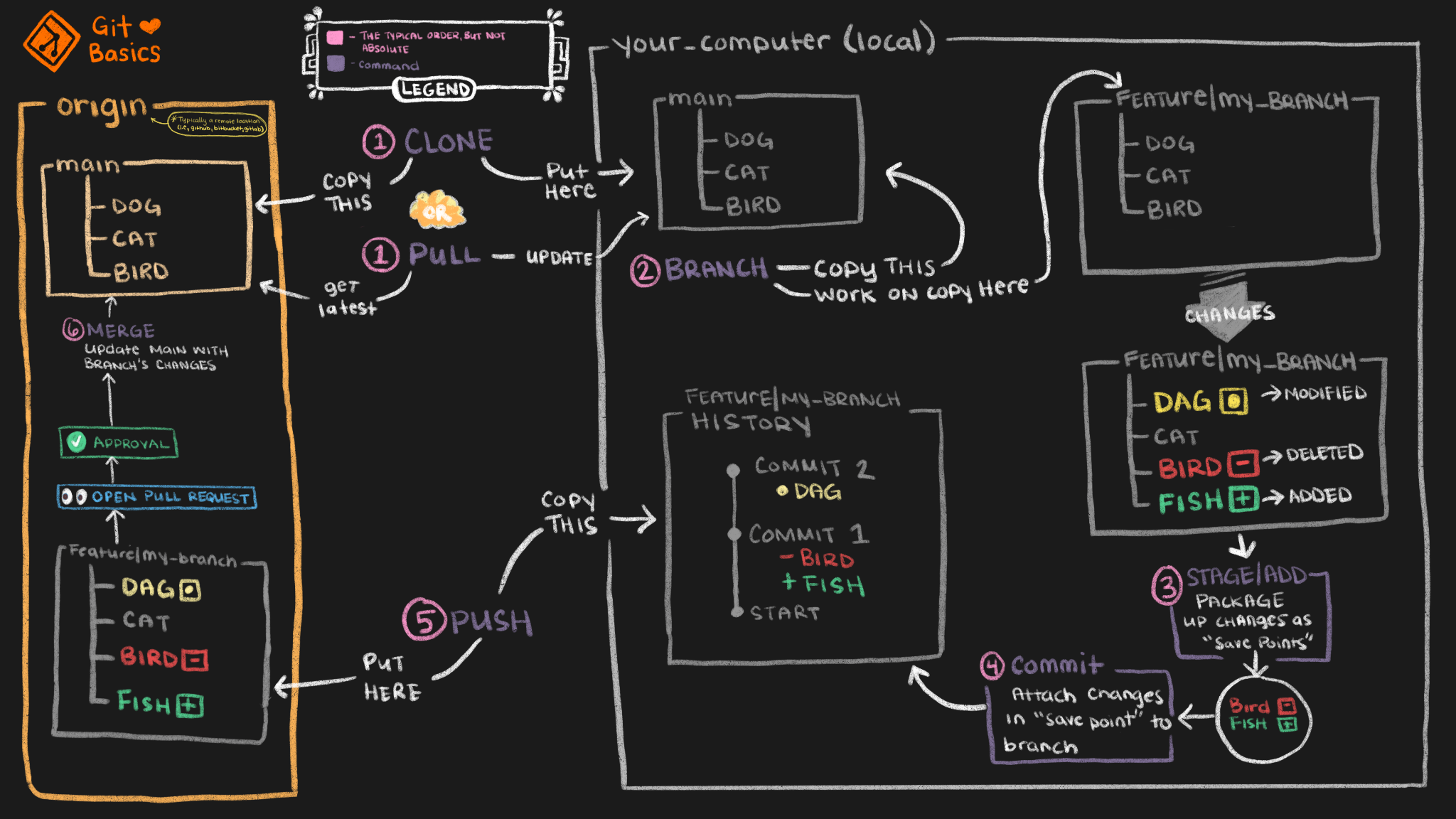
Git Workflow 183 Gitbook Riset

Git How To Change Commit Author with Real Examples Logilax

Lending Professional Change Log June 2021 Tamil Mugam

Change An Author And Email Of A Git Commit In 3 Easy Steps

Visualize Git Log Tree Tech serhatteker

A Beginner s Guide To Git What Is A Changelog And How To Generate It
WEB Then when git prompts you to change the commit use this git commit amend author quot Author Name lt email address gt quot no edit For example if your commit
WEB Sep 28 2020 nbsp 0183 32 Change the author info for the current repository To change the author information that is used for all future commits in the current repository you can update

WEB In case you want to change just the very last commit Git offers a very easy way to do this git commit amend author quot John Doe lt john doe gt quot This effectively replaces the

WEB Suppose we want to change the author of the first commit b123892 second commit author is what we want We start by checking out this commit git checkout b123892 2 Change

WEB git changelog parses your commit messages to extract useful data that is then rendered using Jinja2 templates for example to a changelog file formatted in Markdown Each Git
WEB Creating co authored commits on GitHub After you ve made changes in a file using the web editor on GitHub you can create a co authored commit by adding a Co authored by WEB Jun 23 2021 nbsp 0183 32 git rebase continue When that appears that message mention we have some options to change the author or just continue with the command git rebase
WEB Mar 24 2020 nbsp 0183 32 The git log author option searches the canonical address and git show and git log by default display the canonical address But my format ae overrides the