Git Bash Create Symbolic Link To Directory Unix Linux How To Remove Soft Link To Directory YouTube Create Symbolic Link In Windows 10 With PowerShell How To Create A Symbolic Link In Linux Using Ln Command Read News Today Update Today Trending With Enjoy How To Create Hard Which Command Is Used To Create A Symbolic Link Jaden has Morton Web Bash move file directory and create a link of it I am trying to make a bash script that moves a file or directory from source directory to destination directory and puts a
Web Nov 8 2022 nbsp 0183 32 I already did some research How to create a symlink between directories from inside an elevated cmd Git Bash shell fails to create symbolic links mklink D Web May 31 2023 nbsp 0183 32 I want to move files from one location to another in a git repository However I would like that programs can still access the files at the old location thus I want to
Which Command Is Used To Create A Symbolic Link Jaden has Morton Which Command Is Used To Create A Symbolic Link C mo Guardar La Sesi n De Herramientas Profesionales En El Disco Duro Bash Shell For Windows 10 Ln Link Symbolic Link Likosian How To Create Hard And Symbolic Links In Linux How To Create Symbolic link To A Directory On Windows When I Wanted To Create Soft And Hard Symbolic Links In Windows Tutorials New Git Version Doesn t Like My Symbolic Link Git Bash Shell For Windows 10 Ln Link Symbolic Link Likosian
Git Bash Create Symbolic Link To Directory
 Git Bash Create Symbolic Link To Directory
https://i.ytimg.com/vi/TWpfIx4RMks/maxresdefault.jpg
Web Apr 4 2021 nbsp 0183 32 Creating a link to one directory is a common use case of the ln command The syntax is the same as creating a soft link to a file ln s TARGET DIR LINK NAME
Pre-crafted templates provide a time-saving service for creating a diverse variety of documents and files. These pre-designed formats and designs can be used for numerous individual and expert projects, consisting of resumes, invitations, flyers, newsletters, reports, presentations, and more, improving the material production procedure.
Git Bash Create Symbolic Link To Directory
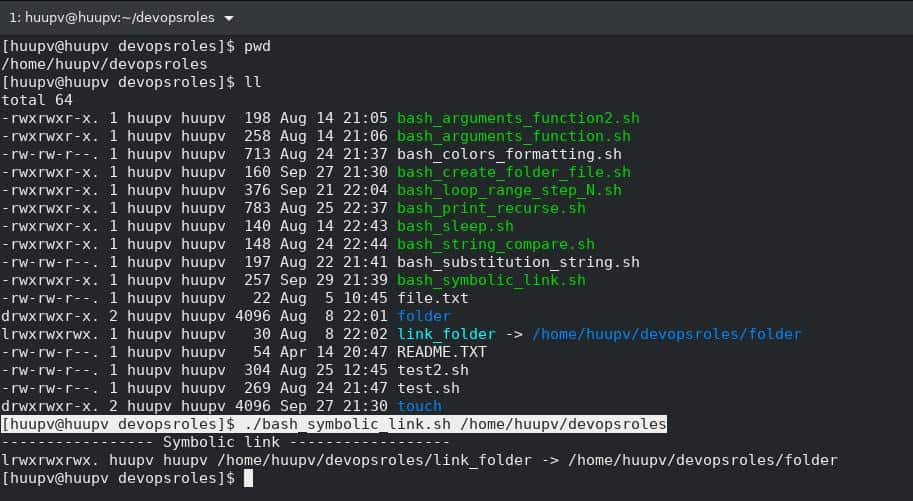
Bash Script Symbolic Link DevopsRoles Better 2023

Which Command Is Used To Create A Symbolic Link

C mo Guardar La Sesi n De Herramientas Profesionales En El Disco Duro

Bash Shell For Windows 10 Ln Link Symbolic Link Likosian

How To Create Symbolic link To A Directory On Windows When I Wanted To
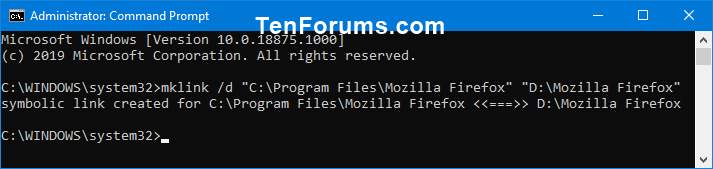
Create Soft And Hard Symbolic Links In Windows Tutorials

Web Oct 26 2018 nbsp 0183 32 You can see what Git does with a symbolic link by adding it to the index The index is like a pre commit When the index is committed you can use git checkout to

Web Jun 3 2015 nbsp 0183 32 It s important to launch the Git Bash shell as administrator as on Windows only administrators could create the symbolic links So in

Web Nov 7 2016 nbsp 0183 32 Creating Symbolic links or Soft links on Linux Open Bash prompt and type the below mentioned command to make a symbolic link to your file A Goto the folder
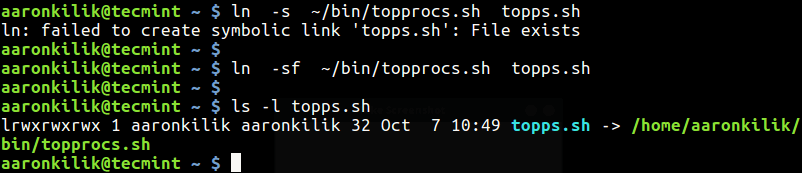
Web Wrap your git command s bwrap dev bind bind srv www projectfiles home me code project git status Similarly you can also wrap git add or even GUI apps

Web 2 Answers Sorted by 808 Symbolic or soft link files or directories more flexible and self documenting Source Link ln s home jake doc test 2000 something home jake xxx
Web Jan 11 2018 nbsp 0183 32 38 Answered by primetheus on Aug 21 2018 Symbolic links on Git Bash for Windows needs to be enabled when you install it 1LKsG png747 215 621 106 KB Web May 4 2012 nbsp 0183 32 31 According to help cd Options L force symbolic links to be followed resolve symbolic links in DIR after processing instances of P use the physical
Web Nov 2 2018 nbsp 0183 32 To create a symbolic link use the s symbolic option The ln command syntax for creating symbolic links is as follows ln s OPTIONS FILE LINK If both the