Get Data From Json To Excel Centrinis rankis Atliekantis Svarb Vaidmen Bandyti Dauguma Json Array Name Languageschool Working With JSON Data In Python Bagaimana Mengonversi Json Ke Excel Materi Sekolah Pengayaan Convert JSON To Excel In Node js Online Import JSON To XLS How To Convert Json To Excel Ticketslalar Just follow these steps On the ribbon bar choose Data Get Data From File From Json Select your Json file input json in this example In the opened Power Query Editor window and on the ribbon bar choose View
Uploaded 4930296 MB This is a free app to convert Json to Excel format also you can save the result to PDF DOCX PPTX XLS XLSX XLSM XLSB XLT ET ODS CSV TSV HTML JPG BMP PNG SVG TIFF XPS JSON XML SQL MHTML and Markdown Convert Excel online from Mac OS Linux Android iOS and anywhere How to automatically import JSON to Excel How to import JSON to Excel with Power Query How to import a JSON file to Excel using Power Query How to import data from JSON URL using Power Query Importing JSON data to Excel using VBA Import JSON Data to Excel Choosing the Best Method
How To Convert Json To Excel Ticketslalar JSON XML XML JSON Transforming Data From JSON To XML And XML To JSON Quick How To Convert JSON Data To An Excel Spreadsheet With Angular JSON To Excel Javatpoint Load Json Into Excel Weekendvse C Get Data From Json On Json Stack Overflow Import Json To Excel And Export Excel To Json Coding Is Love Solved How To Get Data From JSON Nested Arrays In Excel Vba json VBA Excel JSON To Excel Javatpoint
Get Data From Json To Excel
 Get Data From Json To Excel
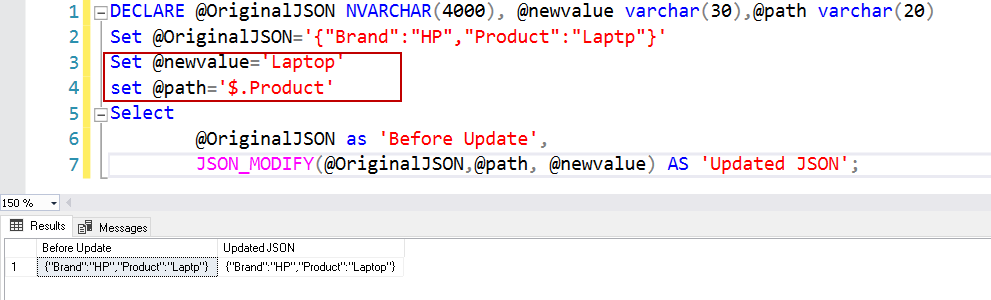
https://s33046.pcdn.co/wp-content/uploads/2020/05/variable-in-the-json_modify-function.png
If you re aware of PowerQuery Get Data in excel you can extract data from a JSON file and transform it to your desired output Gangula Jul 19 2019 at 8 32 Add a comment 2 Answers Sorted by 0 Since the items can have more than one value for the same ingredient and the desired output should sum these per ingredient name
Templates are pre-designed documents or files that can be utilized for numerous purposes. They can conserve effort and time by providing a ready-made format and layout for developing different type of content. Templates can be used for individual or expert projects, such as resumes, invites, leaflets, newsletters, reports, discussions, and more.
Get Data From Json To Excel
How To Convert JSON Data To An Excel Spreadsheet With Angular

JSON XML XML JSON Transforming Data From JSON To XML And XML To JSON Quick
How To Convert JSON Data To An Excel Spreadsheet With Angular
JSON To Excel Javatpoint

C Get Data From Json On Json Stack Overflow

Import Json To Excel And Export Excel To Json Coding Is Love
If you want to extract from JSON in Google Sheets you can use REGEXEXTRACT like this Put JSON in A1 Put the key you want to lookup in B1 Put this formula in C1 REGEXEXTRACT A1 B1 You can test it out by changing the lookup key in B1 If you want to extract from CSV you can use this Put
Use Power Query in Excel to import data into Excel from a wide variety of popular data sources including CSV XML JSON PDF SharePoint SQL and more

If you have some important data stored in a JSON file that you would like to import into an Excel spreadsheet you can easily do that with Excel s Get Transform feature and you don t even need any VBA code to import data from the local disk or from a web API Let s see how to convert import a JSON file to an Excel file

In Excels Data ribbon under GET and Transform Data we have the option of connecting to data of multiple sources and multiple types If we select Get data from file we will then have the option to get data from a JSON file In this example we have URL API endpoint https api coinmarketcap v1 ticker bitcoin Therefore from the Data

Go to Data Get Data From File From JSON This will be the output Go to Convert To Into Table Click on the arrow next to Value Select the items to show Click OK The image below will be the result Right click on the column header select Rename to change the column name This will be the output
Customer Stories If you re looking to view JSON in Microsoft Excel you ve come to the right place In this post we ll provide step by step instructions to view JSON in Excel First it s worth explaining why Excel can t simply open JSON like any other spreadsheet Step 1 Go to the Main Menu Tab To start the process of parsing a JSON file to Microsoft Excel click the Data tab from the main menu tabs in the spreadsheet window Step 2 Go to file from Get Data From File From JSON On the Data tab from the Get Transform Data section select Get Data From File From
Sample JSON File Type Title Description Tags Best Online JSON to Excel Converter Online JSON data converter tool to Excel