Foxit Pdf Printer Setup Download Foxit Pdf Twitter DOWNLOAD INSTALL FOXIT READER YouTube Foxit Pdf Printer For Windows 10 Of PDF WPS PDF Blog Why Install Foxit Reader Pohrock Foxit Pdf Editor Register Key Download Twitter WEB How to Install The installer format of Foxit PDF Editor can be EXE or MSI Please download the installer to your computer and then do the following Take Foxit PDF Editor Pro for example For an EXE installer Double click the
WEB The method for Deploying Custom Printer settings for Foxit PDF Editor has changed from v9 7 x to 11 x Below are the steps for setting up Custom Printer settings in v11 x Requirements Foxit PDF Editor v11 x must already be installed WEB With Foxit PDF Reader you can print a whole PDF file a selected portion of a page or specifed sections in a document Foxit PDF Reader also allows you to print multiple PDF files at a time Before printing you need to make sure that you have installed the printer successfully on your device
Foxit Pdf Editor Register Key Download Twitter Foxit PDF Editor Software Onlineshop Foxit RCE PDF Reader PDF Editor Chuy n i PDF Sang C c nh D ng T i Li u Kh c Trong Foxit PDF Editor Calam o Tutorial Foxit Reader Foxit PDF Editor Pro 2022 For Lifetime Windows Foxit PDF Editor Pro 11 2 2 53575 x32x64 ENG Crack ITorrent Foxit PDF Editor Pro For Teams Blitzhandel24 Foxit PDF Editor 11 PU V e tin SW CZ
Foxit Pdf Printer Setup
 Foxit Pdf Printer Setup
https://pbs.twimg.com/media/Et658h0XUAUdOye.jpg
WEB Foxit s free PDF Reader is the most powerful in the industry Our small feature rich and very fast PDF Reader enables you to view annotate fill out or securely sign PDF documents no matter where you are or what device you re on No other PDF Reader is as intuitive and quick to use
Templates are pre-designed files or files that can be used for different purposes. They can conserve effort and time by offering a ready-made format and design for developing different sort of content. Templates can be used for individual or expert projects, such as resumes, invites, leaflets, newsletters, reports, discussions, and more.
Foxit Pdf Printer Setup
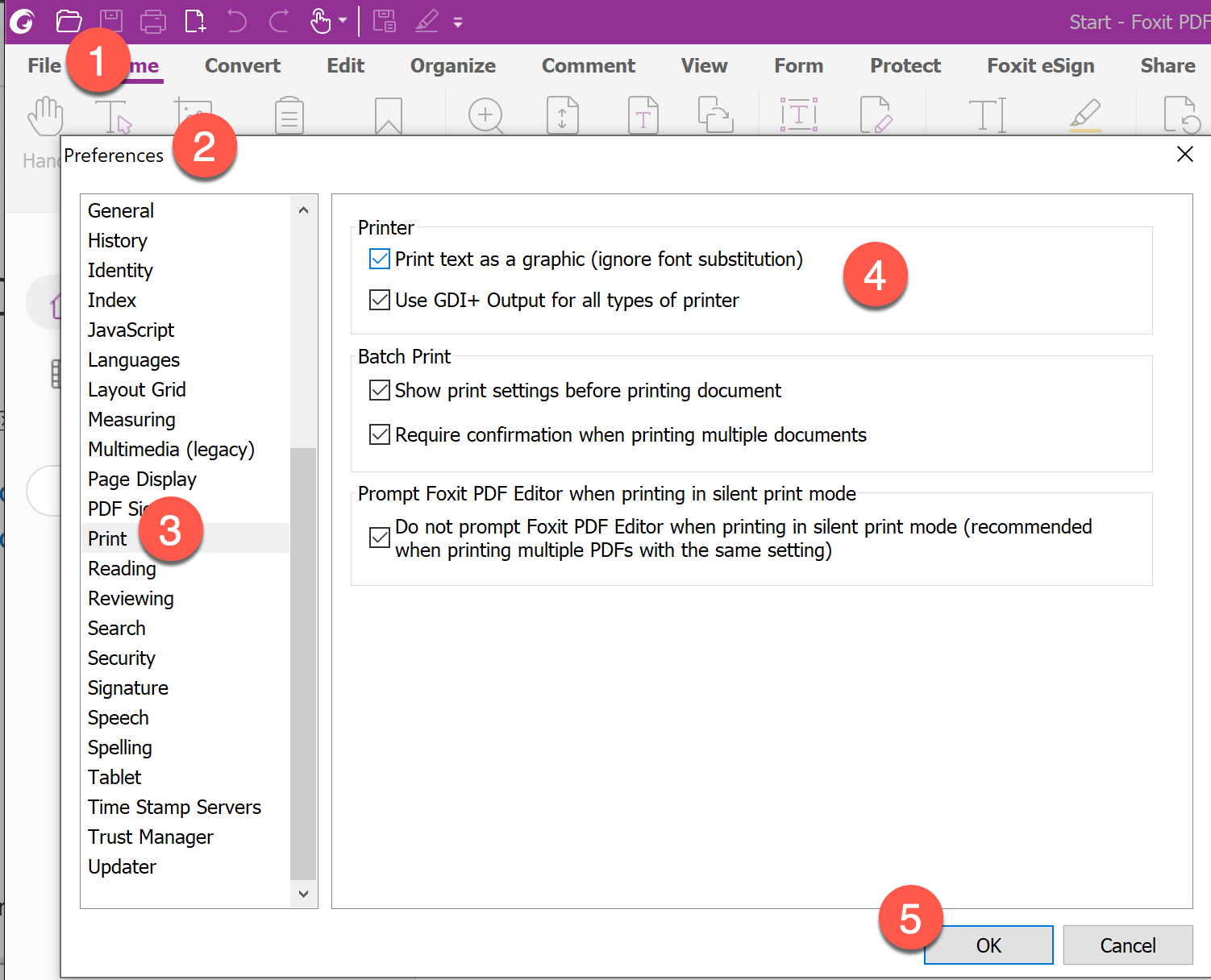
Advanced Printing Options Help Center Foxit Software

Foxit PDF Editor Software Onlineshop
Foxit RCE PDF Reader PDF Editor
Chuy n i PDF Sang C c nh D ng T i Li u Kh c Trong Foxit PDF Editor
Foxit PDF Editor Pro 2022 For Lifetime Windows

Foxit PDF Editor Pro 11 2 2 53575 x32x64 ENG Crack ITorrent

WEB In Foxit PhantomPDF v10 and Foxit PDF Editor the default printer setting includes setting via the Print Preferences of Foxit PhantomPDF Printer in Control Panel and XML file in C Users USERNAME AppData Roaming Foxit Software PDF Creator PH SettingTemplate

WEB Foxit PDF software download and cloud service trial center Free download PDF software for Windows Mac iOS or Android to view convert amp edit PDF files
WEB Jul 4 2024 nbsp 0183 32 The first step in solving a printing issue is to trace the source of the issue The troubleshooting techniques below solve some of the most common issues and are grouped into three categories Your physical Printer PDF file document itself Foxit PDF Editor Foxit PDF Reader Software Printer related solutions
WEB Advanced Printing Options in Foxit PDF Editor allows you to optimize printing PDFs to paper by substituting text as graphic and utilizing Graphics Device Interface GDI in Windows which enables Foxit PDF Editor to transmit objects and text directly to the printer using GDI APIs

WEB Foxit PDF Creator installs just like a regular printer You just download the setup program file into your own PC named foxitcreator setup exe from Foxit
WEB How to Install The installer format of Foxit PhantomPDF can be EXE or MSI Please download the installer to your computer and then do the following Take Business Edition for example For an EXE installer Double click WEB This document is intended for administrators to deploy and configure Foxit PDF Editor in an enterprise environment Please follow the instructions below for details
WEB Here is an article that provides a stand alone package of Foxit PDF Editor Creator PDF Printer for virtual environments for you to download Step 1 Choose an appropriate Foxit PDF Editor Creator package to download Foxit PDF Editor Creator for windows subscription license package