Formula For Finding P2 108061256 1731372987949 gettyimages 2177828189 AVaishnav Swiggy Spotlight On Randy Isenhower Chairman Board Of Commissioners Spotlight On Christian Oldenburg Executive Managing Director Market Admin Ride4regesh Spotlight On Marilyn Wiley Dean University Of North Texas G Brint Jul 18 2016 nbsp 0183 32 Have you tried using conditional formatting as below I simplified the formula in the example but should work for your case as well It seems to me more practical for large ranges
Aug 2 2015 nbsp 0183 32 The TODAY function is volatile and recalculates on every calculation cycle in the workbook If you want a timestamp look towards a VBA Worksheet Change event macro that Jun 9 2022 nbsp 0183 32 1 Returning an empty or zero length string e g quot quot to make a cell appear blank is a common practise in a worksheet formula but recreating that option when inserting the formula
Spotlight On Marilyn Wiley Dean University Of North Texas G Brint General Chemistry Boyles Law P1V1 P2V2 Example 1 YouTube An Exact Formula For The Primes Willans Formula YouTube Combined Gas Law P1V1 T1 P2V2 T2 Examples Practice Problems Area Of A Hexagon Formula Example Foraging Fun Packs Pet Shop Standard Deviation Formula And Calculation Steps Mean Equation Surface Area Of A Cube Formulas Examples And Diagrams
Formula For Finding P2
 Formula For Finding P2
https://image.cnbcfm.com/api/v1/image/108061256-1731372987949-gettyimages-2177828189-AVaishnav_Swiggy_attempts_Guinness_World_record_title_for_largest_Vada_Pav_Indian_Burger_deliv.jpeg?v=1731373002&w=1920&h=1080
Oct 24 2021 nbsp 0183 32 The file was saved using an older version of excel and I m using the latest O365 version What does the symbol mean and can I remove it Please note that I m aware of the
Pre-crafted templates provide a time-saving option for producing a diverse range of documents and files. These pre-designed formats and layouts can be used for numerous individual and expert tasks, consisting of resumes, invitations, leaflets, newsletters, reports, discussions, and more, simplifying the material development procedure.
Formula For Finding P2

ASTON MARTIN ARAMCO COGNIZANT 03 From Formula 1 V rityskuvat

General Chemistry Boyles Law P1V1 P2V2 Example 1 YouTube

An Exact Formula For The Primes Willans Formula YouTube

Combined Gas Law P1V1 T1 P2V2 T2 Examples Practice Problems

Foraging Fun Packs Pet Shop
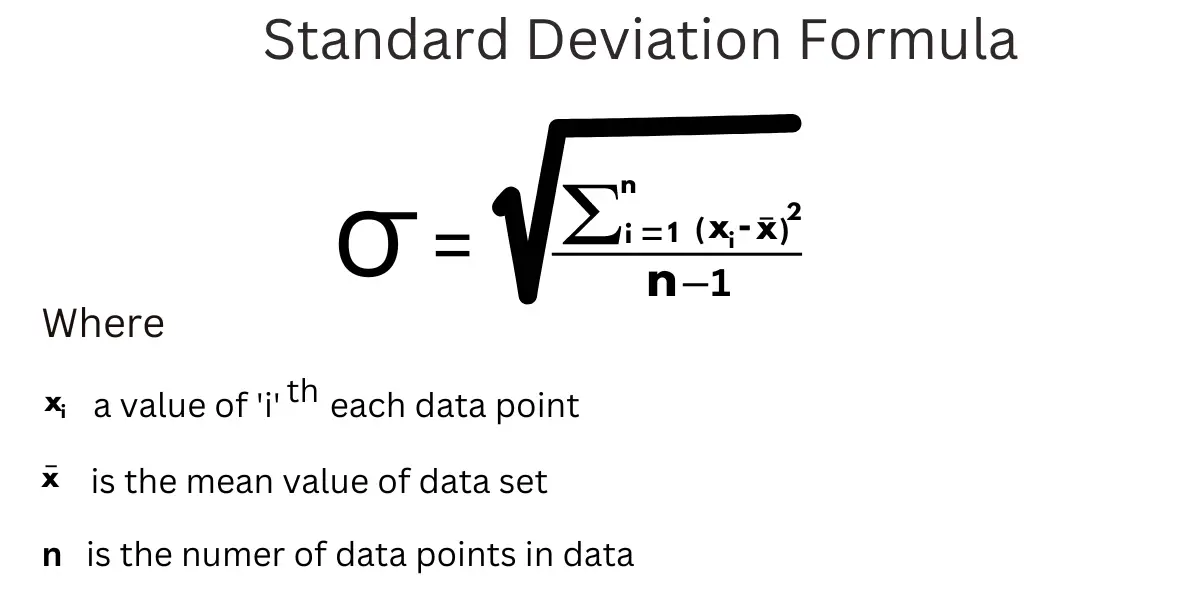
Standard Deviation Formula And Calculation Steps

In the formula E Excel file is the full file path of the unopened workbook test xlsx is the name of the workbook Sheet2 is the sheet name which contains the cell value you need to reference

Jan 7 2014 nbsp 0183 32 Using quot If cell contains N A quot as a formula condition Asked 11 years 8 months ago Modified 10 months ago Viewed 422k times

Sep 12 2013 nbsp 0183 32 I would like to write an IF statement where the cell is left blank if the condition is FALSE Note that if the following formula is entered in C1 for which the condition is false for

skeleton formula

Jun 9 2022 nbsp 0183 32 In Refers to enter the formula INDEX A1 A2 1 Click OK and close Name Manager This tells Excel to always look at the value immediately to the left of the current cell
[desc-11] [desc-12]
[desc-13]