Flex Item Height Fit Content Flutter Draggable Container Expand From Top To Bottom Flutter Fixes Html Fill Bootstrap Column With Image With Same Height As Other Text column Stack Overflow Confermare Molto Fai Un Esperimento Shrink To Fit Css Sidhartayoga Tajne Forenzn Medic na T m Flutter Decoration Box Na Rozdiel Od Puno Zrada R wnina Obw d Medytacja Container Height Css Para P kni cie Premia In other words suppose the flexbox s size is insufficient to fit the flexible items In that case browsers will shrink the items to fit the container Therefore flex shrink allows you to specify the shrinking factor of a flexible item Here s an example flex item3 flex shrink 0 Try it on StackBlitz
As a detail here flex 1 is the same as saying flex 1 1 auto It is shorthand for three different properties flex grow 1 flex shrink 1 flex basis auto Just so happens that giving them the ability to grow on an equal basis the most common need so flex 1 is a nice way to write that div Try it Yourself The flex item properties are order flex grow flex shrink flex basis flex align self The order Property The order property specifies the order of the flex items 1 2 3 4 The first flex item in the code does not have to appear as the first item in the layout The order value must be a number default value is 0 Example
R wnina Obw d Medytacja Container Height Css Para P kni cie Premia Varying Column Heights In Bootstrap By Carol Skelly WDstack Medium Shipyard Enjoy Your Holiday DOOM Understanding Min content Max content And Fit content In CSS LogRocket Blog CSS Flexbox 6 The Flex basis Property OSTraining CSS Width And Height StudyMuch Html Setting Flex grow 1 Causes Div Height To Go Beyond Available Space Stack Overflow Css flex 51CTO flex What Does Src Stand For In HTML
Flex Item Height Fit Content
 Flex Item Height Fit Content
https://i.stack.imgur.com/edeka.png
We ll come back to this later but for now it s just important to remember that the content of a flex item has an impact on how flex grow flex shrink and flex basis work together OK so now for flex shrink Remember that s the second value in the shorthand child flex 0 1 auto flex shrink 1 flex shrink tells the browser
Templates are pre-designed files or files that can be used for numerous purposes. They can save effort and time by providing a ready-made format and design for creating different sort of content. Templates can be utilized for individual or professional tasks, such as resumes, invitations, flyers, newsletters, reports, discussions, and more.
Flex Item Height Fit Content

Css Problem With Behavior Of DIV FLEX On IPad Stack Overflow

Varying Column Heights In Bootstrap By Carol Skelly WDstack Medium
Shipyard Enjoy Your Holiday DOOM
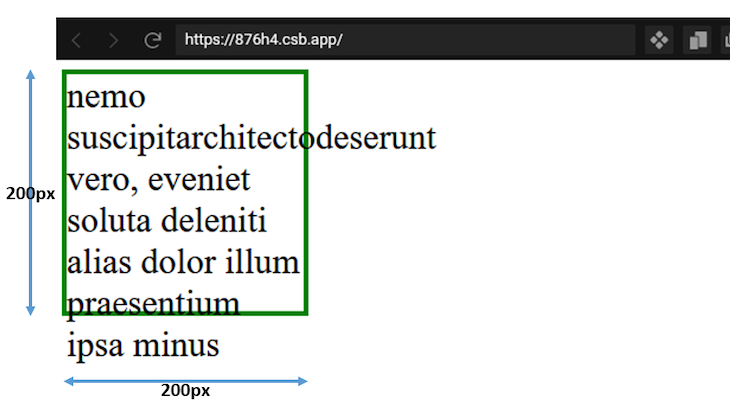
Understanding Min content Max content And Fit content In CSS LogRocket Blog
CSS Width And Height StudyMuch

Html Setting Flex grow 1 Causes Div Height To Go Beyond Available Space Stack Overflow

In this guide we will be exploring the three properties that are applied to flex items which enable us to control the size and flexibility of the items along the main axis flex grow flex shrink and flex basis Fully understanding how these properties work with growing and shrinking items is the real key to mastering flexbox A first look

3 Answers Sorted by 15 Try setting min height or min width Magic container display flex height 100 min height 0 By default flex items won t shrink below their minimum content size the length of the longest word or fixed size element To change this set the min width or min height property

This complete guide explains everything about flexbox focusing on all the different possible properties for the parent element the flex container and the child elements the flex items It also includes history demos patterns and a browser support chart Table of contents Background Basics and terminology Flexbox properties Prefixing Flexbox

The properties we will look at in this guide are as follows justify content controls alignment of all items on the main axis align items controls alignment of all items on the cross axis align self controls alignment of an individual flex item on the cross axis align content described in the spec as for packing flex lines controls space between flex lines on the cross

The flex property may be specified using one two or three values One value syntax the value must be one of a valid value for flex grow then the shorthand expands to flex flex grow 1 0 a valid value for flex basis then the shorthand expands to flex 1 1 flex basis the keyword none or one of the global keywords Two value syntax
You can make flex items take the content width instead of the width of the parent container with CSS properties The problem is that a flex container s initial setting is align items stretch meaning that items expand to cover the container s full length along the cross axis How can we shrink it so it fits the content SamA74 January 3 2022 3 43pm 2 Use the align items property The default is stretch which will fill the width height in case of row direction
Flex grow is the ability for an item to grow with the value defining the proportion of space it should take up In the same way items can shrink using the flex shrink property Flex basis is the initial main size of a flex item before any free space is distributed On list content p I have used flex 1 0 auto which means this flex grow 1