Fix Boot Manager Windows Command Fix Bootmgr Is Corrupted The System Cannot Boot In Windows 10 Windows Boot Manager How To Edit And Fix Boot Manager In Windows 10 RAY S BLOGGING AGAIN The Windows Boot Manager How To Enable Or Disable Windows Boot Manager On Windows 7 8 10 YouTube Disable Windows Boot Manager On Startup Without Having Access To Web Aug 2 2015 nbsp 0183 32 Solution Boot a Windows 10 installation media GParted explains how to get it direct link for Windows 10 and rebuild the Boot Configuration Data BCD store using the cmd exe command line Windows 10 from thinstallation media
Web Jul 29 2021 nbsp 0183 32 Fix Windows 10 Winload exe Using the Command Prompt If you are unable to perform a startup repair then your next option is to try using your Windows 10 installation media to fix the Web Jun 14 2022 nbsp 0183 32 After booting into the recovery environment you need to open a command line console select System Restore gt Troubleshoot gt Command Prompt You can run the Command Prompt even if you only have a Windows installation media at hand
Disable Windows Boot Manager On Startup Without Having Access To Windows Fix Boot Manager Windows Boot Manager Edit Bootmgr Fix Boot Errors In Windows 10 Step by Step Guide To Repair And Fix MBR Windows 7 8 8 1 10 Windows Boot Manager Windows Failed To Start FIX YouTube Badscale blogg se Install Windows 11 Without Secure Boot Disable Windows Boot Manager 7 8 1 10 Free Boot Manager Windows 7 Supportforward How To Edit Windows 10 Boot Manager Uvnew
Fix Boot Manager Windows Command
 Fix Boot Manager Windows Command
https://computertechnicians.b-cdn.net/wp-content/uploads/2021/11/fix-bootmgr-is-corrupted-the-system-cannot-boot-windows-10.png
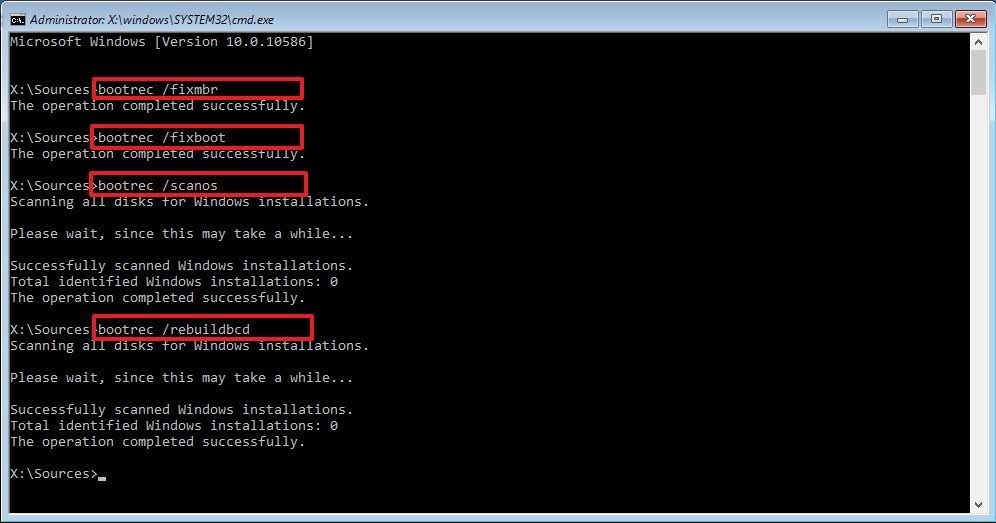
Web Jun 29 2022 nbsp 0183 32 How to use Windows Boot Manager to fix Windows 10 boot errors Repairing the master boot code and boot sector Fixing Boot Configuration Data BCD errors Replace the Bootmgr
Templates are pre-designed files or files that can be used for numerous purposes. They can save effort and time by supplying a ready-made format and design for creating various kinds of material. Templates can be used for individual or professional jobs, such as resumes, invites, leaflets, newsletters, reports, discussions, and more.
Fix Boot Manager Windows Command

Windows Boot Manager Hot Sex Picture

Windows Fix Boot Manager

Windows Boot Manager Edit Bootmgr Fix Boot Errors In Windows 10
Step by Step Guide To Repair And Fix MBR Windows 7 8 8 1 10
Badscale blogg se Install Windows 11 Without Secure Boot
Disable Windows Boot Manager 7 8 1 10

Web Feb 10 2022 nbsp 0183 32 Boot your computer from the Windows install image and press Shift F10 on the language selection screen You will see a command prompt Try to repair the BCD file automatically using this command bootrec RebuildBCD Reboot your computer and check if Windows boots don t forget to change the boot device priority in the BIOS settings

Web May 6 2021 nbsp 0183 32 You can manage the Boot Manager from Advanced System Properties System Configuration MSConfig exe tool or Windows command Prompt BCDEdit command BOOTMGR provides useful information for troubleshooting and resolving Windows boot errors

Web Jan 3 2024 nbsp 0183 32 Way 1 Repair system files using SFC command Way 2 Check and fix disk errors through CHKDSK command Way 3 Run Bootrec exe tool to repair boot errors Way 4 Access the System Restore with Command Prompt Run Command Prompt from Windows Recovery mode first

Web Dec 15 2021 nbsp 0183 32 Add a boot entry for your Windows partition bcdboot D Windows Reboot the PC Windows should appear Set up or repair the boot menu on a dual boot PC When setting up a PC to boot more than one operating system you may sometimes lose the ability to boot into one of the operating systems

Web Feb 8 2023 nbsp 0183 32 On the Install Windows screen select Next gt Repair your computer On the Choose an option screen select Troubleshoot On the Advanced options screen select Startup Repair After Startup Repair select Shutdown then turn on your PC to see if Windows can boot properly
Web Apr 27 2021 nbsp 0183 32 1 Restart Your PC 2 Check for Bootable Media 3 Change the Boot Order in BIOS 4 Unplug USB and Other Devices From Your PC 5 Run Startup Repair 6 Rebuild the Boot Configuration Data 7 Use System Restore 8 Clean Install Windows 10 or 7 9 Replace Your Hard Drive 1 Restart Your PC Web Dec 20 2023 nbsp 0183 32 Software Apps Windows 10 How to use Startup Repair to fix boot problems with Windows 10 How to By Mauro Huculak last updated 20 December 2023 You can fix most Windows 10 boot
Web Restart your computer and check if Windows 10 can now boot If bootrec utility doesn t fix your Windows 10 installation try following the next commands to fix the EFI bootloader Boot from the installation DVD or the Windows 10 setup or recovery USB Click Repair your computer Choose Troubleshoot Choose Command Prompt