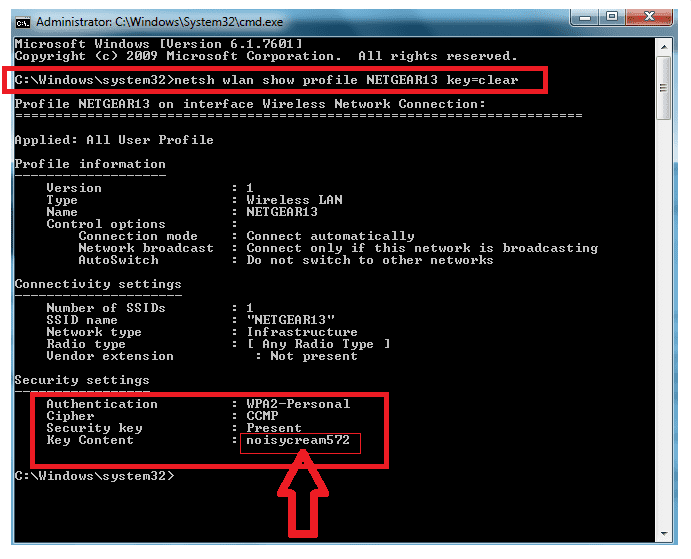
Find Wifi Password Using Cmd Find Passwords Of All Connected Wi Fi Networks Using CMD Tips And Tricks Internet Tricks And 3 Tips To Help You Find Or View Wi Fi Password On Windows 10 How To Find Your WiFi Password Using CMD YouTube How To Find Current WiFi Password Using CMD On Windows10 8 7 In Tamil Rocky Tech Tips YouTube How To Find Wifi Password On Windows 10 Using CMD Step By Step Web Nov 29 2022 nbsp 0183 32 Search for Command Prompt right click the top result and select the Run as administrator option Type the following command to view the wireless network profiles saved on your PC and press Enter
Web Jun 3 2021 nbsp 0183 32 Method 1 Using Windows Download Article 1 Open CMD with administrator permissions as an admin on the connected device Press Win R or go to your search bar type cmd right click and then select Run as administrator Using this option requires being on the admin account on the device or at least having the admin password 2 Web Dec 10 2020 nbsp 0183 32 Method 1 Finding the WiFI Password Using CMD Lines The first method of finding your WiFi password is with CMD or command prompt which is a built in program on Windows 10 that allows you to execute entered commands
How To Find Wifi Password On Windows 10 Using CMD Step By Step How To Find Wi Fi Password Using CMD On Windows 10 8 7 Wifi Windows 10 Wifi Wifi Password How To Find WiFi Password Of All Network Using Command Prompt InfoBrother Here Is How To Find Passwords Of All Connected Wi Fi Networks Using CMD How To View Saved Wi Fi Passwords In Windows 11 11 Vrogue Find All WIFI Password Using CMD With One Command Windows 10 8 1 8 7 YouTube How To Find WiFi Password Of All Network Using Command Prompt InfoBrother CMD Show Wi Fi Password How To Find Wi Fi Password Windows 10 8 1 8 7 XP YouTube Learn Computer Coding Life Hacks Computer Computer Basics Hacking Computer Computer Books
Find Wifi Password Using Cmd
 Find Wifi Password Using Cmd
https://www.techworm.net/wp-content/uploads/2017/01/wifi-password-cmd3.png
Web To do this select the Start button then select Settings gt Network amp internet gt Properties gt View Wi Fi security key Note You can also view the password of saved networks on the Manage known networks page by selecting any network and then View Wi Fi security key
Templates are pre-designed files or files that can be used for various functions. They can save effort and time by providing a ready-made format and layout for developing various kinds of content. Templates can be used for individual or professional projects, such as resumes, invitations, leaflets, newsletters, reports, presentations, and more.
Find Wifi Password Using Cmd

How To Find WiFi Password Of All Network Using Command Prompt InfoBrother

How To Find Wi Fi Password Using CMD On Windows 10 8 7 Wifi Windows 10 Wifi Wifi Password

How To Find WiFi Password Of All Network Using Command Prompt InfoBrother

Here Is How To Find Passwords Of All Connected Wi Fi Networks Using CMD
Find All WIFI Password Using CMD With One Command Windows 10 8 1 8 7 YouTube

How To Find WiFi Password Of All Network Using Command Prompt InfoBrother

Web Mar 11 2019 nbsp 0183 32 Here s how to find the WiFi password using the command prompt Open the command prompt by opening Run Windows R and typing CMD Hit Enter Note Alternatively you can use Search and type CMD Right click on Command Prompt and select Run As Administrator Type the following command line and hit Enter NETSH
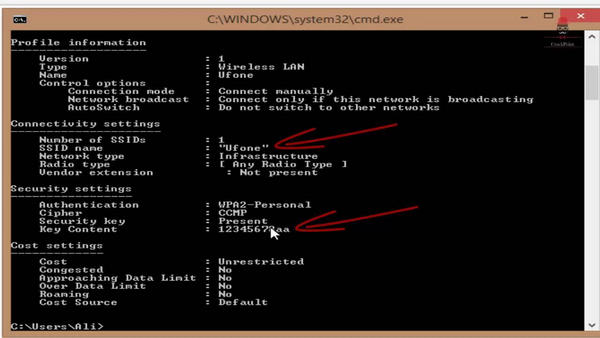
Web Oct 24 2023 nbsp 0183 32 Select Wireless Properties On the Security tab of Wireless Network Properties check the box Show characters you will find the Wi Fi password in the Network security key field Method 2 Check the Wi Fi password via Command Prompt Type and search Command Prompt in the Windows search bar then click Open

Web Apr 8 2023 nbsp 0183 32 How to Find the Wi Fi Password Using CMD in Windows In this article you learn how to use the command prompt to get the Wi Fi password to avoid resetting the passwords just because you forgot it Apr 8 2023 3 min read Finding the Wi Fi Password Using CMD

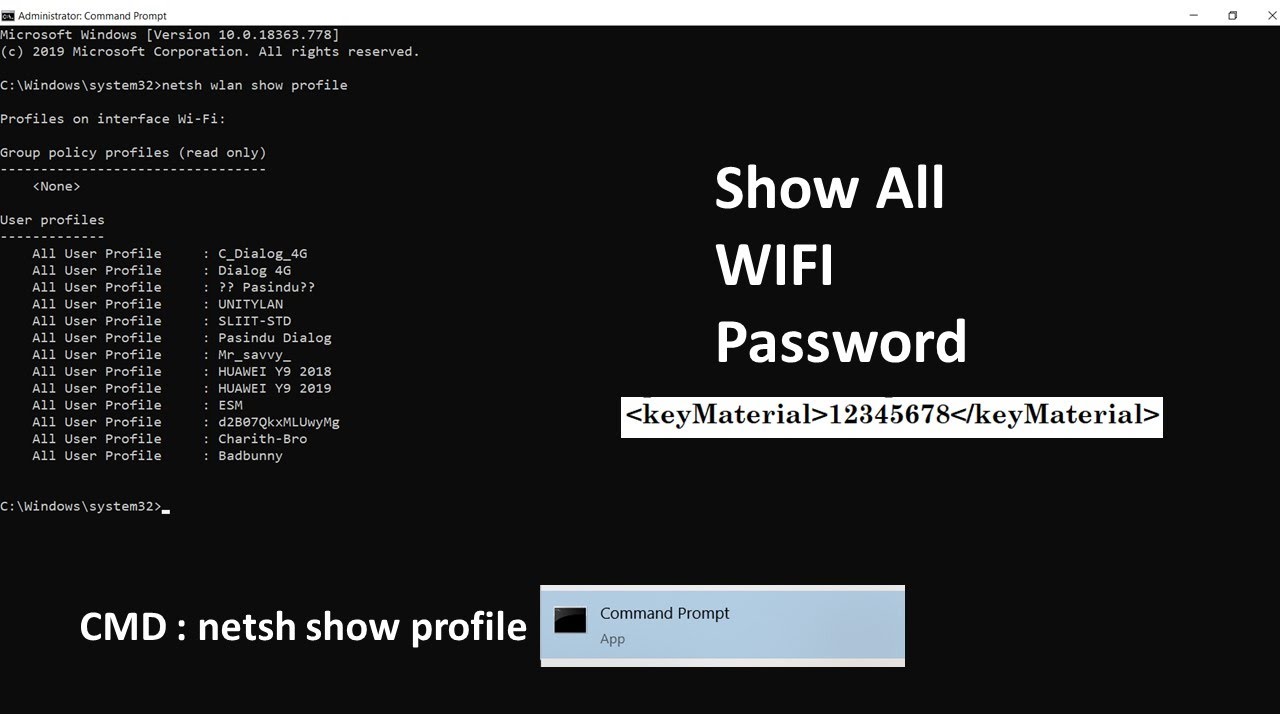
Web May 6 2022 nbsp 0183 32 Open the command prompt and run it as administrator In the next step we want to know about all the profiles that are stored on our computer So type the following command in the cmd netsh

Web Apr 10 2022 nbsp 0183 32 1 Navigate to the View Network Connections control panel app The easiest way to get there is to search for quot View Network Connections quot in the Windows Search box and click the top result Image
Web Mar 10 2023 nbsp 0183 32 Go to Control Panel gt Network and Internet gt Network and Sharing Center gt your Wi Fi network name Select Wireless Properties gt Security gt Show characters Look next to Network security key To find passwords from previous wireless connections use the Command Prompt This article will show you how to find the Wi Fi password on Web Jun 4 2023 nbsp 0183 32 However Windows provides a convenient way to retrieve the Wi Fi password using the Command Prompt CMD Steps to find the Wi Fi password using CMD in Windows 11 10 ensuring that you regain access to your network without hassle How to Find the Wi Fi Password Using CMD in Windows 11 10 Step 1 Opening the
Web Oct 16 2023 nbsp 0183 32 To view the password for the Wi Fi network that you are currently connected to use an option in Windows 11 s Settings app Start by opening the Settings app on your PC Do this by pressing Windows i keys at the same time In Settings from the left sidebar select quot Network amp Internet quot On the quot Network amp Internet quot page click quot Wi Fi quot