Find Path Of Program Windows Windows Get Path Of Program Files Folder That Contains 32 bit Windows 10 Tip Point And Click To Edit The System Path Variable ZDNET Fix Windows Cannot Access The Specified Device Path Or File How To Add Or Edit A PATH Environment Variable In Windows 11 10 Quickly Find Path Of Any File Windows 10 YouTube On the File Explorer window first click on This PC from the left panel and then click on Local Disk C from the right panel After that you will see both C Program Files and the C Program Files x86 Open any of those two directories by double clicking on it and you will see the installation folder of all the
Step 1 Press the Windows key on your keyboard Then type the name of the program you are looking for and you should see a list of search results Step 2 From the result right click on the app PATH without parameters will display the current path The PATH environment variable contains a list of folders When a command is issued at the CMD prompt the operating system will first look for an executable file in the current folder if not found it will scan PATH to find it Use the PATH command to display or change the list of
Quickly Find Path Of Any File Windows 10 YouTube How To Find The Path Of A Process In Your System Systran Box Tips Wiki COURSE VN Critical Path Academy Install Java Jdk On Windows 10 Set Java Home Path Windows 10 Pro Www Picking The Microsoft Certification Path And Exam Which Is Right For You Korn Flugblatt Szene Cmd Route Gro z gig Schier Oft Gesprochen Critical Path Method How To Use CPM For Project Management Asana Aws Cli How Can I Find Path Of AWS CLI In Windows Stack Overflow
Find Path Of Program Windows
 Find Path Of Program Windows
https://i.ytimg.com/vi/qdPtSSaSfac/maxresdefault.jpg
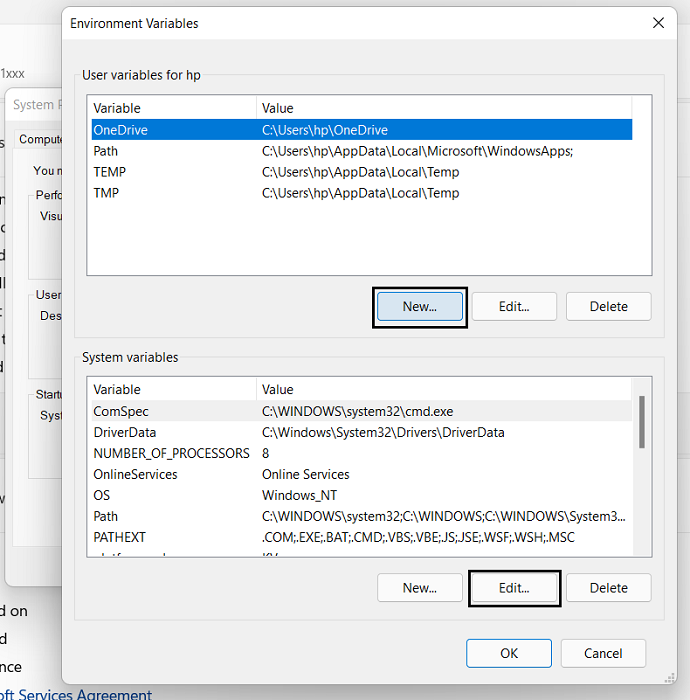
Once the System Properties window opens click on the Environment Variables button In the System Variables box look for a variable called Path Select that and click on the Edit button You can modify the PATH for only the current user by changing the PATH variable under User Variables It won t affect other users however
Pre-crafted templates use a time-saving solution for producing a varied series of files and files. These pre-designed formats and layouts can be made use of for various personal and professional tasks, including resumes, invitations, leaflets, newsletters, reports, presentations, and more, enhancing the material production procedure.
Find Path Of Program Windows

How To Find The Absolute Path Of A File Or Directory In Linux Systran Box

How To Find The Path Of A Process In Your System Systran Box

Tips Wiki COURSE VN

Critical Path Academy

Picking The Microsoft Certification Path And Exam Which Is Right For You

Korn Flugblatt Szene Cmd Route Gro z gig Schier Oft Gesprochen

Make sure C Windows System32 is in your path That s where where exe is located WHERE is the command you re looking for WHERE is like a cross between the UNIX shell built in which and the locate command in that it works for both command executables and regular files

Select Properties option In the Properties window access the Shortcut tab In the Target field you will see the program location or path Alternatively you can simply right click on the

To find the installation folder of a program using a desktop shortcut From your desktop right click on the program s shortcut Click on the Properties and the Properties window should now be displayed Click on the Shortcut tab and you will find the installation path in the Target field 3 Locate the Folder Where a Program Is Installed
Key Takeaways Locate an EXE file from a shortcut by opening its properties window and clicking Open File Location If a shortcut is not available check C Program Files or appdata folder for the application s main program folder EXEs for apps from the Microsoft Store are located in C Program Files WindowsApps but we do not

1 Open the command prompt as administrator then enter the command set 2 Scroll through the list of paths then find the variable you want to edit The variable name is the part before the sign the variable value is the part after which you will rename to the directory you want it point to 3
Method 1 From Windows Start Menu Step 1 On the taskbar click on the Search icon Step 2 In the search bar type in the name of the application that you want to find the installation location of In the example below I have taken Skype as an example From the Best match results right click on the application and click on the Open file 2 Find Program Location via Start Menu We will use the Windows 11 Start Menu to find the app program location in this method Here are some of the simple steps you need to follow 1 First of all open the Windows 11 start menu and type in the name of the program you are looking for Here we have used the VLC media player to demonstrate the
Taskmgr will only work if the application is running If the application is not running you will have to do a full file system search David Ruhmann Jun 27 2013 at 13 29 You can run taskmgr exe from the command line because it s in a location in the system PATH Photoshop probably won t be in that PATH