Find Duplicate Files Ubuntu Command Line Perfectly Solved How To Find Duplicate Files Across Multiple Drives How To Edit Files In Ubuntu Command Line How To Find And Delete Duplicate Files In Ubuntu Using Fdupes VITUX How To Find And Delete Duplicate Files In Ubuntu Using Fdupes VITUX How To Find And Delete Duplicate Files In Ubuntu Using Fdupes VITUX In order to install FSlint open your Ubuntu Terminal through the Dash or by pressing Ctrl Alt T and enter the following command sudo apt install fslint Enter y when prompted with a y n option in order to continue installation Once the installation is complete you can access both the FSlint Janitor graphical application and FSlint command
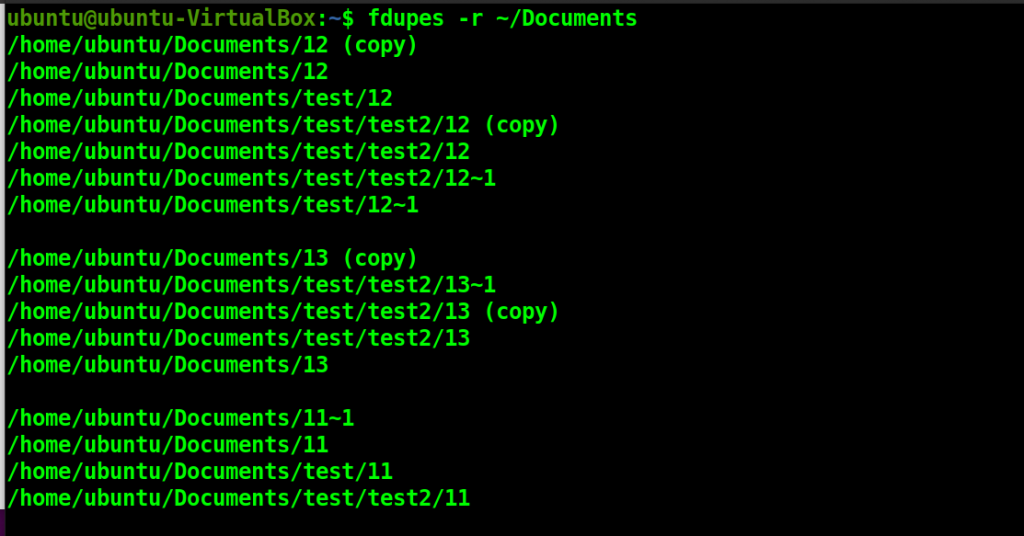
For finding duplicates you have execute the command fdupes path to some directory This command will only look in directory specified and will print out all the duplicate files It will not look into sub directories To look also in sub directories add the r command option It denotes recursively and will force the command to Sudo apt install fslint On RHEL based distros like CentOS and Fedora sudo yum install fslint sudo dnf install fslint On Arch Linux and Manjaro sudo pacman S fslint 2 Fdupes Fdupes is one of the easiest programs to identify and delete duplicate files residing within directories
How To Find And Delete Duplicate Files In Ubuntu Using Fdupes VITUX Install Deb File Ubuntu Command Line Choicegre How To Find Duplicate Files In Linux And Remove Them How To Find And Delete Duplicate Files In Directory On Linux Server How To Check Memory Usage In Linux Via Command Line Ubuntu B Fdupes A Command Line Tool To Find And Delete Duplicate Files In How To Uninstall Software In Ubuntu Command Line How To Find Remove Duplicate Files In Linux Ubuntu Systems
Find Duplicate Files Ubuntu Command Line
 Find Duplicate Files Ubuntu Command Line
https://toolbox.easeus.com/images/toolbox/dupfiles-cleaner/screenshots/find-duplicate-files.png
find type f Firstly we use process substitution so that the awk command can read the output of the find command find type f The find command searches for all files in the searchPath directory awk F We use as the FS of the awk command It makes extracting the filename easier The last field will be the
Templates are pre-designed files or files that can be utilized for different functions. They can conserve effort and time by providing a ready-made format and layout for creating various type of content. Templates can be utilized for individual or expert jobs, such as resumes, invitations, leaflets, newsletters, reports, discussions, and more.
Find Duplicate Files Ubuntu Command Line

How To Find And Delete Duplicate Files In Ubuntu Using Fdupes VITUX
Install Deb File Ubuntu Command Line Choicegre

How To Find Duplicate Files In Linux And Remove Them

How To Find And Delete Duplicate Files In Directory On Linux Server

B

Fdupes A Command Line Tool To Find And Delete Duplicate Files In

On Ubuntu you ll find them under usr share fslint fslint So if you wanted to run the entire fslint scan on a single directory here are the commands you d run on Ubuntu cd usr share fslint fslint fslint path to directory This command won t actually delete anything It will just print a list of duplicate files you re on your own

5 FSlint Duplicate File Finder for Linux FSlint is a free utility that is used to find and clean various forms of lint on a filesystem It also reports duplicate files empty directories temporary files duplicate conflicting binary names bad symbolic links and many more It has both command line and GUI modes

To find duplicate files run the following command with your directory path fdupes directory path You can see the duplicate files presented in the output Search for Duplicate Files in Subfolders With Fdupes The above command only finds duplicate files within the current folder It does not look through the subfolders and such
Select further actions for duplicate files Rdfind CLI tool to find and remove duplicate files Rdfind or redundant data find is a command line utility to find and remove duplicate files on Linux The tool is available to install on Ubuntu through the official repositories Open a terminal and run sudo apt install rdfind Using Rdfind
To recursively search through all sub directories in the specified directory and identify all the duplicate files fdupes r Documents Image credit Tom s Hardware Both the above commands
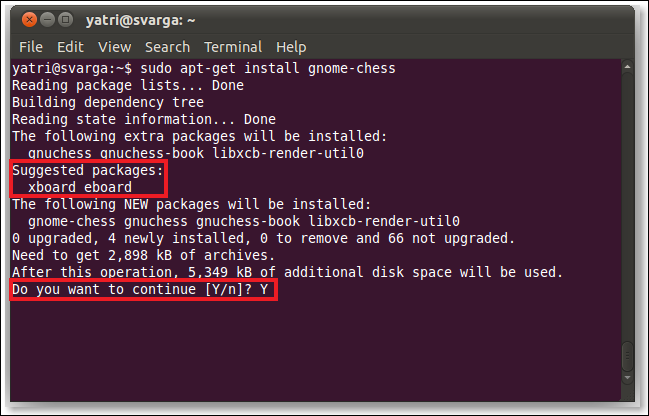
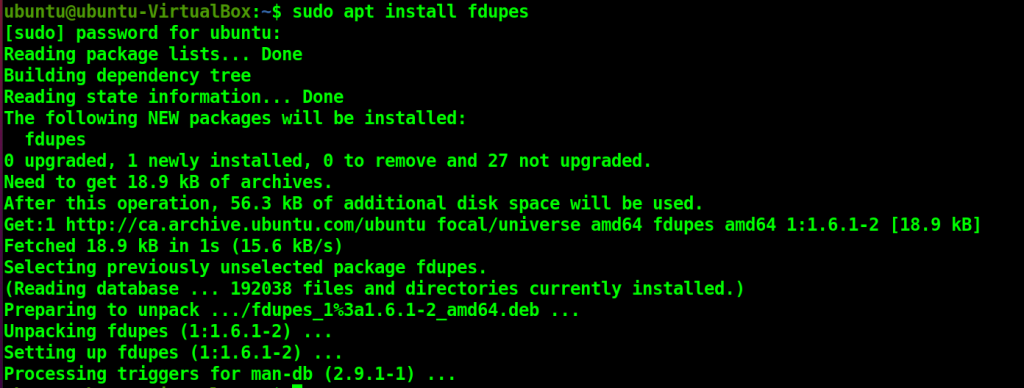
Searches the given path for duplicate files Such files are found by comparing file sizes and MD5 signatures followed by a byte by byte comparison In Debian or Ubuntu you can install it with apt get install fdupes In Fedora Red Hat CentOS you can install it with yum install fdupes On Arch Linux you can use pacman S fdupes and on Gentoo Fdupes is a Linux utility written by Adrian Lopez in C programming Language released under MIT License The application is able to find duplicate files in the given set of directories and sub directories Fdupes recognize duplicates by comparing MD5 signature of files followed by a byte to byte comparison A lots of options can be passed with
To find duplicates in a particular directory simply type fdupes directory path on the Linux terminal and run it Else go to the required directory using cd and run fdupes the in command means the current directory in the Linux command line However this only checks for files inside the given directory