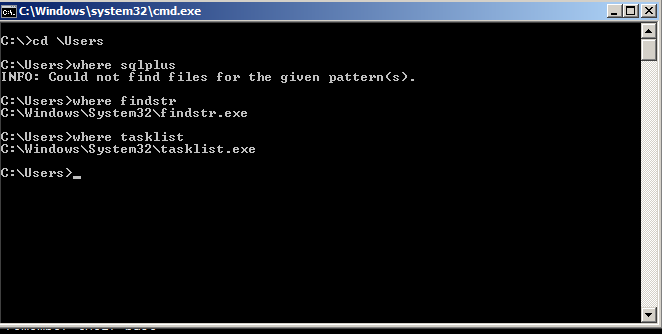
Find Command Windows Windows Equivalent Of Linux Which Whereis Command Windows WHERE How To Use The Find Command To Search In Windows How To Use Find From The Windows Command Prompt How To Use Find From The Windows Command Prompt Windows Find File Command Line Spiritualtiklo Web Apr 19 2011 nbsp 0183 32 Using Find command we can search for specific text in a set of files Find below the syntax of this command with examples Note that windows find command is different from the Linux find command in functionality Linux find command is used to search for files that match the given criteria
Web Jun 12 2020 nbsp 0183 32 First open the Command Prompt on your PC by typing cmd in the Windows Search bar and then selecting Command Prompt from the search results With the Command Prompt opened you re ready to find and open your file Web Findstr Windows and ReactOS command line tool to search for patterns of text in files find Unix a Unix command that finds files by attribute very different from Windows find grep a Unix command that finds text matching a pattern similar to Windows find
Windows Find File Command Line Spiritualtiklo How To Get Help In Windows Cmd Lates Windows 10 Update How To Get A List Of Files In A Folder Into Excel Riset 5 Most Useful Windows Cmd Commands Hindi Youtube Www vrogue co 10 Ways To Open The Command Prompt In Windows 10 Full List Of Windows CMD Commands You Need To Know LearnFully Open Command Prompt Fullscreen In Windows 10 Reset Pc From Command Prompt Windows 10 Racksubtitle How To Open The Command Prompt In Windows 10
Find Command Windows
 Find Command Windows
https://www.pc-freak.net/images/windows-find-commands-full-location-where-which-linux-commands-equivalent-in-windows-where-screenshot.png
Web Jun 7 2020 nbsp 0183 32 A Press the Ctrl F keys This will not work in PowerShell OR B Right click or press and hold on the title bar click tap on Edit and click tap on Find 2 Perform the following actions in the Find dialog box see screenshots below A Type what you want to search for in the Find what box B Check or uncheck default Match case Alt C
Templates are pre-designed documents or files that can be utilized for various purposes. They can save time and effort by providing a ready-made format and design for producing different kinds of content. Templates can be utilized for personal or expert projects, such as resumes, invitations, flyers, newsletters, reports, discussions, and more.
Find Command Windows

How To Use Find From The Windows Command Prompt
How To Get Help In Windows Cmd Lates Windows 10 Update
How To Get A List Of Files In A Folder Into Excel Riset
5 Most Useful Windows Cmd Commands Hindi Youtube Www vrogue co
Full List Of Windows CMD Commands You Need To Know LearnFully
Open Command Prompt Fullscreen In Windows 10

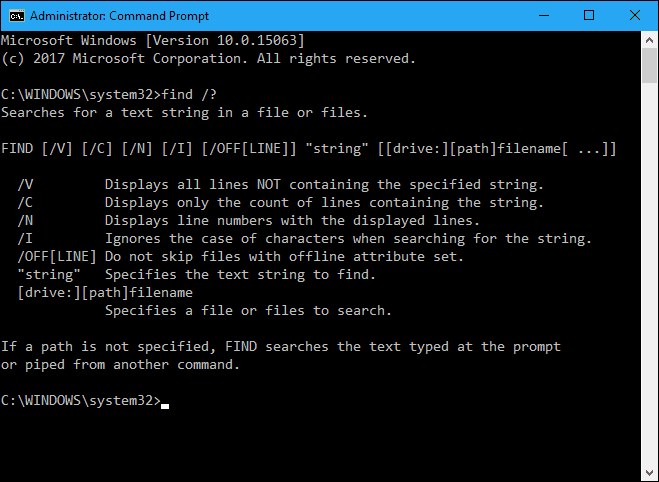
Web Feb 3 2023 nbsp 0183 32 You can type parameters and command line options for the find command in any order You can t use wildcards and in the searched string To search for a string with wild cards and regex patterns you can use the FINDSTR command

Web Aug 18 2021 nbsp 0183 32 How to Use the Find Command to Search in Windows Open the Command Prompt Window with Administrative Privileges Opening the Command Prompt window as administrator is not Switches and Parameters for the find Command Most commands have optional switches that modify the default operation of

Web I want to quickly search for a file given its name or part of its name from the windows command line not power shell This is similar to opening explorer and using the search box at the top Note dir can search based on a string

Web Mar 16 2012 nbsp 0183 32 What is the equivalent of the Unix find command on Windows I see that the find exe on Windows is more like a grep I am especially interested in the equivalent of find name filename Share Improve this question Follow edited Dec 15 2014 at 20 20 Kevin Panko 7 346 22 44 53 asked Mar 16 2012 at 15 10 ARV 895 3 10 14 Add a

Web Oct 28 2013 nbsp 0183 32 2 Answers Sorted by 9 If by chance you are talking about Windows command line which is not DOS then there is findstr findstr quot one two three quot Yes quoted as single argument Alternative syntax which allows spaces in
[desc-11] [desc-12]
[desc-13]