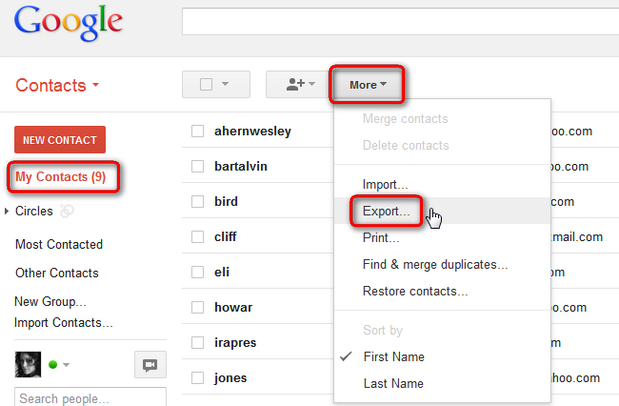
Export Contacts From Gmail How To Export Contacts From Gmail Explanation With Images Import Contacts From Gmail Google Noabe Customer Support Portal How To Export Contacts From Gmail Explanation With Images Two Simple Ways To Export Gmail Contacts To Excel How To Export Gmail Contacts To Excel YouTube Web Feb 1 2023 nbsp 0183 32 Import Google contacts to iCloud contacts using a Mac or PC 1 Visit contacts google in your computer web browser and sign in to your Google Gmail account if not already 2 Click Export from the left sidebar choose vCard for iOS Contacts and hit the Export button It will download a vcf file to your computer
Web Oct 18 2023 nbsp 0183 32 Log in to your Gmail account Click the grid and select Contacts Now select Export and choose Contact Options Check the vCard VCF option and hit Export The Gmail export contacts to VCF process is complete After Web Jul 12 2022 nbsp 0183 32 Level 9 64 439 points Take help of a web browser and enter in www icloud with the apple id and password used in an iPhone the contacts that were saved in will be visible select the desired contacts and click on gear icon in the left bottom corner and click on export as v card
How To Export Gmail Contacts To Excel YouTube 2 Ways To Import Contacts From Gmail To Android Easily Dr fone How To Export Contacts From Gmail To Gmail YouTube How To Export Contacts From Gmail Step By Step Guide How To Export Contacts From Gmail Explanation With Images How To Import Outlook Contacts Into Gmail Account How To Export Contacts From Gmail Step By Step Guide Phone To Phone Data Transfer How To Transfer Contacts From Android To How To Export Contacts From Gmail Explanation With Images
Export Contacts From Gmail
 Export Contacts From Gmail
https://www.saleshandy.com/blog/wp-content/uploads/2018/01/[email protected]
Web Oct 19 2021 nbsp 0183 32 Select Export in the toolbar Make sure CSV Comma Separated Values is highlighted Select Export Choose a folder to receive the exported contacts or open a new folder Type a folder name such as quot Windows Mail contacts quot under the File name Click Save and then select Next Make sure the address book fields you want to be
Templates are pre-designed documents or files that can be utilized for different purposes. They can conserve effort and time by supplying a ready-made format and layout for creating various type of content. Templates can be used for personal or expert projects, such as resumes, invitations, leaflets, newsletters, reports, presentations, and more.
Export Contacts From Gmail

How To Export Contacts From Gmail To IPhone YouTube
2 Ways To Import Contacts From Gmail To Android Easily Dr fone
How To Export Contacts From Gmail To Gmail YouTube
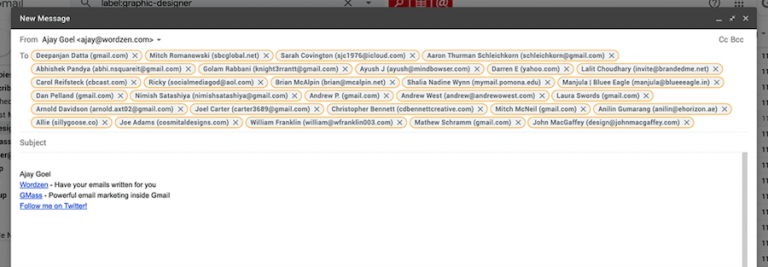
How To Export Contacts From Gmail Step By Step Guide
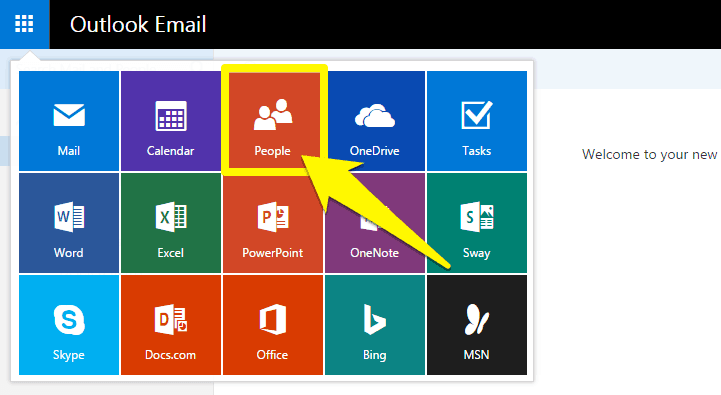
How To Import Outlook Contacts Into Gmail Account

How To Export Contacts From Gmail Step By Step Guide
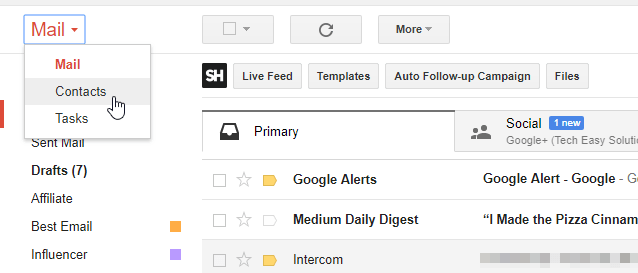
Web Feb 24 2021 nbsp 0183 32 To export Gmail contacts you ll need to use Google Contacts which you can access through Gmail itself Because Gmail contacts are synced across your Google account your saved contacts may include email addresses phone numbers from synced mobile devices and other additional contact information
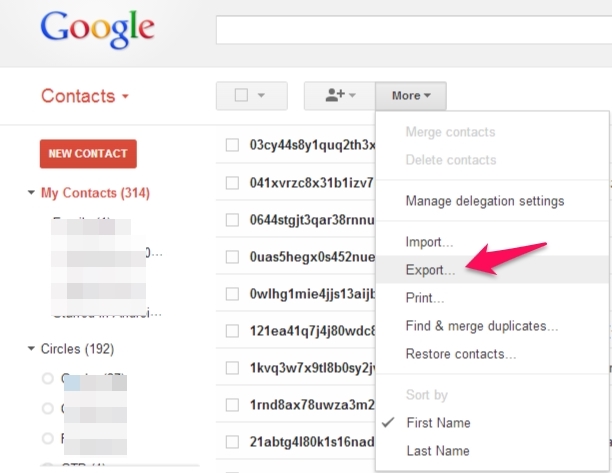
Web From a Gmail account Step 1 Export existing Gmail contacts On your computer go to Google Contacts At the top right click Export Select which contacts to export Select

Web Sep 21 2023 nbsp 0183 32 How to Import Contacts from Gmail to Your iPhone This wikiHow teaches you how to add your Gmail account s contacts to your iPhone s address book You can add a Gmail account if the account isn t already on your iPhone or you can enable contacts from an existing Gmail account on your phone
Web May 15 2021 nbsp 0183 32 Vist to the Gmail website and login with your account Then at the top left press the 9 dots icon and then choose the Contacts option A window will now pop up with a list of all of your contacts Select all of the contacts that

Web Mar 20 2022 nbsp 0183 32 1 Export contacts from Google same for both Android and iOS 2 Import contacts Export contacts from Google 1 Open contacts google in a browser on your PC and sign in with your Google account 2
[desc-11] [desc-12]
[desc-13]