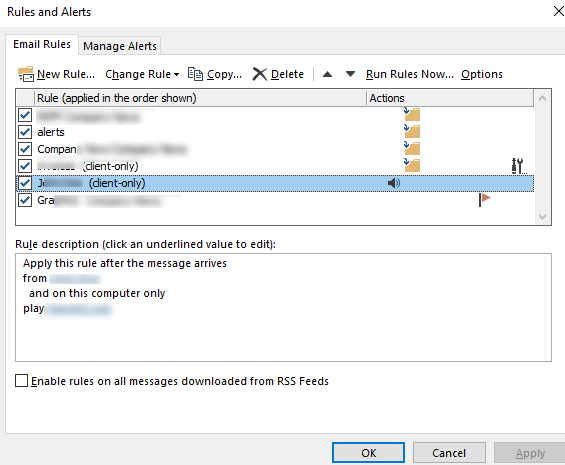
Exchange Inbox Rules Not Working Oops Flickr WeMo Rules Not Working 3 Quick Ways To Fix Top 7 Methods To Fix Outlook Rules Not Working Error On Windows 10 Fix Outlook Rules Not Working 8 Effective Solutions 2023 Fix Outlook Rules Not Working On Phone Proven Method 2022 Select File Manage Rules Alerts to open the Rules and Alerts dialog box On the Email Rules tab select New Rule Select one of the templates from Step 1 To start from a blank rule select Apply rule on messages I receive or Apply rule on messages I send In the Step 2 Edit the rule description box click on any underlined options to set
Since the exception match the rule did not match ETR frequent issues Before running Test Message cmdlet there are several things that should be confirmed Check the rule priority Check whether there is a triggered rule with a higher priority than the rule you are troubleshooting whose action s can cause a problematic rule to not work as Click the cog wheel View all Outlook settings Email Rules Tip you can turn them off without deleting them if you need to troubleshoot email mis delivery then reenable when finished If there is no obvious cause in the mail rules you may have a common problem with hidden rules on your mailbox
Fix Outlook Rules Not Working On Phone Proven Method 2022 IPv6 Compression Rules Not Working Lung Award Rabbit How To Set Rules In Outlook 2013 Healthy Food Go Hiking Dozen PfSense Rules Not Working The Geek Pub Outlook Server Side Rules Not Working Fixed By Experts 2022 How Do I Fix Outlook Rules Not Working Configuring Integrations Dashboard Legal Web Dashboard Legal Docs Microsoft Exchange Online Outlook Email Business Email Provider Configurar Y Controlar El Reenv o De Correo Electr nico Externo En Microsoft 365 Office 365
Exchange Inbox Rules Not Working
 Exchange Inbox Rules Not Working
https://live.staticflickr.com/7320/27998349380_aa3e47e8cf_c.jpg
I opened a case with Microsoft and I we have tried everything that you can think of recreating the rules doing them only from OWA seeing if run now works as opposed to working automatically creating logs and sending them to MS etc I opened the case with MS on 3 2 so it s been over 5 weeks
Templates are pre-designed documents or files that can be utilized for different purposes. They can conserve time and effort by supplying a ready-made format and design for creating various sort of material. Templates can be utilized for personal or expert jobs, such as resumes, invites, leaflets, newsletters, reports, discussions, and more.
Exchange Inbox Rules Not Working

Microsoft 365 Office 365 Microsoft Learn
IPv6 Compression Rules Not Working
Lung Award Rabbit How To Set Rules In Outlook 2013 Healthy Food Go Hiking Dozen

PfSense Rules Not Working The Geek Pub
How Do I Fix Outlook Rules Not Working

Configuring Integrations Dashboard Legal Web Dashboard Legal Docs

ShaunToole Created on February 13 2020 Outlook 365 Inbox Rules Do Not Work I have set up rules to send mail from certain senders to junk email or other folders but they do not work All my mail lands in my inbox The only time a rule works is when I create or modify it and apply it as soon as I have saved the changes This thread is locked
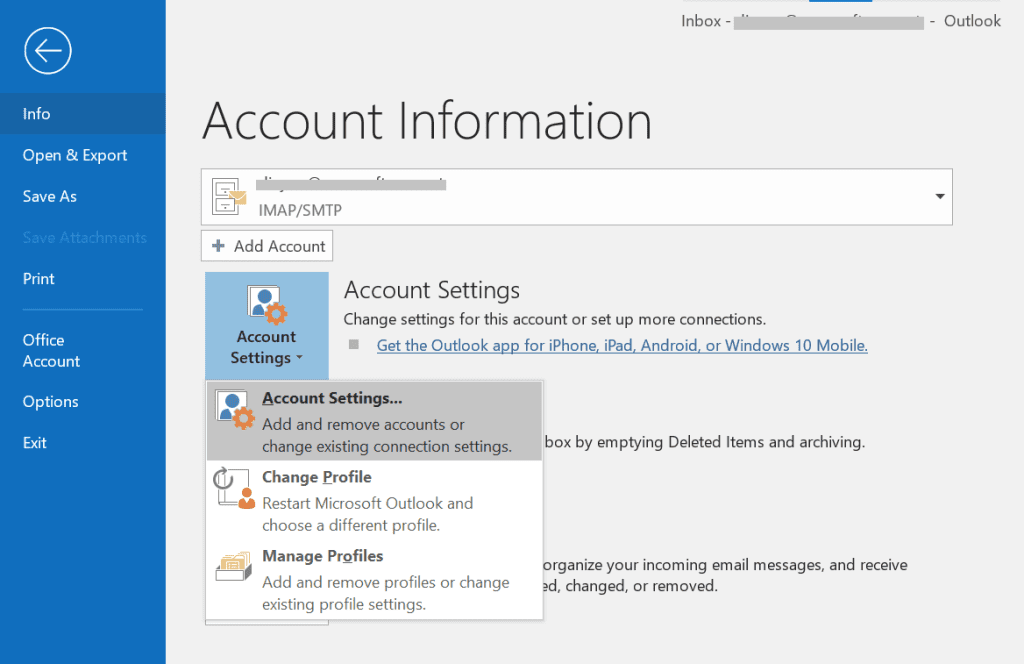
Solution Enable the rule On the Tools menu click Rules In the left pane of the Rules dialog box click the account type for the rule you want to edit If you don t know what type of account you have In the Rules dialog box click Show All and then under Personal Settings click Accounts

Workaround To work around this behavior create a distribution group or a Microsoft 365 group and then add the individual recipients to the group For details see Create a group in the Microsoft 365 admin center Provides a workaround to an issue in which a forward rule doesn t work for a Microsoft 365 account
Delete old rules Another way to reduce the overall size of your existing rules is to get rid of those you no longer need Clear the Client only or on this computer only checkbox
PowerShell Copy Set Mailbox sally contoso ForwardingSmtpAddress manuel contoso DeliverToMailboxAndForward True The user creates an inbox rule in Microsoft Outlook to redirect messages that they receive For example Sally creates a rule in Outlook to redirect messages to another address
Use this to create a new Inbox rule Highlight a rule and then select to view or edit the details of a rule Highlight a rule and then select Delete to delete it Use this to move the selected rule up in the list Rules are processed from top to bottom Use this to move the selected rule down in the list Symptoms You create or modify an Inbox rule in Outlook on the web or the new Outlook for Windows You expect to see and manage the rule in the classic Outlook for Windows but the rule doesn t appear in the Rules and Alerts dialog box Instead you see the following warning message in the dialog box There are rules created with a different
Use inbox rules to automatically perform specific actions on email that arrives in your inbox For example you can create rules that will change the importance level of messages as they come in automatically move them to other folders or delete them based on certain criteria If you re not on Outlook for Windows check which Outlook version