Excel Workday Exclude Holidays Excel Workday Workday INTL Functions To Add Business Days To Date Exclude Weekends Holidays Excel Workday Function Find End Date Exclude Weekends Holidays V004 YouTube Get Workdays Between Dates Excel Formula Exceljet Excel WORKDAY Function Exceljet Excel WorkDay Function Exclude Weekends Holidays YouTube To create a list of workdays that exclude weekends and holidays you can use a formula based on the SEQUENCE function inside the WORKDAY INTL function In the example shown the formula in D5 is WORKDAY INTL B5 1 SEQUENCE 12 1 B8 B11 The result is a series of 12 dates beginning on September 1 2023 and ending on September 19 2023 Notice that weekends and holidays are not included in
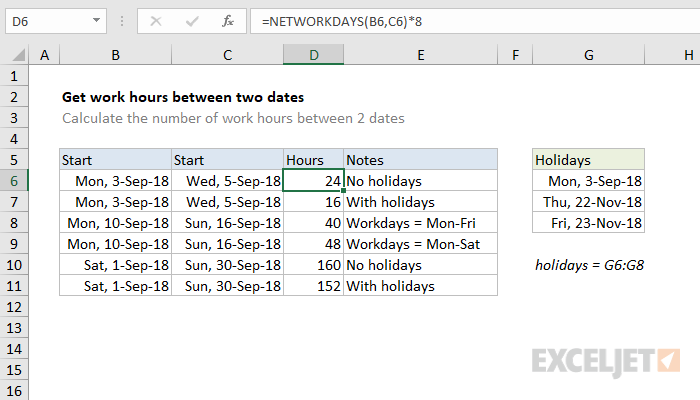
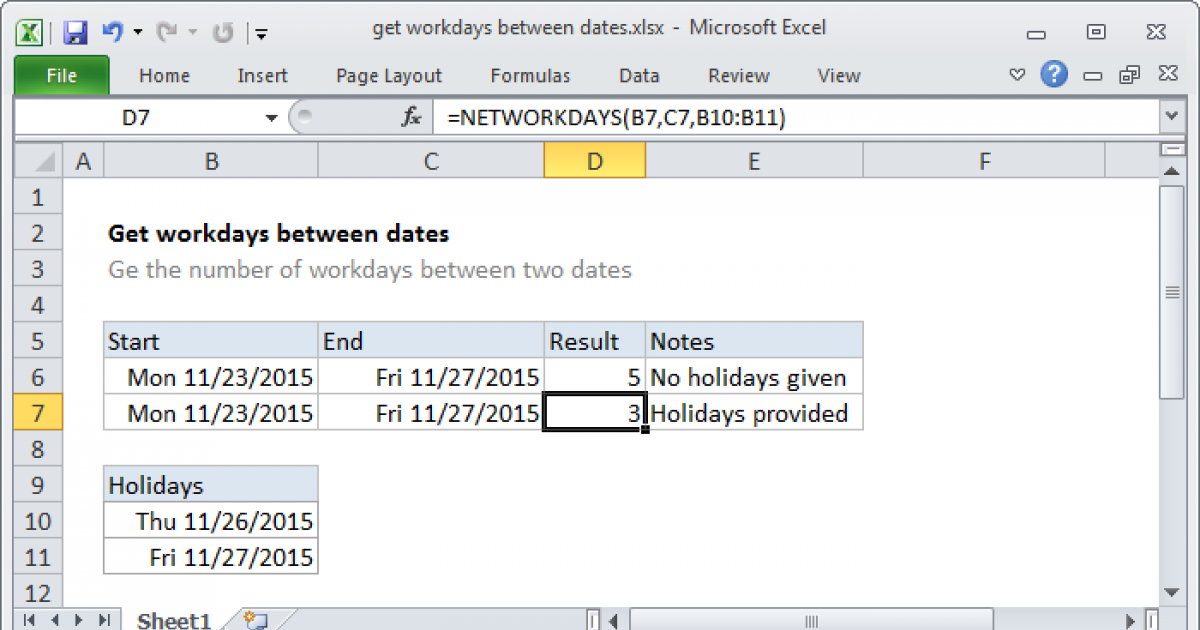
There are 3 parts to the WORKDAY function the start day the number of days you want to add and the holidays you want to exclude This last argument is optional WORKDAY start date days holidays If you d like to exclude holidays in addition to weekends create a range of holidays to refer to in the formula The Excel NETWORKDAYS function calculates the number of working days between two dates NETWORKDAYS automatically excludes weekends Saturday and Sunday and can optionally exclude a list of holidays supplied as dates Purpose Get the number of working days between two dates Return value A number representing days Syntax
Excel WorkDay Function Exclude Weekends Holidays YouTube Excel WORKDAY Function How To Use WORKDAY In Excel IONOS Trouble Adding A Cell Value To Workday Function Smartsheet Community Excel Gantt Chart Using Workday Function Workers Holidays Stack Overflow WORKDAY Excel Function Formula Examples How To Use Excel WORKDAY Functions Add Working Business Days Excel WORKDAY And NETWORKDAYS Functions To Calculate Working Days Ablebits Excel Weekday Function Part 1 How To Use The WEEKDAY Function In Excel With IF Function YouTube How To Calculate Total Work Days Or Hours Exclude Weekends Holidays In Excel Free Excel Tutorial
Excel Workday Exclude Holidays
 Excel Workday Exclude Holidays
https://i.ytimg.com/vi/BUna7eg6Klo/maxresdefault.jpg?sqp=-oaymwEmCIAKENAF8quKqQMa8AEB-AHUBoAC4AOKAgwIABABGGkgaShpMA8=&rs=AOn4CLCmOHFoRygNG0rZkI972M78z1juDQ
WORKDAY Function In Excel Calculate Completion Date Exclude Holidays And Weekends Using Excel 2020 Advanced Excel Essentials Training Series For Excel 2020
Templates are pre-designed documents or files that can be used for numerous functions. They can conserve effort and time by providing a ready-made format and layout for developing various kinds of content. Templates can be utilized for personal or expert jobs, such as resumes, invites, flyers, newsletters, reports, presentations, and more.
Excel Workday Exclude Holidays
Get Work Hours Between Dates Excel Formula Exceljet
Excel WORKDAY Function How To Use WORKDAY In Excel IONOS

Trouble Adding A Cell Value To Workday Function Smartsheet Community

Excel Gantt Chart Using Workday Function Workers Holidays Stack Overflow
Excel WORKDAY Functions Add Working Business Days
Excel WORKDAY And NETWORKDAYS Functions To Calculate Working Days Ablebits

Steps Select the E5 cell and write down the following formula NETWORKDAYS B5 C5 Then hit Enter Consequently we will get the net workdays excluding the weekends Then pull the cursor down to the last data cell to get the values for all the data 1 2 Excluding Both Weekends and Holidays

Example 1 Basic usage In the formula below WORKDAY is given Friday January 1 2021 for start date 1 for days and F5 F13 for holidays The result is Monday January 4 2021 since Saturday and Sunday are excluded WORKDAY 1 Jan 2021 1 F5 F13 returns 4 Jan 2021
Excel WORKDAY NETWORKDAYS Functions Exclude Weekends and Holidays by Leila Gharani Excel s WORKDAY function is great when you need to calculate an end date based on a given number of working days which means you need to exclude weekends and holidays Some examples are creating a project timeline creating a reporting timetable
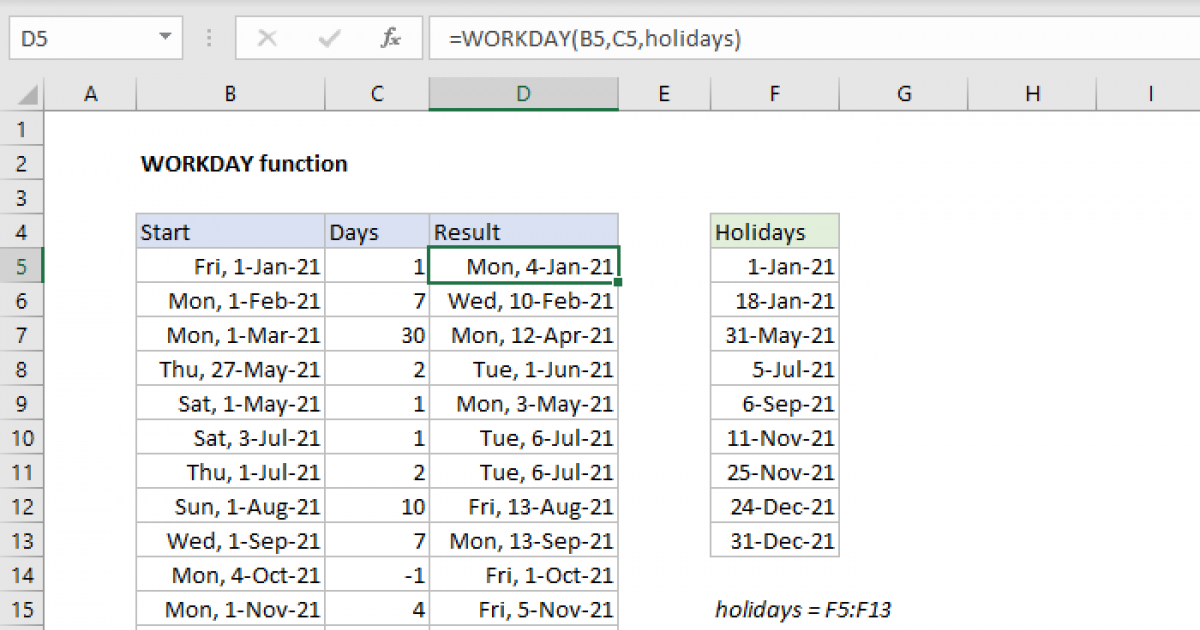
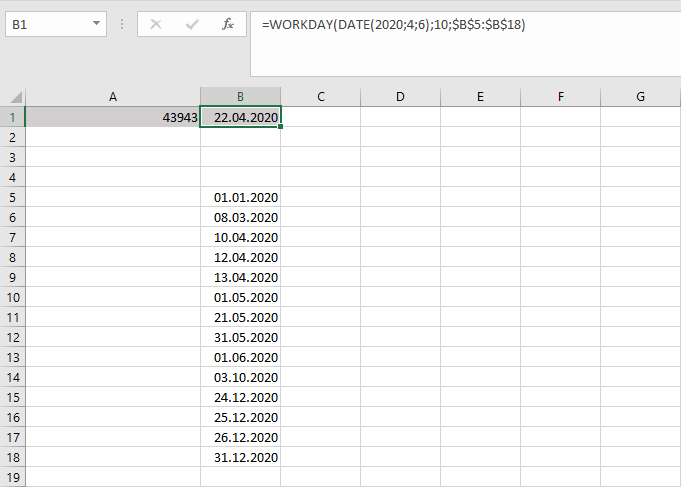
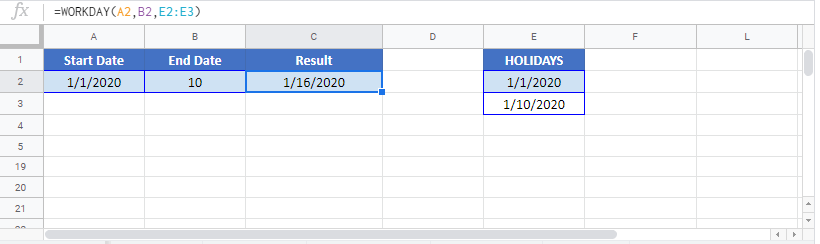
The function WORKDAY is used to calculate the date a certain amount of work days before or after the start date information here Syntax WORKDAY start date days holidays The WORKDAY function syntax has the following arguments Start date Required A date that represents the start date Days Required

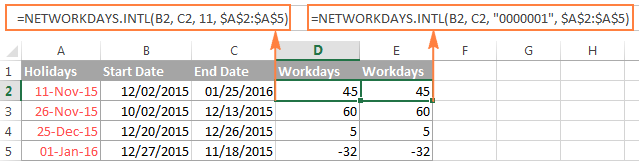
Working days exclude weekends and any dates identified in holidays Use NETWORKDAYS to calculate employee benefits that accrue based on the number of days worked during a specific term Tip To calculate whole workdays between two dates by using parameters to indicate which and how many days are weekend days use the NETWORKDAYS INTL function
How to use the WORKDAY function in Excel The Excel WORKDAY function adds a specified number of working days to a given start date and returns the resulting date It excludes weekends Sat and Sun and optionally holidays as well In the above example we add 1 working day to the start date 02 Jun 20 using the following formula Click the cell where you want to get the result type the following function and press Enter In this function replace B2 with the cell that contains the starting date C2 with the cell that contains the ending date and E2 E6 with the range where you ve specified your holidays NETWORKDAYS B2 C2 E2 E6
Learn how to exclude weekends and holidays from lists of dates in Excel using SEQUENCE DATE functions I ll show you how to specify a start date establi