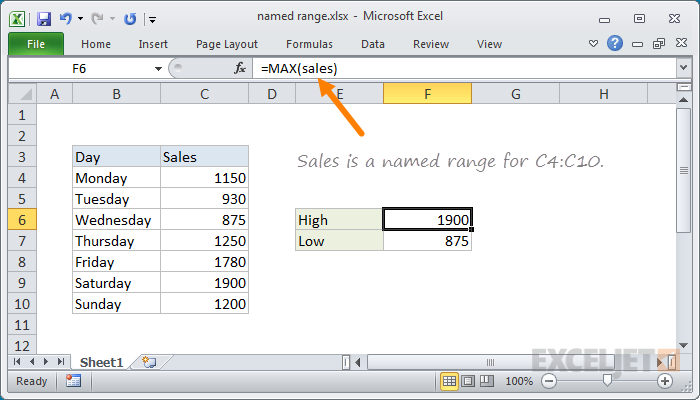
Excel Use Named Range In Formula Excel Trendline For Specific Range Qlerohack How To Use Named Range In Excel VBA 2 Ways ExcelDemy How To Use Named Ranges In Excel Excelbuddy Excel Named Range Exceljet 5 Ways To Create An Excel Named Range A named range is one or more cells that have been given a name Using named ranges can make formulas easier to read and understand They also provide simple navigation via the Name Box In the example the formula in F6 is MAX sales where sales is the named range C4 C10
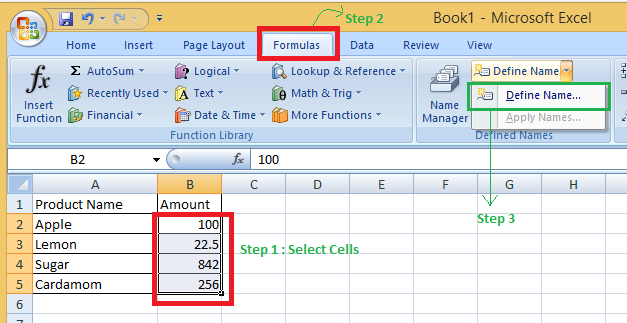
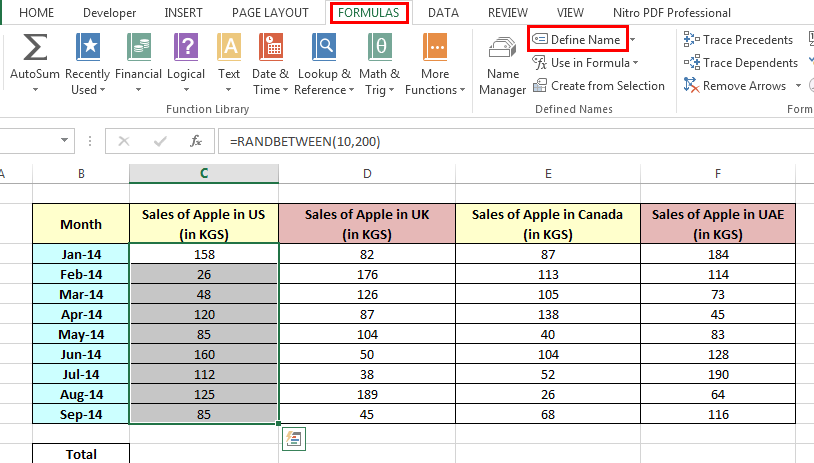
To get the last cell we use INDEX Here we give INDEX the named range data which is the maximum possible range of values and also the values from J5 rows and J6 columns INDEX doesn t return a range it only returns a single cell at that location E9 in the example INDEX data J5 J6 returns E9 You can quickly create a named range by using a selection of cells in the worksheet Note Named ranges that are created from selecting cells have a workbook level scope Select the range you want to name including the row or column labels Click Formulas
5 Ways To Create An Excel Named Range Named Range In Excel Use Benefit Of Named Range In Excel Formula Named Range In Excel How To Define And Edit A Named Range In Excel Excel Vlookup Named Range MyExcelOnline Use Custom Named Range In Excel 2013 Excel Tutorials Excel Custom View Excel Vba Range Formula Tips Formulas Creating A Chart Using A Dynamic Named Range In Excel 2010 Super User MS Excel 2016 Add A Named Range
Excel Use Named Range In Formula
 Excel Use Named Range In Formula
https://media.geeksforgeeks.org/wp-content/uploads/20210515115512/f1.png
8 Now you can use this named constant in your formulas If the tax rate changes use the Name Manager to edit the value and Excel automatically updates all the formulas that use TaxRate 9 On the Formulas tab in the Defined Names group click Name Manager 10 Select TaxRate and click Edit Note use the Name Manager to view create edit
Pre-crafted templates provide a time-saving solution for producing a diverse range of files and files. These pre-designed formats and layouts can be utilized for numerous individual and professional projects, consisting of resumes, invites, leaflets, newsletters, reports, presentations, and more, enhancing the content creation process.
Excel Use Named Range In Formula

Named Range In Excel Use Benefit Of Named Range In Excel Formula

Named Range In Excel Use Benefit Of Named Range In Excel Formula
Named Range In Excel

How To Define And Edit A Named Range In Excel

Use Custom Named Range In Excel 2013 Excel Tutorials Excel Custom

View Excel Vba Range Formula Tips Formulas

Follow these steps to create a named range Select the cell or range of cells you want to name Choose Define Name from the Formulas tab This activates the New Name dialog box In the Name input box enter a friendly descriptive name for your range In the Scope drop down box select whether you

What Does Name Mean in Excel What Is Named Range in Excel Why Use and When Not to Use Named Ranges How Many Named Ranges Can We Create Naming Rules for Named Ranges Create Named Range in Excel Using Name Box Using Define Name Option Using Name Manager Using

For example you can create a generic CellAbove named range like this Select cell A2 Control F3 to open Name Manager Tab into Refers to section then type A1
To have it done perform these steps On the Formula tab in the Defined Names group click Define Name Or press Ctrl F3 to open the Excel Name Manger Either way the New Name dialogue box will open where you specify the following details In the Name box type the name In the Name box

Here are some useful keyboard shortcuts that will come handy when you are working with Named Ranges in Excel To get a list of all the Named Ranges and pasting it in Formula F3 To create new name using Name Manager Dialogue Box Control F3 To create Named Ranges from Selection Control Shift
[desc-11] [desc-12]
[desc-13]