Excel Sumif Sum Range Multiple Columns SUMIFS On Multiple Columns With Criteria In Excel Sheetaki Using SUMIFS To Sum With Multiple Conditions Journal Of Accountancy Sumif With Index And Match Functions In Excel Exceldemy Riset Excel SUMIF Multiple Columns With One Or More Criteria Sum If Multiple Columns Excel Formula Exceljet How to use The SUMIFS function sums the cells in a range that meet multiple conditions referred to as criteria Each condition is provided with a separate range and criteria To define criteria SUMIFS supports various logical operators
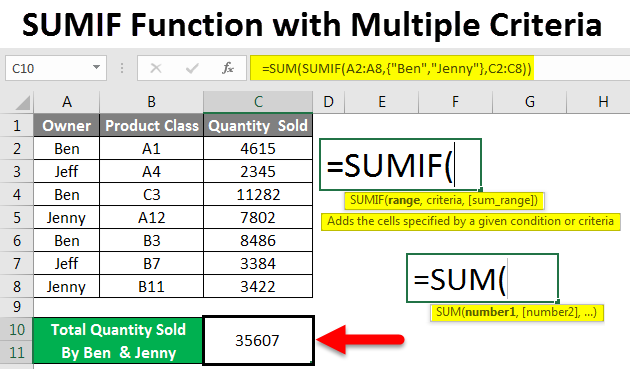
SUMIFS is an arithmetic formula It calculates numbers which in this case are in column D The first step is to specify the location of the numbers SUMIFS D2 D11 In other words you want the formula to sum numbers in that column if they meet the conditions When you are looking to sum numbers in one column when another column is equal to either A or B the most obvious solution is to handle each condition individually and then add the results together SUMIF range criteria1 sum range SUMIF range criteria2 sum range
Sum If Multiple Columns Excel Formula Exceljet SUMIFS On Multiple Columns With Criteria In Excel Sheetaki Excel Use SUMIFS Con M ltiples Criterios En La Misma Columna Matem ticas Aprender Nunca SUMIF Function In Excel With Multiple Criteria Coupler io Blog SUMIF Function In Excel With Multiple Criteria Coupler io Blog Excel Formula Multiple Ranges Use The Sum Function To Add Up A Column Or Row Of Cells In Excel Excel Formula Sumif Between Date Range Profesi Guru Honorer How To Use Multiple Criteria In SUMIF Function Excel Sum If Horizontal Excel Google Sheets Automate Excel
Excel Sumif Sum Range Multiple Columns
 Excel Sumif Sum Range Multiple Columns
https://sheetaki.com/wp-content/uploads/2022/10/sum_if_multiple_columns_featured.png
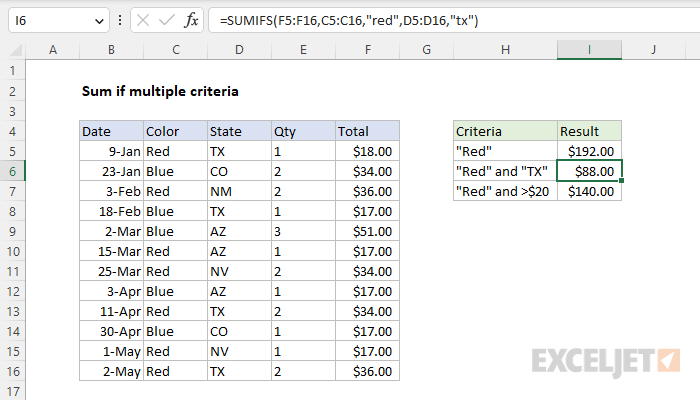
The SUMIFS function sums the values in a range that meet multiple criteria It is similar to the SUMIF function which only allows a single condition but SUMIFS allows multiple criteria using AND logic This can be illustrated with the following formulas
Pre-crafted templates provide a time-saving solution for developing a varied series of documents and files. These pre-designed formats and layouts can be used for various personal and expert tasks, including resumes, invitations, flyers, newsletters, reports, discussions, and more, simplifying the content development procedure.
Excel Sumif Sum Range Multiple Columns
Sum If Multiple Criteria Excel Formula Exceljet

SUMIFS On Multiple Columns With Criteria In Excel Sheetaki

Excel Use SUMIFS Con M ltiples Criterios En La Misma Columna Matem ticas Aprender Nunca

SUMIF Function In Excel With Multiple Criteria Coupler io Blog
Excel Formula Multiple Ranges Use The Sum Function To Add Up A Column Or Row Of Cells In Excel
Excel Formula Sumif Between Date Range Profesi Guru Honorer

The simplest working solution that suggests itself is to create a helper column summing the numbers for each individual row and then use that column for sum range So go ahead and place a SUM formula in F2 then drag it down across as many cells as needed SUM C2 E2 After that you can quickly have the job done

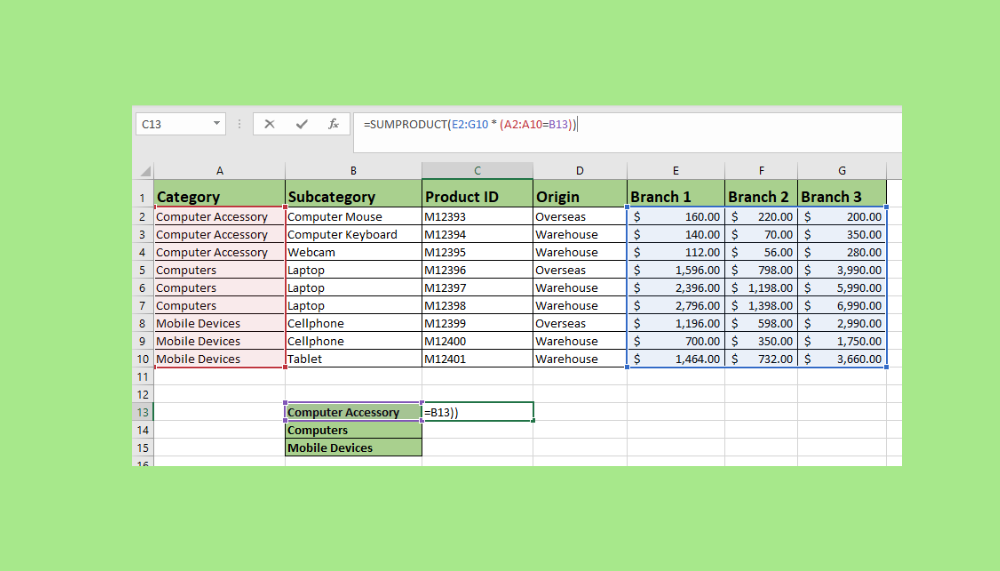
Summary To calculate a conditional sum for multiple columns of data you can use a formula based on SUM function and the FILTER function In the example shown the formula in H5 copied down is SUM FILTER data group G5 where data C5 E16 and group B5 B16 are named ranges
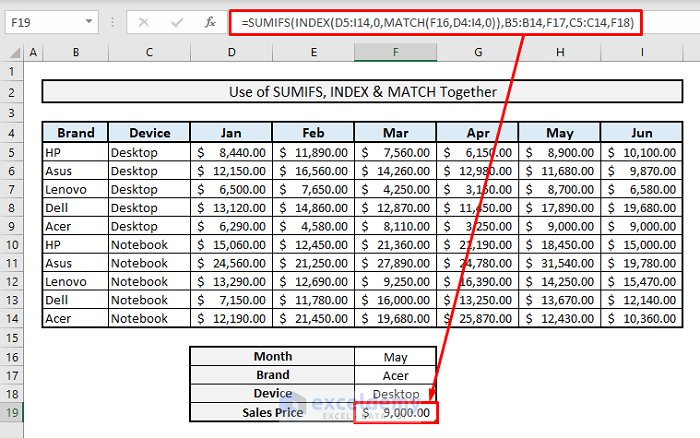
1 Use of Helper Column to Sum Multiple Ranges The easiest way to sum multiple ranges using the SUMIF function is to add an extra column known as the helper column In the helper column we will add all the values in a row
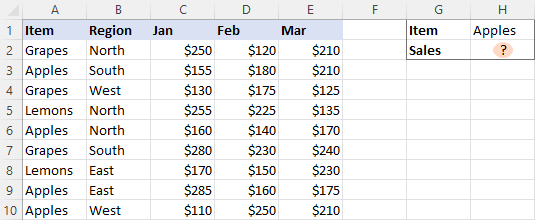
If you want you can apply the criteria to one range and sum the corresponding values in a different range For example the formula SUMIF B2 B5 John C2 C5 sums only the values in the range C2 C5 where the corresponding cells in the range B2 B5 equal John To sum cells based on multiple criteria see SUMIFS function

With SUMIFS sum range is the first and required argument Size of ranges In SUMIF formulas sum range does not necessarily have to be of the same size and shape as range as long as you have the top left cell right In Excel SUMIFS each criteria range must contain the same number of rows and columns as the sum range argument
[desc-11] [desc-12]
[desc-13]