Excel Sumif Between Two Numbers Download Using The Sumif Function In Excel Gantt Chart Excel Template How To Sum A Column In Excel Based On Date Range Cyprussop Sum If Multiple Criteria Excel Formula Exceljet Sumif Function In Excel Cleanlat Not Just Numbers EXCEL TIP Using The SUMIF Function To Interrogate Lists You use SUMIFS in Excel to find a conditional sum of values based on multiple criteria The SUMIFS function was introduced in Excel 2007 and is available in all subsequent versions of Excel 2010 2013 2016 2019 2021 and Excel 365 Compared to SUMIF the SUMIFS syntax is a little bit more complex
As you type the SUMIFS function in Excel if you don t remember the arguments help is ready at hand After you type SUMIFS Formula AutoComplete appears beneath the formula with the list of arguments in their proper order Looking at the image of Formula AutoComplete and the list of arguments in our example sum range is D2 D11 the To sum values between two numbers in Excel you can use the Excel SUMIFS function like SUMIFS values values lower values upper This will ensure that all values fall within the range between lower and upper bounds Let s take a look at an example of how to add values between two numbers in Excel
Not Just Numbers EXCEL TIP Using The SUMIF Function To Interrogate Lists SUMIFS Between Two Values In Excel And Google Sheets Sum If Date Is Between Excel Formula Exceljet Summing Values Between Two Dates In Powerand Excel Data Mobile Legends Excel Sumif With Multiple Or Criteria How To Use In 2013 Youtube Vrogue Excel Calculate Sum With Criteria From Many Columns Of Another Hot Excel SUMIF Formula Between 2 Dates Using Date Range Criteria Summing Values Between Two Dates In Powerand Excel Data Mobile Legends SUMIFS With Dates How To Sum Values Between Two Dates
Excel Sumif Between Two Numbers
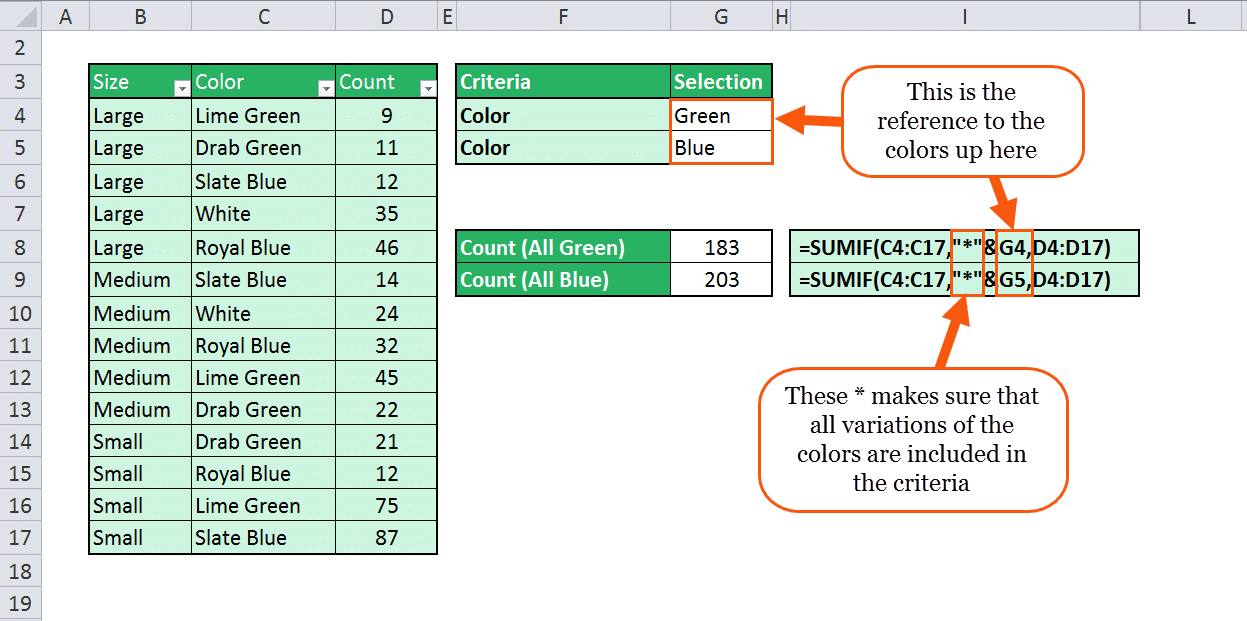 Excel Sumif Between Two Numbers
https://spreadsheeto.com/wp-content/uploads/2016/05/Picture-4-3.png
The SUMIF function sums cells in a range that meet a single condition referred to as criteria The SUMIF function is a common widely used function in Excel and can be used to sum cells based on dates text values and numbers Note that SUMIF can only apply one condition To sum cells using multiple criteria see the SUMIFS function Syntax
Pre-crafted templates use a time-saving option for creating a diverse series of files and files. These pre-designed formats and layouts can be utilized for different personal and professional projects, including resumes, invitations, leaflets, newsletters, reports, presentations, and more, simplifying the content development process.
Excel Sumif Between Two Numbers

Solved Excel SUMIF Between Dates 9to5Answer
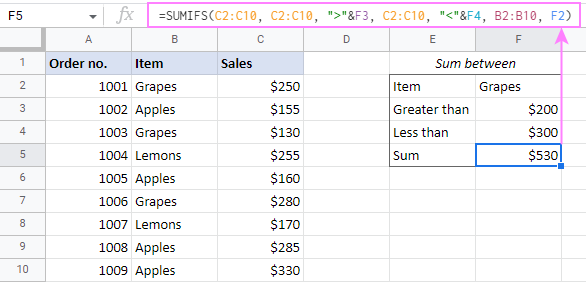
SUMIFS Between Two Values In Excel And Google Sheets
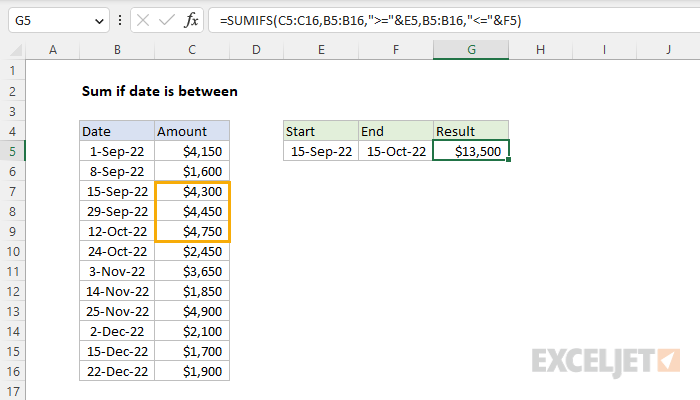
Sum If Date Is Between Excel Formula Exceljet
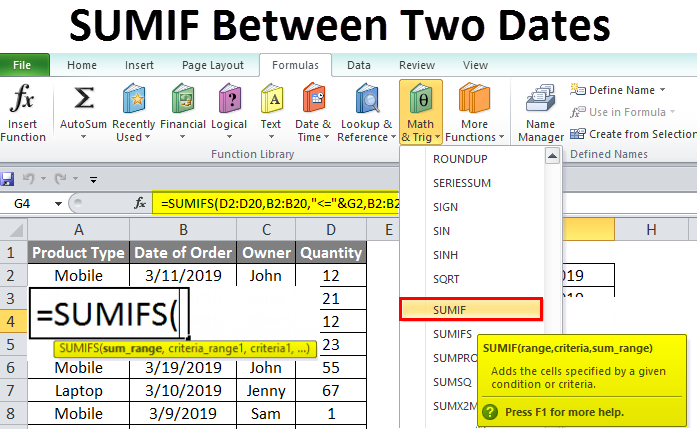
Summing Values Between Two Dates In Powerand Excel Data Mobile Legends
Excel Calculate Sum With Criteria From Many Columns Of Another Hot

Excel SUMIF Formula Between 2 Dates Using Date Range Criteria
To sum numeric values that are between two numbers you can use the SUMIFS function In the example shown the formula in cell H5 is SUMIFS data Amount data Amount F5 data Amount G5 Where data is an Excel Table in the range B5 D16

The SUMIFS Function sums data rows that meet certain criteria Its syntax is This example will sum the Revenue for all Order Numbers between but not including 525 and 528 SUMIFS C3 C9 B3 B9 525 B3 B9 528 As you can see above we use two logical tests as SUMIFS criteria 525 represents greater than 525

To sum data between two numbers you can use the SUMIFS function with two criteria Including the threshold numbers SUMIFS values values min number values max number Excluding the threshold numbers SUMIFS values values min number values max number
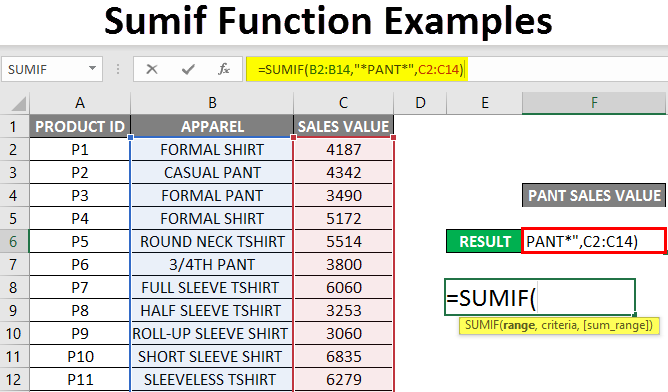
Syntax SUMIF range criteria sum range The SUMIF function syntax has the following arguments range Required The range of cells that you want evaluated by criteria Cells in each range must be numbers or names arrays or references that contain numbers Blank and text values are ignored

To get the total values between two given numbers the SUMIFS function can do you a favor The generic syntax is SUMIFS sum range criteria range criteria1 criteria range criteria2 sum range The range with values that you want to sum criteria range The range of cells to match the criteria
Here are the steps to sum values between two numbers Type SUMBETWEEN range 3000 5000 Select the range B3 B10 Add the lower bound 3000 Add the upper bound 5000 Press Enter The formula will sum if values are between 3000 and 5000 SUMBETWEEN is a fast and useful user defined function in Excel SUMBETWEEN function Example When you are looking to sum numbers in one column when another column is equal to either A or B the most obvious solution is to handle each condition individually and then add the results together SUMIF range criteria1 sum range SUMIF range criteria2 sum range In the table below suppose you want to add up sales for two different
SUMIFS function works with many logical operators in excel These include and many others In our example above we want to find the sum of the amount that is above 250 but less than 500 These are values found in column B The sum range will thus be B2 B8