Excel Strip Spaces Awk Trim Whitespace Trust The Answer Brandiscrafts Excel Formula Remove Leading And Trailing Spaces From Text Exceljet Strip Trailing Slashes From A String In Excel YouTube VsCode Css 13 Time geekbang Web Mar 20 2023 nbsp 0183 32 You use the TRIM function in Excel removes extra spaces from text It deletes all leading trailing and in between spaces except for a single space character between words The syntax of the TRIM function is the easiest one could imagine TRIM text Where text is a cell that you want to remove excess spaces from
Web Sep 28 2021 nbsp 0183 32 After many years of working with Excel I ve become a Space Hunter That sounds like a sci fi movie title but it s just someone who can quickly locate and delete superfluous spaces in cell values Based on my space hunting experience here are five techniques I use frequently to clean up data Web Mar 23 2023 nbsp 0183 32 Select one or several columns with the data to delete spaces between words Press Ctrl H to get the quot Find and Replace quot dialog box Press the Space bar twice in the Find What field and once in Replace With Click on the quot Replace all quot button and then press Ok to close Excel confirmation dialog
13 Time geekbang Scratch scratch FLC632 CSDN Norm Architects Norm Architects dinzd Strip Non Numeric Characters Formula In Excel YouTube Strip Plan Software For Road Excel Solution Quick Pin On Favorite Places Spaces How To Remove Spaces From A String In Python Pin On PORTFOLIO Jackie Bowen Pin By Cindie Terry On Flower Gardens Border Planting Ideas Foliage Plants Side Garden Ideas
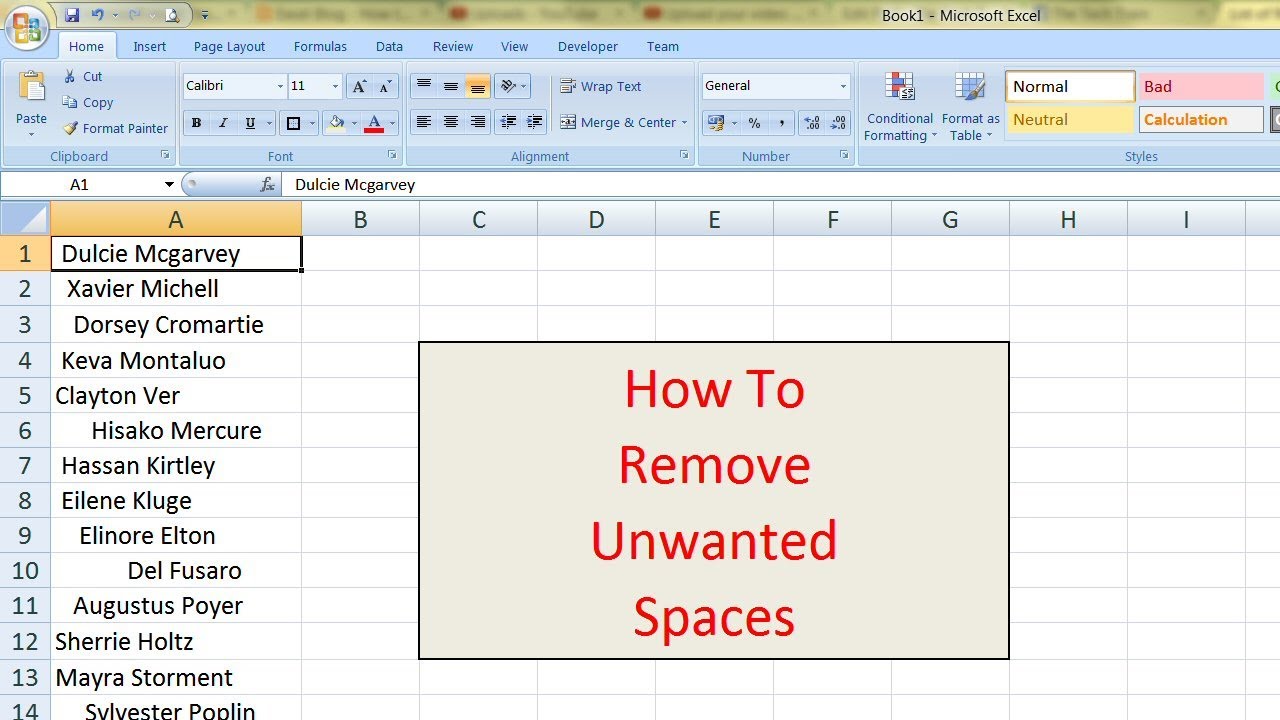
Excel Strip Spaces
 Excel Strip Spaces
https://i.ytimg.com/vi/HEYE9YWtETY/maxresdefault.jpg
Web If you need to strip leading and trailing spaces from text in one or more cells you can use the TRIM function In the example show the formula in cell C3 is TRIM B3 Once you ve removed extra spaces you can copy the cells with formulas and paste special elsewhere as quot values quot to get the final text Video How to clean text with TRIM and CLEAN
Pre-crafted templates use a time-saving service for producing a varied variety of files and files. These pre-designed formats and layouts can be utilized for numerous personal and expert tasks, including resumes, invites, flyers, newsletters, reports, presentations, and more, simplifying the material development procedure.
Excel Strip Spaces

Php Strip Spaces The 16 Correct Answer Brandiscrafts
Scratch scratch FLC632 CSDN

Norm Architects Norm Architects dinzd
Strip Non Numeric Characters Formula In Excel YouTube

Pin On Favorite Places Spaces

How To Remove Spaces From A String In Python
Web Mar 20 2023 nbsp 0183 32 A regular TRIM formula is as simple as this TRIM A2 Where A2 is the cell you want to delete spaces from As shown in the following screenshot the Excel TRIM formula successfully eliminated all spaces before and after the text as well as consecutive spaces in the middle of a string
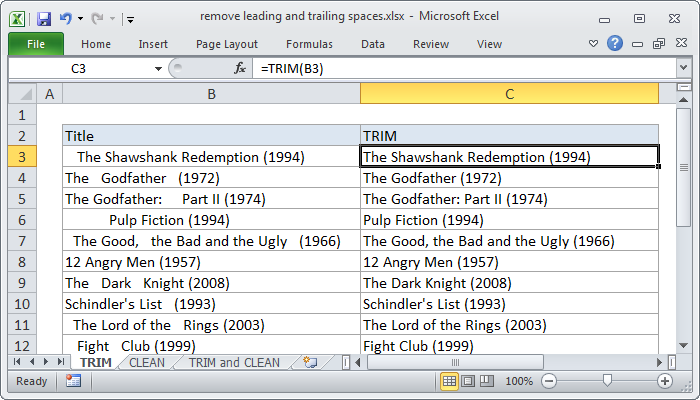
Web Sep 24 2023 nbsp 0183 32 How to Trim Spaces in Excel 8 Ways 1 Using TRIM Function to Trim Spaces of String Values The TRIM function is the most useful function to trim extra spaces It trims all several types of spaces these are leading trailing and in between spaces from both String and Numeric values It is unable to trim a single space character between

Web Description Removes all spaces from text except for single spaces between words Use TRIM on text that you have received from another application that may have irregular spacing Important The TRIM function was designed to trim the 7 bit ASCII space character value 32 from text
Web 1 The TRIM function below removes 2 leading spaces 3 extra spaces and 2 trailing spaces Note the TRIM function does not remove single spaces between words 2 To get the length of a string use the LEN function Explanation the LEN function counts 2 spaces 2 characters 4 spaces 3 characters and 2 spaces 3

Web The Excel TRIM function strips extra spaces from text leaving only a single space between words and no space characters at the start or end of the text Purpose Remove extra spaces from text Return value Text with extra spaces removed Arguments text The text from which to remove extra space Syntax TRIM text How to use
Web TRIM B3 The function only needs one argument the reference to the cell with the text to do its work Below we will use the TRIM function to eliminate all needless space characters from the list of names The TRIM function has cleaned up Web To remove some of the natural complexity of text strip punctuation normalize case remove extra spaces you can use a formula based on the SUBSTITUTE function with help from the TRIM and LOWER functions Context There may be times when you need to remove some of the variability of text before other processing One example is when you want to
Web Aug 16 2023 nbsp 0183 32 The first way we can remove the extra unwanted spaces is with the help of the FIND and REPLACE options Ctrl H We must put a space and replace that with a Blank Nothing kept This removes the spaces anywhere from the selected cells Alternatively we can remove the spaces using a TRIM function