Excel Strip Last 2 Characters How To Remove First And Last Characters From Text String In Excel Free Excel Tutorial The Last Of Us 2 Which Characters Are In The Sequel Game Rant Multiform Excel Bender Strip Metal Fabrication Tool JA Richards Co Kalamazoo USA EBay Excel Formula To Remove First Two Characters In A Cell Printable Templates Free Remove Characters From Right In Excel Quick Guide Excelkid Web Sep 24 2023 nbsp 0183 32 In this method I will trim the first N and last N characters from a text string using the MID function along with the LEN functions To illustrate I will delete the first 2 and last 5 characters from the text strings of the dataset below
Web 1 Remove first N characters with formula UDF 2 Remove last N characters with formula UDF 3 Batch remove N characters from left or right or mid without formulas 4 Download sample file 1 Remove first N characters with formulas In this part I introduce three different ways to quickly remove first N characters from a string Web Mar 13 2023 nbsp 0183 32 For example to strip off text before the 2 nd comma in A2 the formula is RIGHT SUBSTITUTE A2 quot quot quot quot 2 LEN A2 FIND quot quot SUBSTITUTE A2 quot quot quot quot 2 1 To eliminate a leading space we again use the TRIM function as a wrapper
Remove Characters From Right In Excel Quick Guide Excelkid How To Remove First And Last 2 Characters From A String In C NET AspDotnetHelp Excel Remove Characters From Right 5 Ways ExcelDemy Scratch scratch FLC632 CSDN A Worked Out Example For A Set Of Reads R TATTA TAATA And K 3 Download Scientific How To Remove Last 2 Characters In The Dataweave Dynamically Irrespective Of Size Of The Payload Strip Non Numeric Characters Formula In Excel YouTube Strip Plan Software For Road Excel Solution Quick Cesar Zambelli Works ZBrushCentral
Excel Strip Last 2 Characters
 Excel Strip Last 2 Characters
https://www.excelhow.net/wp-content/uploads/2018/01/remove-last-character2.jpg
Web TRIM strips extra spaces from text leaving only single spaces between words and no space characters at the start or end of the text TRIM is useful when cleaning up text that has come from other applications or environments TRIM only removes the ASCII space character 32 from text
Pre-crafted templates use a time-saving solution for developing a diverse series of files and files. These pre-designed formats and layouts can be used for different individual and professional tasks, consisting of resumes, invitations, leaflets, newsletters, reports, discussions, and more, improving the content creation process.
Excel Strip Last 2 Characters

EXCEL TEMPLATES How To Remove Initials In Excel

How To Remove First And Last 2 Characters From A String In C NET AspDotnetHelp
Excel Remove Characters From Right 5 Ways ExcelDemy
Scratch scratch FLC632 CSDN
How To Remove Last 2 Characters In The Dataweave Dynamically Irrespective Of Size Of The Payload
Strip Non Numeric Characters Formula In Excel YouTube
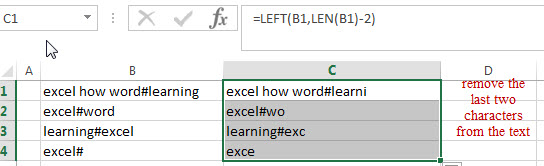
Web Aug 16 2023 nbsp 0183 32 Often you may want to remove the last 2 characters from a string in Excel You can use the LEFT function combined with the LEN function to do so LEFT A2 LEN A2 2 This particular formula removes the last 2 characters from the string in cell A2 The following example shows how to use this formula in practice

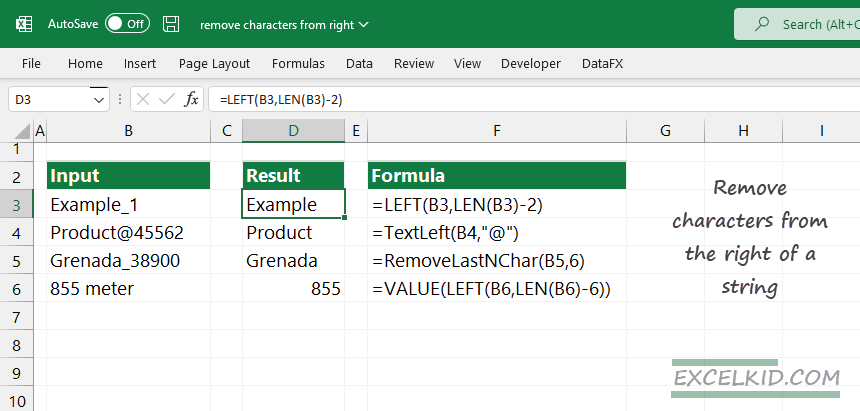
Web To remove the last n characters from a text string you can use a formula based on the LEFT and LEN functions You can use a formula like this to strip the last 6 characters of a text string starting on the left In the example shown the formula in E6 is VALUE LEFT D6 LEN D6 6

Web Sep 8 2021 nbsp 0183 32 Table AddColumn quot Changed Type quot quot First Characters quot each Text Start ProductSKU 2 type text This will result in the above M code formula If you need the last 2 characters then click on Last Characters in the Extract drop down Table AddColumn quot Inserted First Characters quot quot Last Characters quot each

Web Jul 30 2016 nbsp 0183 32 1 i want to remove the last two digits or letter ramon Jul 30 2016 at 10 20 Add a comment 0 This Should do it LEFT A1 LEN A1 2 What we do in the formula is ask for the Left side of the text from the total string lenght minus two which removes the 2 last characters in the string
Web Mar 10 2023 nbsp 0183 32 Press Ctrl H to open the Find and Replace dialog In the Find what box type the character Leave the Replace with box empty Click Replace all As an example here s how you can delete the symbol from cells A2 through A6
Web Method 1 Remove first or last x characters from text strings with formulas Method 2 Remove first or last x characters from text strings with User Defined Function Method 3 Remove first last x characters or certain position characters without any formulas Method 4 Remove both first x and last x characters from text strings with formula Web We tell Excel that we want to replace 2 characters in cell A2 starting at position 1 This means that we re replacing the first two characters Instead of passing in a replacement string we simply replace it with an empty string quot quot How to Use the RIGHT Function to Remove Characters from the Left of a String
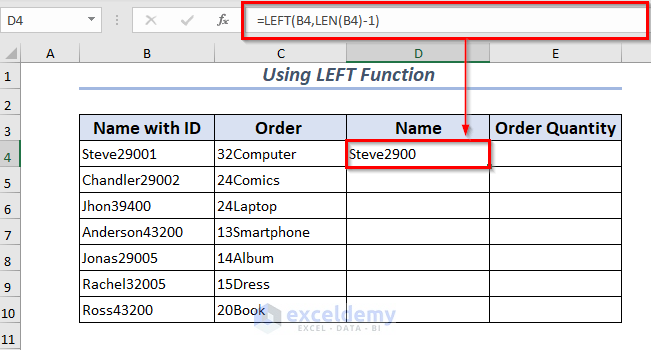
Web Feb 8 2023 nbsp 0183 32 The LEFT Function returns a certain number of characters from the left side of a cell For the number of characters we will use the result of the LEN Function minus the number of characters to remove ex 1 LEFT C3 E3 1 Combining these functions yields the original formula LEFT C3 LEN C3 1