Excel Strip Characters From Cell Strip Non Numeric Characters Formula In Excel YouTube Strip Numeric Characters From Cell Excel Formula Exceljet Cell Theory Comics Strip Storyboard By 920f4624 How To Clear Formatting From A Cell In Excel Cell Comic Strip Storyboard By 174d2846 Web How to Remove Characters from the Left of a String in Excel Excel makes it easy to remove characters from the left of a string by providing two options Using the REPLACE function and Using the RIGHT function In this section you ll learn how to use both of these functions to strip characters using these two functions
Web Mar 13 2023 nbsp 0183 32 RIGHT SUBSTITUTE cell quot char quot quot quot n LEN cell FIND quot quot SUBSTITUTE cell quot char quot quot quot n 1 For example to strip off text before the 2 nd comma in A2 the formula is RIGHT SUBSTITUTE A2 quot quot quot quot 2 LEN A2 FIND quot quot SUBSTITUTE A2 quot quot quot quot 2 1 Web Feb 28 2024 nbsp 0183 32 The LEFT function in Excel is a versatile tool used for extracting a specified number of characters from the beginning of a text string The syntax for the LEFT function is simple LEFT text num chars text The text string that you want to
Cell Comic Strip Storyboard By 174d2846 How To Count Characters In Cell Including Spaces In Excel 5 Methods Count Characters In Google Sheets Sheet Mojo Format Characters In The Cell Using Excel VBA Cell Comic Strip Storyboard By 174d2846 Bejitaprice Dragon Ball Z Gohan Cell Saga Dessins En Couleurs How To Divide A Cell In Excel Into Two Cells Images And Photos Finder Cell Theory Comic Strip Storyboard By 86c7e416 How To Extract Characters From A Cell In Excel YouTube
Excel Strip Characters From Cell
 Excel Strip Characters From Cell
https://i.ytimg.com/vi/EvK_-8sihhU/maxresdefault.jpg
Web You can use a formula like this to strip the last 6 characters of a text string starting on the left In the example shown the formula in E6 is VALUE LEFT D6 LEN D6 6 which trims quot miles quot from each value returning just the number The VALUE function converts text to a numeric value
Templates are pre-designed files or files that can be utilized for different functions. They can conserve time and effort by offering a ready-made format and layout for developing various type of content. Templates can be utilized for individual or expert projects, such as resumes, invitations, leaflets, newsletters, reports, discussions, and more.
Excel Strip Characters From Cell

10 Most Iconic Newspaper Comic Strips From The 80s

How To Count Characters In Cell Including Spaces In Excel 5 Methods

Count Characters In Google Sheets Sheet Mojo
Format Characters In The Cell Using Excel VBA

Bejitaprice Dragon Ball Z Gohan Cell Saga Dessins En Couleurs
How To Divide A Cell In Excel Into Two Cells Images And Photos Finder
Web Mar 13 2023 nbsp 0183 32 Strip characters from left Custom function to remove first n characters How to remove right characters Delete last character from a string Strip characters from right Custom function to delete last n characters How to delete characters on both sides of a string Get the result as number Delete first or last character with Flash Fill
Web Summary To remove specific unwanted characters in Excel you can use a formula based on the SUBSTITUTE function In the example shown the formula in C4 is SUBSTITUTE B4 CHAR 202 quot quot Which removes a series of 4

Web Dec 21 2023 nbsp 0183 32 Excel Remove Characters Knowledge Hub Remove Non numeric Characters from Cells in Excel Remove Non Alphanumeric Characters in Excel Remove Characters from String Using VBA in Excel Remove Characters After a Specific Character in Excel Excel Remove Characters From Right lt lt Go Back To Excel

Web Dec 18 2023 nbsp 0183 32 You can trim certain characters from text using the SUBSTITUTION function You can delete multiple characters at once using this function 3 Trimming Part of Text Using Flash Fill in Excel You can use the Flash Fill option in excel to cut a certain part of a text string Excel can sense the patterns of the data you are entering into it

Web Below is the formula to do this RIGHT A2 LEN A2 3 The above formula uses the LEN function to get the total number of characters in the cell in column A From the value that we get from the LEN function we subtract 3 as we only want to extract the numbers and want to remove the first three characters from the left of the string in each cell
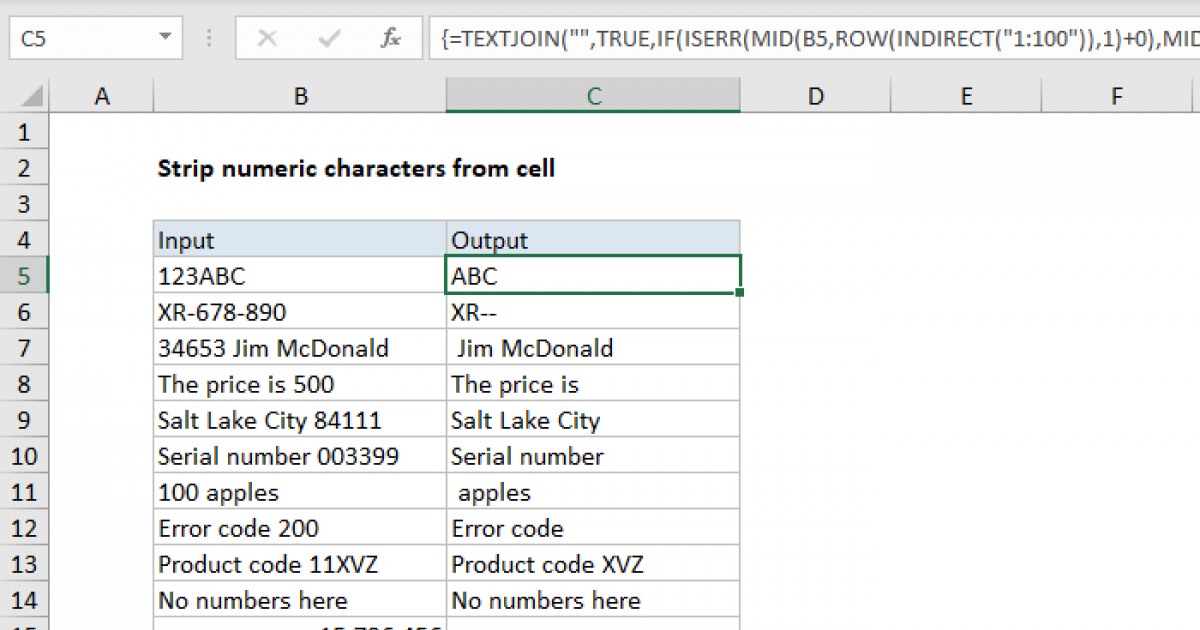
Web Aug 22 2023 nbsp 0183 32 Strip certain characters Remove special characters Delete non numeric characters Strip off everything after space Remove text after certain character Purge everything before space Eliminate everything before character Remove everything except Regular expression to remove HTML tags Ablebits Regex Remove Tool Web Mar 13 2023 nbsp 0183 32 The generic formula is TEXTJOIN quot quot TRUE IFERROR MID cell ROW INDIRECT quot 1 quot amp LEN cell 1 1 quot quot In Excel 365 and 2021 this one will also work TEXTJOIN quot quot TRUE IFERROR MID cell SEQUENCE LEN cell 1 1 quot quot At first sight the formulas may look a bit intimidating but they do work
Web Dec 19 2023 nbsp 0183 32 Steps 1 Type the following formula in Cell D5 REPLACE B5 1 C5 quot quot 2 Then press Enter It will remove the character you want to remove from the left 3 After that drag the Fill Handle over the range of cells D6 D9 As you can see the number of characters we want to remove from the left is gone 2