Excel Select Top 10 Values How To Find D10 D30 D60 In Excel Kingsley Dayinexce54 How To Find D10 D30 D60 In Excel Kingsley Dayinexce54 Excel Replace Blank With 0 Riset Creating College Lists 101 Introduction To Calculating Data In Excel How To Calculate Average Excluding Zero In Excel Haiper You can use the following formulas to find the top 10 values in Excel based on criteria Method 1 Find Top 10 Based on One Criteria LARGE IF A2 A20 Value C2 C20 ROW A1 A10 This formula finds the top 10 values in the range C2 C20 where the value in the range A2 A20 is equal to Value Method 2 Find Top 10 Based on
Step 1 Sorting the data in descending order Step 2 Using the LARGE or SMALL formula to extract the top 10 values Step 3 Displaying the results in a separate area of the worksheet By following these steps you will be able to efficiently identify and analyze the top values within your Excel dataset Based on this the following formula returns 3 columns of the top 10 values sorted by HP in descending order INDEX SORT Pokemon 3 1 SEQUENCE 10 SEQUENCE 1 3 In this article we are going to show you how to get top values from a list or a table in Excel with using new SORT and SEQUENCE formulas
How To Calculate Average Excluding Zero In Excel Haiper SQL Select Top Specify The Limit Using The Top Statement In SQL Sql SELECT TOP 10 Rows Stack Overflow Top 10 Values With One Excel Formula YouTube Excel Snaptik Excel How To Find Top 10 Values Based On Criteria Statology Select Entire Column In Excel For Mac Poosing How To Select Values From A List In Excel YouTube SQL SELECT AS WHERE UNIQUE DATABASE Statement 2023
Excel Select Top 10 Values
 Excel Select Top 10 Values
https://cdn.ablebits.com/_img-blog/top-values/top-values-excel.png
To find the top 10 values click on the drop down arrow of the column you want to analyze and select Sort Largest to Smallest This will arrange the data in descending order with the largest values at the top You can then simply select the top 10 values from the filtered dataset Discuss the benefits of using filters to analyze and extract data
Pre-crafted templates use a time-saving option for producing a varied series of files and files. These pre-designed formats and layouts can be used for various individual and expert tasks, including resumes, invitations, flyers, newsletters, reports, discussions, and more, simplifying the content production procedure.
Excel Select Top 10 Values

Value Sort List
SQL Select Top Specify The Limit Using The Top Statement In SQL
Sql SELECT TOP 10 Rows Stack Overflow
Top 10 Values With One Excel Formula YouTube

Excel How To Find Top 10 Values Based On Criteria Statology
Select Entire Column In Excel For Mac Poosing

1 Find Top 10 Values Based on Single Criterion in Excel We can find top 10 values based on a single criterion using different functions and their combinations I am showing below 3 ways to calculate the top 10 values with single criteria
Summary To filter a set of data to show the top n values you can use the FILTER function together with the LARGE function In the example shown the formula in F5 is FILTER data score LARGE score 3 where data B5 D16 and score D5 D16 are

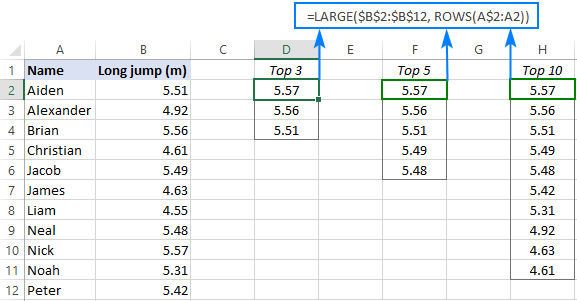
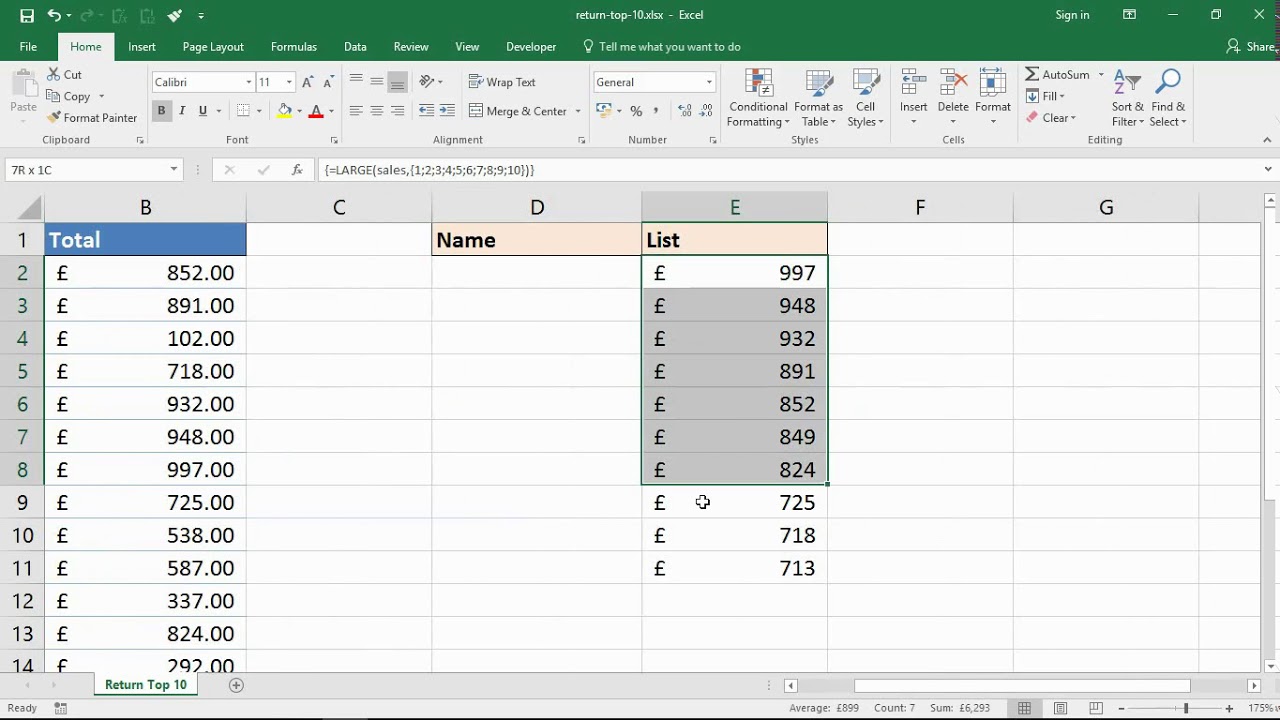
Occasionally you may want to find the top 10 values in a list in Excel Fortunately this is easy to do using the LARGE function which uses the following syntax LARGE array k where array The array of values k The k th largest value to find in the array This tutorial shows an example of how to use this function in practice

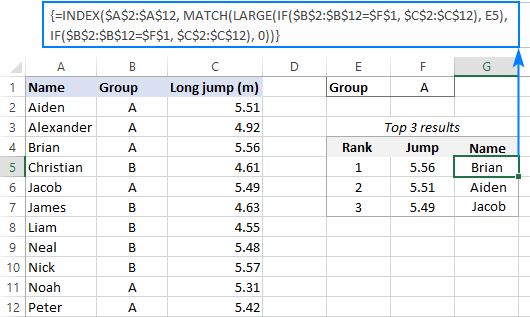
Extracting top 5 values and names based on single or multiple criteria Highlighting top 5 values and names using Conditional Formatting VBA to find the top 5 values and names in Excel Sometimes you may need to find the top 3 5 or 10 values and names from a dataset
But formulas are the most flexible method for reporting in Excel Therefore in this post I will show you exactly how to calculate a top 10 list Through these methods you re not restricted to a top 10 you can create a top 5 top 8 or any number you choose
[desc-11] [desc-12]
[desc-13]