Excel Replace Substring In Column Extract Substring Excel Formula Exceljet Substring In Excel Madame Lelica PowerShell Replace Substring ShellGeek Excel Find And Replace Multiple Values At Once How To Replace Substring In Bash Natively Web The Excel SUBSTITUTE function replaces text in a given string by matching For example SUBSTITUTE quot 952 455 7865 quot quot quot quot quot returns quot 9524557865 quot the dash is stripped SUBSTITUTE is case sensitive and does not support wildcards Purpose Replace text based on content Return value The processed text Arguments text The text to change
Web May 12 2017 nbsp 0183 32 Arrange the lookup values as in the image in columns F G and H and the replace values in the next corresponding row You would need 3 helper columns since you have 3 lookup values Column B C and D are helper columns Enter the below formula in column B B1 IFERROR IF MATCH quot quot amp F 1 amp quot quot A1 0 F 2 quot quot Web This article describes the formula syntax and usage of the SUBSTITUTE function in Microsoft Excel Description Substitutes new text for old text in a text string Use SUBSTITUTE when you want to replace specific text in a text string use REPLACE when you want to replace any text that occurs in a specific location in a text string Syntax
How To Replace Substring In Bash Natively Sql Count Function Simmanchith How To Replace Substring In Javascript SidTechTalks JavaScript Replace How To Replace A String Or Substring In JS Pandas Replace Substring In DataFrame Spark By Examples Replace Functions In Excel How To Replace A String Or Substring In JavaScript SUBSTRING PATINDEX And CHARINDEX String Functions In SQL Queries How To Sum Values Based On Numerical Textual Substring In Microsoft
Excel Replace Substring In Column
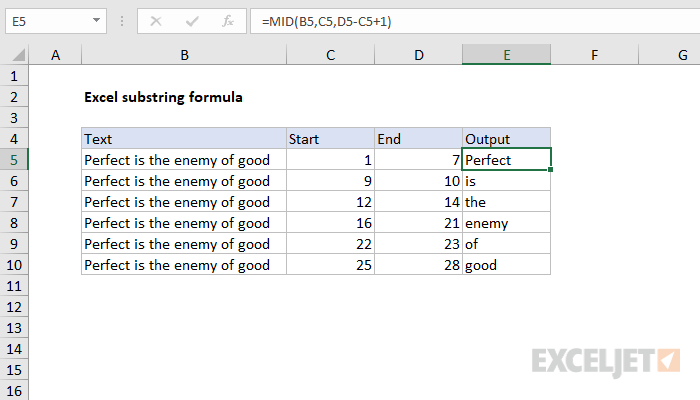 Excel Replace Substring In Column
https://exceljet.net/sites/default/files/styles/original_with_watermark/public/images/formulas/excel substring.png
Web The Excel SUBSTITUTE function replaces text in a given string by matching For example SUBSTITUTE quot 952 455 7865 quot quot quot quot quot returns quot 9524557865 quot the dash is stripped SUBSTITUTE is case sensitive and does not support wildcards
Pre-crafted templates use a time-saving solution for developing a diverse variety of documents and files. These pre-designed formats and layouts can be utilized for various personal and expert tasks, including resumes, invites, leaflets, newsletters, reports, discussions, and more, streamlining the content creation process.
Excel Replace Substring In Column
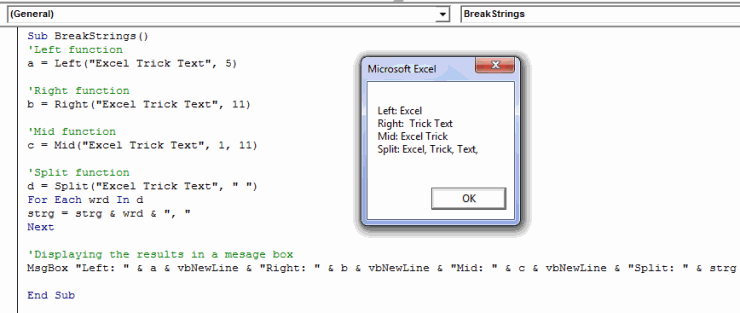
VBA Substring How To Substring In Excel Macro
Sql Count Function Simmanchith

How To Replace Substring In Javascript SidTechTalks

JavaScript Replace How To Replace A String Or Substring In JS

Replace Functions In Excel

How To Replace A String Or Substring In JavaScript

Web Syntax SUBSTITUTE text old text new text instance num The SUBSTITUTE function syntax has the following arguments Text Required The text or the reference to a cell containing text for which you want to substitute characters Old text Required The text you want to replace New text Required The text you want to replace old text with
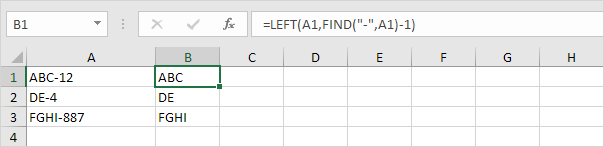
Web Mar 21 2023 nbsp 0183 32 The REPLACE function in Excel is designed to work with text strings Of course you can use it to replace numeric characters that are part of a text string for example REPLACE A2 7 4 quot 2016 quot Notice that we enclose quot 2016 quot in double quotes as you usually do with text values
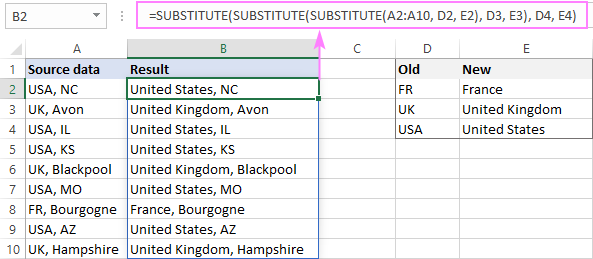
Web It turns out that you can nest the substitute method like so SUBSTITUTE SUBSTITUTE F149 quot a quot quot AM quot quot p quot quot PM quot In my case I am using excel to view a DBF file and however it was populated has times like this 9 16a 2 22p So I just made a new column and put that formula in it to convert it to the excel time format
Web Syntax REPLACE old text start num num chars new text REPLACEB old text start num num bytes new text The REPLACE and REPLACEB function syntax has the following arguments Old text Required Text in which you want to replace some characters Start num Required
Web In the Replace with box enter the text or numbers you want to use to replace the search text Select Replace All or Replace Tip When you select Replace All every occurrence of the criteria that you re searching for is replaced while Replace updates one occurrence at
Web Oct 17 2023 nbsp 0183 32 1 Find and Replace in Column Using Find amp Replace Feature In this method I will show you how to Find and Replaceanything in Columns using the Find amp Replace dialogue box Steps Use the Keyboard shortcut CTRL Hor go to Home gt Editing gt Find amp Select gt Replace Web Step 1 Old text The old text argument is a reference to the cell where you want to replace some text Write REPLACE A2 And put a comma to wrap up the first argument and let s move on to the next Step 2 Start num The start num argument determines where the REPLACE function should start replacing characters from
Web Sep 13 2023 nbsp 0183 32 LEFT A2 4 Get substring from end of string RIGHT To get a substring from the right part of a text string go with the Excel RIGHT function RIGHT text num chars For instance to get the last 4 characters from the end of a string use this formula RIGHT A2 4