Excel Replace Error With Blank Excel Replace Character Riset Excel Replace Blank With 0 Riset Wild Animals Clipart Gif TruSDX Cable Causing Error With CAT Control Trusdx Digirig Forum How To Use The VBA REPLACE Function Syntax Example Where Value required what to check for errors It can be a formula expression value or cell reference Value if error required what to return if an error is found It can be an empty string blank cell text message numeric value another formula or calculation
Excel uses your computer s date system If a cell s date isn t entered using the same date system Excel won t recognize it as a true date For example let s say that your computer displays dates as mm dd yyyy If you typed a date like that in a cell Excel would recognize it as a date and you d be able to use it in a subtraction formula This will replace any errors with whatever value you choose Just be mindful that it would also replace all other errors such as VALUE etc Use it like this IFERROR yourformula 0 Alternatively you can use ISNA to filter only for N A values but it requires if functions and repetition of your formula which can get cluttered IF ISNA
How To Use The VBA REPLACE Function Syntax Example Soft Skills Engineering Listen Via Stitcher Radio On Demand World Map Black And White Labeled Printable Free Printable Maps Open Book With Stephen Nichols Listen Via Stitcher For Podcasts Sexy Unique Podcast Listen Via Stitcher For Podcasts How To Find And Replace Data In Excel Video Lesson Transcript ZOHAL Christy Wright s Business Boutique Listen Via Stitcher For Podcasts How To Fill Or Replace Blank Cells In Excel With A Value From A Cell Above Invalid Data Type Error Smartsheet Community
Excel Replace Error With Blank
 Excel Replace Error With Blank
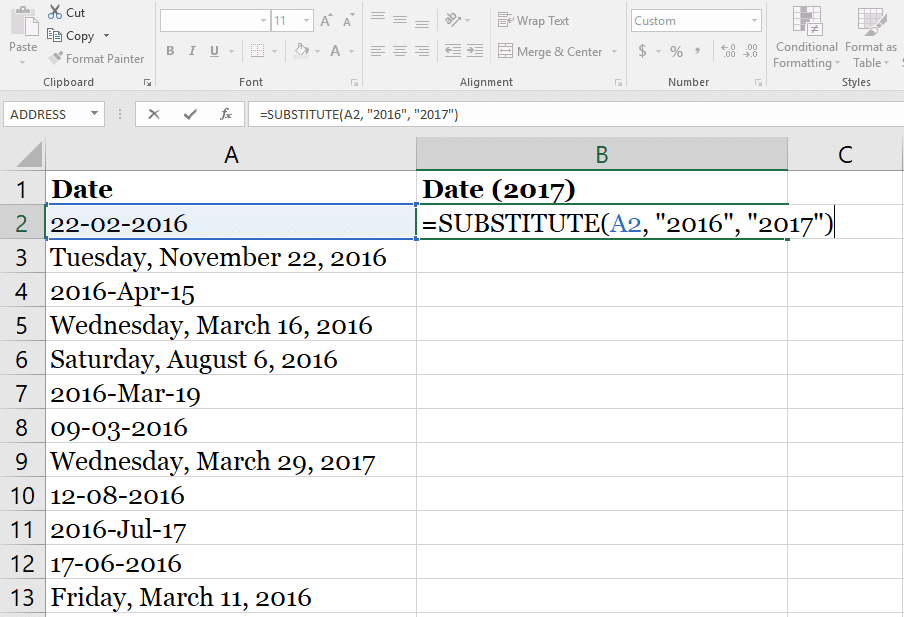
https://spreadsheeto.com/wp-content/uploads/2017/09/substitute-formula-cell.png
To correct the error do any of the following Make sure the divisor in the function or formula isn t zero or a blank cell Change the cell reference in the formula to another cell that doesn t have a zero 0 or blank value
Pre-crafted templates provide a time-saving option for producing a diverse series of documents and files. These pre-designed formats and layouts can be used for various personal and expert tasks, consisting of resumes, invitations, flyers, newsletters, reports, discussions, and more, streamlining the material creation process.
Excel Replace Error With Blank

NMV1212SAC DC DC Converter NMV Series 1 W 12 V DC SIP Single At

Soft Skills Engineering Listen Via Stitcher Radio On Demand

World Map Black And White Labeled Printable Free Printable Maps

Open Book With Stephen Nichols Listen Via Stitcher For Podcasts
How To Find And Replace Data In Excel Video Lesson Transcript ZOHAL

Christy Wright s Business Boutique Listen Via Stitcher For Podcasts
You can use the following basic syntax to replace N A values in Excel with either zeros or blanks replace N A with zero IFERROR FORMULA 0 replace N A with blank IFERROR FORMULA The following example shows how to use this syntax in practice to replace N A values from a VLOOKUP with zero or blanks

There are many reasons why formulas can return errors For example division by 0 is not allowed and if you enter the formula 1 0 Excel returns DIV 0 Error values include DIV 0 N A NAME NULL NUM REF and VALUE Convert an error to zero and use a format to hide the value

Click the Insert Function button to the left of the Formula Bar to open the Insert Function dialog box shown below While the Search for a function area is highlighted type IFERROR and click OK Select IFERROR from the Select a function area The resulting Function Arguments dialog box shown in the screenshot below will appear

By replacing these errors with blank cells we can avoid confusion and incorrect calculations ultimately improving the reliability of our data In this tutorial we will cover the step by step process of identifying VALUE errors in Excel and replacing them with blank cells

To display blanks instead of zeros for specific cells Select the cells that contain the zero 0 values that you want to display as blanks Press Ctrl 1 or right click and select Format Cells The Format Cells dialog box appears Click the Number tab In the categories on the left select Custom
Select the column or range you wish to make replacements in Press CTRL H In the find box type 0 Check the box marked Match entire cell contents as per comment below leave the replace box blank Because of data issues often VALUE error comes This video talks about a simple formula IFERROR to replace errors in calculations with the desired textHo
Wrap your formula in an IFERROR that should fix this for you IFERROR SEARCH Wholesaler Categories Power to the Developer MSI GV72 17 3 i7 8750H Hex Core 32GB DDR4 4GB GeForce GTX 1050 Ti 256GB NVMe M2 2TB HDD 3 people found this reply helpful