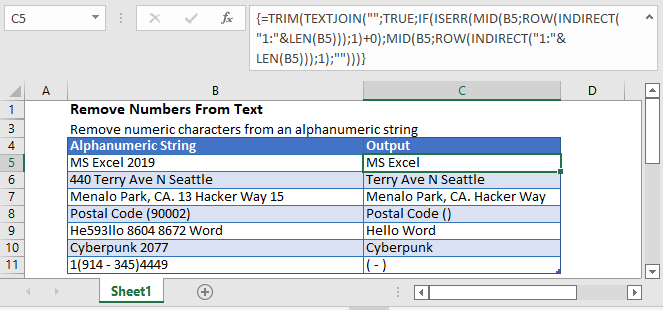
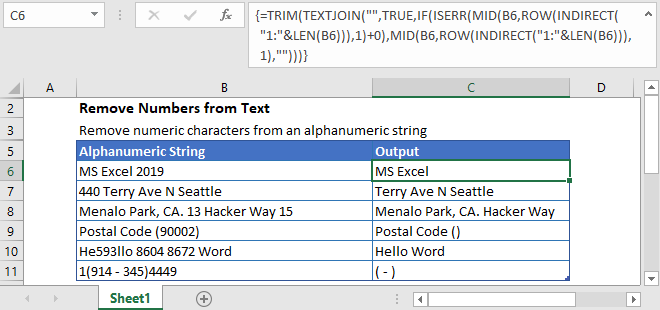
Excel Remove Letters Keep Numbers Formula How To Remove Numbers From Text In Excel Free Excel Tutorial Gambaran How To Remove Formula In Excel And Keep Text Excel Remove Formula But Keep Data With Source Formatting Mobile Excel Remove Symbols Formula Printable Templates Excel How To Remove Only Text Or Only Numbers Zbrainsoft Web To remove non numeric characters from a text string you can use a formula based on the the TEXTJOIN function In the example shown the formula in C5 is TEXTJOIN quot quot TRUE IFERROR MID B5 ROW INDIRECT quot 1 100 quot 1 0 quot quot Note this is an array formula and must be entered with control shift enter except in Excel 365
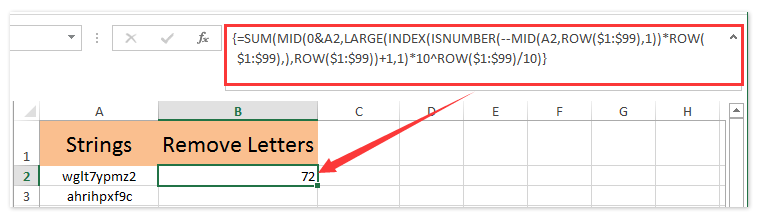
Web To remove specific unwanted characters in Excel you can use a formula based on the SUBSTITUTE function In the example shown the formula in C4 is SUBSTITUTE B4 CHAR 202 quot quot Which removes a series of 4 invisible characters at the start of each cell in column B Generic formula SUBSTITUTE B4 CHAR code quot quot Explanation Web Select a blank cell you will return the text string without letters and enter the formula StripChar A2 A2 is the cell that you will remove letters from into it and drag the Fill Handle down to the range as you need See screenshots
Excel How To Remove Only Text Or Only Numbers Zbrainsoft How To Remove Numbers From Text In Excel Free Excel Tutorial Gambaran How To Remove Letters From Strings numbers cells In Excel Remove Formulas From Cells But Keep Values In Excel In C Hot Sex Picture How To Remove Formula In Excel And Keep Data Riset How To Remove Text Before Or After A Specific Character From Cells In How To Remove Numbers From Text In Excel 2016 Riset How To Remove Formulas In Excel Excel Formula How Do I Remove Last Two Digits Or Last Two Letters In
Excel Remove Letters Keep Numbers Formula
 Excel Remove Letters Keep Numbers Formula
https://www.automateexcel.com/excel/wp-content/uploads/2020/07/remove-numbers-from-text-main-function.png
Web Feb 7 2023 nbsp 0183 32 It s a long formula but it s one of the easiest ways to remove numbers from an alphanumeric string In this formula we have nested SUBSTITUTE functions 10 times one for each number 0 1 9 like this
Pre-crafted templates offer a time-saving solution for creating a diverse series of files and files. These pre-designed formats and layouts can be used for different individual and expert tasks, consisting of resumes, invites, leaflets, newsletters, reports, discussions, and more, simplifying the content creation procedure.
Excel Remove Letters Keep Numbers Formula

Excel Remove Letter In Cell Printable Templates

How To Remove Numbers From Text In Excel Free Excel Tutorial Gambaran
How To Remove Letters From Strings numbers cells In Excel
Remove Formulas From Cells But Keep Values In Excel In C Hot Sex Picture
How To Remove Text Before Or After A Specific Character From Cells In
How To Remove Numbers From Text In Excel 2016 Riset
Web Mar 13 2023 nbsp 0183 32 TRUE or 1 remove text and keep numbers FALSE or 0 remove numbers and keep text For our sample dataset the formulas take this form To remove non numeric characters SplitTextNumbers A2 TRUE To delete numeric characters SplitTextNumbers A2 FALSE

Web Mar 18 2016 nbsp 0183 32 I want to remove from each cell the alpha characters One of the problems is that the alpha characters are not uniform in length or position additionally the numeric string may start with 000 and those need to display in the text field

Web To remove numeric characters from a text string you can use a formula based on the TEXTJOIN function In the example shown the formula in C5 is TEXTJOIN quot quot TRUE IF ISERR MID B5 ROW INDIRECT quot 1 100 quot 1 0 MID B5 ROW
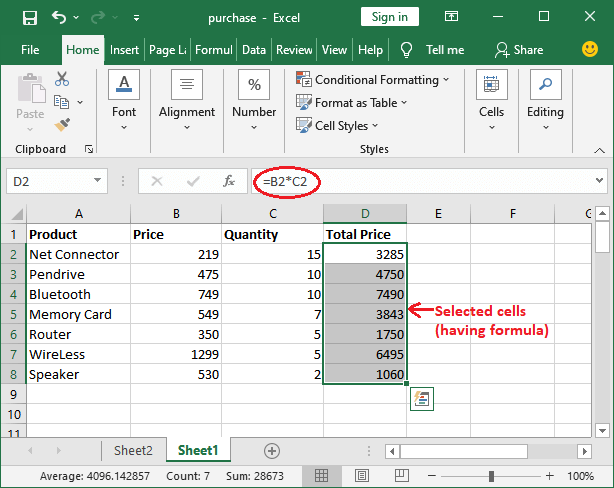
Web Oct 10 2023 nbsp 0183 32 This Array formula will remove all kinds of characters including letters special characters etc except the numeric characters For example if the original string is abc 123 def this formula will remove all letters and

Web Mar 10 2023 nbsp 0183 32 If your goal is to eradicate a certain character from Excel cells there are two easy ways to do it the Find amp Replace tool and a formula Remove character from multiple cells using Find and Replace
Web Apr 20 2016 nbsp 0183 32 I came up with an obvious solution to eliminate all the letters to be replaced with nothing to only leave numbers in the cell You can just replace the quot quot for a quot quot to leave the space that the letters left behind Web May 3 2010 nbsp 0183 32 I looking for a formula that will remove the letters from these cells then return the sum of just the numbers in cells In this case 4 4 10 2 7 27 The LEFT function wont work because sometimes I need only the first digit and sometimes it s the left 2
Web May 21 2023 nbsp 0183 32 Step 1 Identify the Cell The first step is to identify the cell from which you want to remove the letters Let s assume our data is in cell A2 Step 2 Use the SUBSTITUTE Function Next we ll use the SUBSTITUTE function to remove specific letters from the cell The syntax for SUBSTITUTE is as follows